

BeMOVE - BENINCÀ
BeMOVE - BENINCÀ is made and published by AUTOMATISMI BENINCÀ SPA. AppBrain is an independent app data site and isn't affiliated with AUTOMATISMI BENINCÀ SPA. The app name, icon, screenshots and description belong to AUTOMATISMI BENINCÀ SPA and are shown as published on the App Store.
AppBrain's verdict
- Last updated
- October 15, 2026
- Size
- 32.5 MB
User feedback
Ratings and reviews on the App StoreComments on BeMOVE - BENINCÀ for iOS
We don't have enough comments to show example comments. Please check back later.
Store listing
By AUTOMATISMI BENINCÀ SPA, from the App Store


Description by AUTOMATISMI BENINCÀ SPA Written by the developer, not by AppBrain. Click to read.
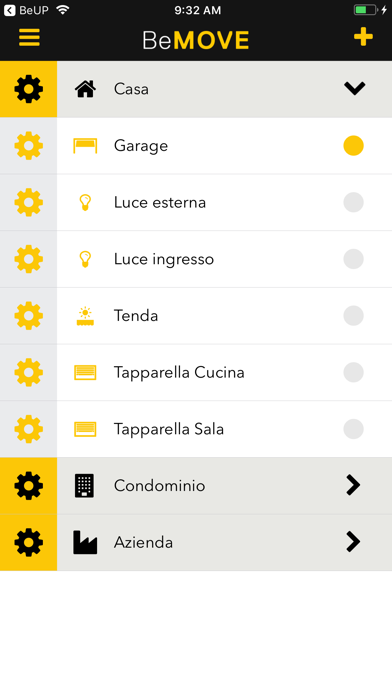
Through the communication with the HOOP Benincà gateway, it is possible to send commands or simply to check the status of the connected automations - for example: "did I turn off the lights before leaving home?" Or "Is the gate closed?".
Quick and easy system configuration thanks to the integrated installation guides and tutorials (step-by-step).
You can manage and enter many HOOP gateways and for each one of them you can choose an icon, name it and set a security PIN.
For each HOOP gateway it is also possible to associate different roles and access modes for each one of the users.
There are three setting modes available:
OPEN MODE, without any restrictions; SECURITY MODE, the Master user can manage and set restrictions for the Slave users; OFFLINE MODE, to be used in case there is no internet connection.
Advanced programming features are also available, such as the management of scheduled events, access time frames for specific user on certain devices or, again, the command via smartphone's GPS position.
In addition, we have implemented the possibility to manage HOOP and pro.UP gateways equipped with a simplified connection to the control panels. We also optimised the authorisation management to allow the app to use the GPS signal and introduced a flag to send the command automatically when the smartphone enters the defined area. Furthermore, we have improved safety notifications related to the change of status and introduced the “User profile” section to allow users to manage their accounts from the app.
We have also integrated pro.UP management functions even for remote diagnostics. This way, the installation’s owner can authorise the installer to access the installed pro.UP remotely to set the authorisation duration or delete it at any time, and change the authorised installer whenever they want.
Safety and technology
Found in the app by AppBrain- Price
- Free
- App size
- 32.5 MB
- Content rating
- Everyone
Technologies used by BeMOVE - BENINCÀ
Releases
Updates seen on the App Store- Version
- 1.3.5
- Launched
- March 2018
No changelog data
Alternatives
Similar apps and more from AUTOMATISMI BENINCÀ SPAAlternatives to BeMOVE - BENINCÀ





More from AUTOMATISMI BENINCÀ SPA

Rankings
App Store top chartsApp Store Rankings for BeMOVE - BENINCÀ
About the app and developer
About BeMOVE - BENINCÀ
BeMOVE - BENINCÀ is an utilities app developed by AUTOMATISMI BENINCÀ SPA.
User Ratings
The app has no ratings yet.
App Information
BeMOVE - BENINCÀ is freely available from the App Store. The app size is 32.53 MB. The latest version available is 1.3.5. The last update was on October 15, 2026.
Technical Requirements
The app has a content rating of Everyone. The app has been available on the App Store since March 2018.
Developer information for AUTOMATISMI BENINCÀ SPA
Address: