




AppBrain's verdict
- Last updated
- November 13, 2026
- Size
- 3.57 MB
User feedback
Ratings and reviews on the App StoreComments on BenchKit: Electronics Tools for iOS
We don't have enough comments to show example comments. Please check back later.
Store listing
By 明 齐, from the App StoreDescription by 明 齐 Written by the developer, not by AppBrain. Click to read.
RESISTOR CODES
Decode 3, 4, 5, and 6-band axial resistors by tapping the bands on a drawn resistor, or SMD codes (3-digit, 4-digit, EIA-96, R notation). See the tolerance range, IEC marking code, and standard E-series match. When a reading is probably reversed, one tap flips it.
PCB TRACE WIDTH
Estimate minimum internal or external copper trace width from current, copper weight, and allowed temperature rise, in millimeters or mils, or the current a given width can carry. Results outside the IPC-2221 chart range are flagged as extrapolations.
VOLTAGE DROP
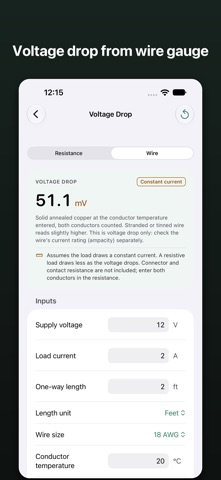
Voltage drop, the drop as a share of the supply, voltage at the load, and power lost in the wiring. Enter the round-trip resistance, or wire gauge (AWG or mm²), length, and conductor temperature.
VOLTAGE DIVIDER
Ideal unloaded output voltage, divider current, per-resistor dissipation, output resistance, and what an optional load does to the output. Or enter a target voltage and get the closest E24/E96 resistor pairs with their worst-case output.
Type values the way engineers write them: 4k7, 2R2, 100m, 3V3; the keyboard has keys for the letters.
Laid out for iPhone Duo: on the open screen the answer and the inputs sit on either side of the fold.
BENCHKIT PRO (optional one-time purchase)
• Value to code: enter a resistance and see its color bands and SMD codes.
• Trace resistance: add a trace length to get its resistance, voltage drop, and heat.
• Wire size for a drop: set an allowed voltage drop and get the thinnest AWG and mm² wire that meets it. Sized for voltage drop only; the wire's current rating is yours to check.
The four tools above are free and stay free.
No account. No ads. No analytics. English, Simplified Chinese, and Japanese.
BenchKit is a quick estimation tool. Always verify production designs against component datasheets, applicable standards, simulation, and physical validation.
Safety and technology
Found in the app by AppBrain- Price
- Free
- App size
- 3.57 MB
- Content rating
- Everyone
Technologies used by BenchKit: Electronics Tools
Releases
Updates seen on the App Store- Version
- 1.2
- Launched
- August 2026
No changelog data
Alternatives
Similar apps and more from 明 齐Alternatives to BenchKit: Electronics Tools


More from 明 齐


Rankings
App Store top chartsApp Store Rankings for BenchKit: Electronics Tools
About the app and developer
About BenchKit: Electronics Tools
BenchKit: Electronics Tools is an utilities app developed by 明 齐.
User Ratings
The app has no ratings yet.
App Information
BenchKit: Electronics Tools is freely available from the App Store. The app size is 3.57 MB. The latest version available is 1.2. The last update was on November 13, 2026.
Technical Requirements
The app has a content rating of Everyone. The app has been available on the App Store since August 2026.
BenchKit: Electronics Tools is made and published by 明 齐. AppBrain is an independent app data site and isn't affiliated with 明 齐. The app name, icon, screenshots and description belong to 明 齐 and are shown as published on the App Store.
Developer information for 明 齐
Address:
Frequently asked questions about BenchKit: Electronics Tools
Is BenchKit: Electronics Tools free?
Yes. BenchKit: Electronics Tools is free on the App Store.
Is BenchKit: Electronics Tools still available?
Yes. BenchKit: Electronics Tools is on the App Store, and the last update we saw was on November 13, 2026.
How large is BenchKit: Electronics Tools?
BenchKit: Electronics Tools is 3.57 MB.
Is BenchKit: Electronics Tools suitable for children?
App Store rates the content of BenchKit: Electronics Tools as suitable for everyone.
Who made BenchKit: Electronics Tools?
BenchKit: Electronics Tools was developed by 明 齐. It is listed in the utilities category on the App Store.
What are the best alternatives to BenchKit: Electronics Tools?
People looking at BenchKit: Electronics Tools also look at these utilities apps: Ham Engineering, DXF Viewer: CAD File Reader, Circuit Wiring Simulator, Kanon AI -Offline AI Assistant, Text To Speech - AI Voice.