



AppBrain's verdict
EstablishedLoved by users- Rating on App Store
- 4.61
- 1,083 ratings
- Last updated
- March 28, 2025
- Size
- 24.7 MB
Users love it: 4.6 stars from 1,083 ratings.
User feedback
Ratings and reviews on the App StoreComments on Best Typing Lessons and Test for iOS
We don't have enough comments to show example comments. Please check back later.
Store listing
By Tamber Schorey, from the App StoreDescription by Tamber Schorey Written by the developer, not by AppBrain. Click to read.
After teaching middle school Computer Applications and typing for the past several years I realized that many of the free online typing programs had several flaws. The biggest problem I found was that many of my students would never learn to use the correct fingers to type with when only using the most popular sites.
The main problem that I discovered was that the online typing tutors almost always teach the pointer fingers first, and for students who are already used to hunting and pecking they don’t transition to the less used fingers redly.
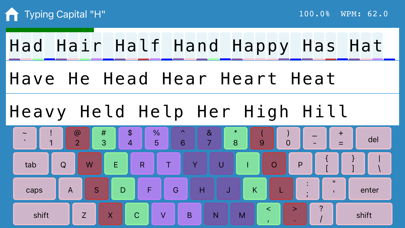
To the best of my knowledge this app and accompanying website www.freetypinglessons.club has the only method that begins teaching the pinkies first and then proceeds to the fingers that students are already used to using. I have found that this method breaks bad habits early and sets students up to successfully type while using the correct fingers. I have also made the learning process easier by color coding the keys creating an alliterating pneumonic device to assist with learning (Pink - pinkies, Red - ring fingers, Mint-Green - middle fingers, and Purple - pointers).
The introductory lessons are designed for learners to develop correct muscle memory when typing the keys. The process systematically begins with home row weak fingers, and then adds top row and bottom row in a way that will teach correct finger position automatically and help break bad typing habits naturally.
As the lessons progress to beginner and intermediate typing lessons students will type text that works on proper reaches. Some programs deviate from this method at this point and prefer to type words first, however this program focuses on teaching muscle memory and proper keying technique, so many letter combinations are systematically introduced so as to help students master the entire keyboard.
Aside from the lessons, students may take a timed typing test. Test options include beginner (lowercase only), intermediate (capitals and lowercase), and advanced (includes numbers and symbols). The typing test duration can be setup for between one and five minutes long, and your results are displayed instantly.
Other benefits of this typing program are that it tracks how long is spent on each individual lesson, and it tracks the total amount of time typed overall. Data from each key is recorded, and you can identify your percentage accuracy for each letter of the alphabet. Students earn points for each letter correctly typed, and stars are earned for finishing lessons with a high degree of accuracy. In addition to these features you can view your typing test statistics which will show up to the last 10 tests that you have taken.
It’s my pleasure to be a middle school typing teacher and to provide this app developed from my years of experience. I know you will find learning to type beneficial in your life and if this app helps I hope you give it a positive rating.
Please don't hesitate to contact me if you have questions, suggestions, or need support via email: squadtiming@gmail.com
Safety and technology
Found in the app by AppBrain- Price
- Free
- App size
- 24.7 MB
- Content rating
- Low
Technologies used by Best Typing Lessons and Test
Releases
Updates seen on the App Store- Version
- 2.1.0
- Launched
- June 2019
No changelog data
Alternatives
Similar apps and more from Tamber SchoreyAlternatives to Best Typing Lessons and Test


More from Tamber Schorey



Rankings
App Store top chartsApp Store Rankings for Best Typing Lessons and Test
About the app and developer
About Best Typing Lessons and Test
Best Typing Lessons and Test is an education app developed by Tamber Schorey.
User Ratings
Best Typing Lessons and Test is rated 4.61 out of 5 stars. The rating is based on 1.1 thousand ratings.
App Information
Best Typing Lessons and Test is freely available from the App Store. The app size is 24.67 MB. The latest version available is 2.1.0. The last update was on March 28, 2025.
Technical Requirements
The app has a content rating of Low Maturity. The app has been available on the App Store since June 2019.
Best Typing Lessons and Test is made and published by Tamber Schorey. AppBrain is an independent app data site and isn't affiliated with Tamber Schorey. The app name, icon, screenshots and description belong to Tamber Schorey and are shown as published on the App Store.
Developer information for Tamber Schorey
Address:
Frequently asked questions about Best Typing Lessons and Test
Is Best Typing Lessons and Test free?
Yes. Best Typing Lessons and Test is free on the App Store.
Is Best Typing Lessons and Test still available?
Yes. Best Typing Lessons and Test is on the App Store, and the last update we saw was on March 28, 2025.
How large is Best Typing Lessons and Test?
Best Typing Lessons and Test is 24.67 MB.
Is Best Typing Lessons and Test suitable for children?
App Store gives Best Typing Lessons and Test a low maturity rating, so it is meant for older children and up.
How do people rate Best Typing Lessons and Test?
Best Typing Lessons and Test scores 4.61 out of 5 stars, from 1,083 ratings on the App Store.
Who made Best Typing Lessons and Test?
Best Typing Lessons and Test was developed by Tamber Schorey. It is listed in the education category on the App Store.
What are the best alternatives to Best Typing Lessons and Test?
People looking at Best Typing Lessons and Test also look at these education apps: Type Flash - typing game, Typing Land, EdClub, Animal Typing - Lite, The Vehicles Typing.