

BiasCheck
BiasCheck is made and published by JASON ARBON. AppBrain is an independent app data site and isn't affiliated with JASON ARBON. The app name, icon, screenshots and description belong to JASON ARBON and are shown as published on the App Store.
AppBrain's verdict
- Last updated
- April 7, 2026
Rankings
App Store top chartsApp Store Rankings for BiasCheck
Competitors
Similar apps and more from JASON ARBONAlternatives to BiasCheck


More from JASON ARBON


Releases
Updates seen on the App Store- Version
- 1.0
- Launched
- April 2026
No changelog data
User feedback
Ratings and reviews on the App StoreComments on BiasCheck for iOS
We don't have enough comments to show example comments. Please check back later.
Technology
Found in the app by AppBrain- Price
- Free
- App size
- 6.72 MB
- Content rating
- High
Technologies used by BiasCheck
About the app and developer
About BiasCheck
BiasCheck is a social networking app developed by JASON ARBON.
User Ratings
The app has no ratings yet.
App Information
BiasCheck is freely available from the App Store. The app size is 6.72 MB. The latest version available is 1.0. The last update was on April 7, 2026.
Technical Requirements
The app has a content rating of High Maturity. The app has been available on the App Store since April 2026.
Developer information for JASON ARBON
Address:
Frequently asked questions about BiasCheck
Is BiasCheck free?
Yes. BiasCheck is free on the App Store.
Is BiasCheck still available?
Yes. BiasCheck is on the App Store, and the last update we saw was on April 7, 2026.
How large is BiasCheck?
BiasCheck is 6.72 MB.
Is BiasCheck suitable for children?
App Store gives BiasCheck a high maturity rating. It is meant for adults.
Who made BiasCheck?
BiasCheck was developed by JASON ARBON. It is listed in the social networking category on the App Store.
What are the best alternatives to BiasCheck?
People looking at BiasCheck also look at these social networking apps: BIOGRAF.ai, Ditto: Fun Social Media, Report King Followers Tracker, WhiteFlag: Mental Health Help, Spill-App.
Store listing
By JASON ARBON, from the App Store


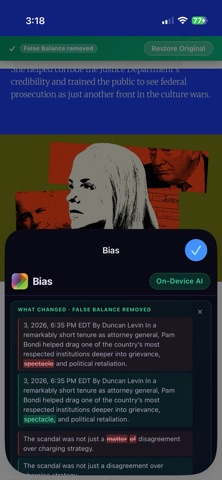
Description by JASON ARBON Written by the developer, not by AppBrain. Click to read.
HOW IT WORKS
Enable Bias in Safari (Settings → Safari → Extensions → Bias). Then tap the Bias icon in Safari's toolbar to analyze the current page. Or long-press any selected text and tap "Check Bias" from the menu.
WHAT YOU GET
• Political Lean — a left-to-right spectrum showing where the content sits, from Far Left to Far Right
• Bias Score — 0–100 neutrality score so you can compare sources at a glance
• Truthiness Score — how factually grounded the content appears
• Bias Types — Framing Bias, Loaded Language, Appeal to Emotion, Confirmation Bias, and 18 more
• Emotional Tone — Neutral, Sensational, Fear-Mongering, Inflammatory, and more
• Summary — a plain-English explanation of what bias is present and why
• Key Phrases — the exact quotes driving the detected bias
COMPLETELY PRIVATE
Everything runs on your device using Apple's on-device AI. Your text, history, and settings never touch a server. Deleting the app permanently removes all stored data.
SAFARI EXTENSION
Bias adds a "Check Bias" option to Safari's long-press menu for any selected text. Results appear instantly in the extension popup without leaving the page you're reading.
HISTORY
Every analysis is saved locally so you can review and compare past results across sessions.
No subscription. No API keys. No accounts. Just clarity.