

Bible Seek is made and published by Rollin Seymour. AppBrain is an independent app data site and isn't affiliated with Rollin Seymour. The app name, icon, screenshots and description belong to Rollin Seymour and are shown as published on the App Store.
AppBrain's verdict
- Rating on App Store
- 5.00
- 4 ratings
- Last updated
- August 30, 2026
It doesn't have enough ratings yet to judge what users think.
Rankings
App Store top chartsApp Store Rankings for Bible Seek
Competitors
Similar apps and more from Rollin SeymourAlternatives to Bible Seek





More from Rollin Seymour


Releases
Updates seen on the App Store- Version
- 2.6.4
- Launched
- March 2026
No changelog data
User feedback
Ratings and reviews on the App StoreComments on Bible Seek for iOS
We don't have enough comments to show example comments. Please check back later.
Technology
Found in the app by AppBrain- Price
- Free
- App size
- 126.6 MB
- Content rating
- Low
Technologies used by Bible Seek
About the app and developer
About Bible Seek
Bible Seek is a reference app developed by Rollin Seymour.
User Ratings
Bible Seek is rated 5.00 out of 5 stars. The rating is based on 4 ratings.
App Information
Bible Seek is freely available from the App Store. The app size is 126.62 MB. The latest version available is 2.6.4. The last update was on August 30, 2026.
Technical Requirements
The app has a content rating of Low Maturity. The app has been available on the App Store since March 2026.
Developer information for Rollin Seymour
Address:
Frequently asked questions about Bible Seek
Is Bible Seek free?
Yes. Bible Seek is free on the App Store.
Is Bible Seek still available?
Yes. Bible Seek is on the App Store, and the last update we saw was on August 30, 2026.
How large is Bible Seek?
Bible Seek is 126.62 MB.
Is Bible Seek suitable for children?
App Store gives Bible Seek a low maturity rating, so it is meant for older children and up.
How do people rate Bible Seek?
Bible Seek scores 5.00 out of 5 stars, from 4 ratings on the App Store.
Who made Bible Seek?
Bible Seek was developed by Rollin Seymour. It is listed in the reference category on the App Store.
What are the best alternatives to Bible Seek?
People looking at Bible Seek also look at these reference apps: Bible Authorized Version, Golden Tablet, OhMyBible – NextGen Bible, Harvest Fields Community, Bible Quiz Unlimited & Trivia.
Store listing
By Rollin Seymour, from the App Store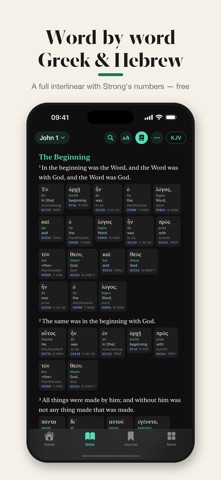


Description by Rollin Seymour Written by the developer, not by AppBrain. Click to read.
READER:
Four offline translations — *King James Version*, *American Standard Version*, *Berean Standard Bible*, and *World English Bible*.
Verse-by-verse or flowing paragraph options.
Red Letter edition available.
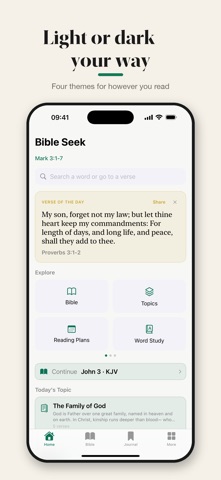
Adjustable font size, themes, and auto night mode for after sunset.
MARK ANYTHING:
Highlight in the color of your choice.
Add notes; a subtle dotted underline shows where each note lives– tap it to edit.
Tag notes (prayer, promise, question, anything you like).
Tap a verse for quick actions: change color, remove, or add a note.
STUDY:
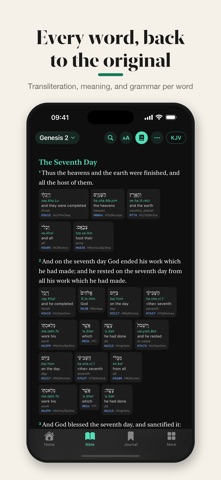
Greek/Hebrew Word Study. Select any word within the inline wordstudy screen or the separate menu, and see the definition, transliteration, and gloss.
Biblical name meanings — look up a name for the Hebrew or Greek behind it, what it means, who bore it in Scripture, and the verses where it appears.
Cross-references on tap. Each verse has its own "Related" sheet if applicable.
Compare versions side-by-side.
See your annotations from the other translation surfaced as a badge so nothing gets buried after a version switch.
KEEP A JOURNAL:
Every bookmark, highlight, and note lives in the Journal.
Notes show the source verse alongside your writing.
Save the whole journal as a PDF for sharing or keeping.
JSON backup + restore so you can move between devices safely.
Recently-deleted entries linger for 7 days for easy recovery.
READING PLANS:
Three built-in plans: Bible in a Year, Gospels in 30 Days, New Testament in 90 Days.
Build your own custom plan from any combination of books and a duration you choose.
A "Continue plan" card on the home screen surfaces today's reading.
Daily notification reminders at the time you choose.
A celebration screen when you finish.
MEMORIZE BY DOING:
Memory Verses uses active recall, not passive reading. The verse appears as blanks; its words appear in a shuffled bank. Tap them in the right order to fill it in. Only when you've actually completed it does the app mark it memorized.
EVERYDAY HABIT:
Verse of the Day on the home screen, plus an optional iOS home-screen widget.
Topics — themed verse collections on prayer, faith, grief, gratitude, forgiveness, and more.
SHARE CAPABILITIES:
Generate image cards of any verse or note in a range of themes — Parchment (flat/textured), Slate, Sage, and Gold — ready to drop into chats
Plain quoted text with the reference attached also available.
OFFLINE & PRIVATE:
The full text of both translations ships inside the app. Reads anywhere — plane, mountain, basement.
Your highlights, notes, and bookmarks stay on your device. No account, no analytics, no cloud.
Annotations are searchable from iOS Spotlight (your data, your phone, your search).
I hope this helps someone know Christ for themselves.