

Bible Widget & Jesus Clock
Bible Widget & Jesus Clock is made and published by 永欣 赵. AppBrain is an independent app data site and isn't affiliated with 永欣 赵. The app name, icon, screenshots and description belong to 永欣 赵 and are shown as published on the App Store.
AppBrain's verdict
- Last updated
- September 23, 2024
Rankings
App Store top chartsApp Store Rankings for Bible Widget & Jesus Clock
Competitors
Similar apps and more from 永欣 赵More from 永欣 赵


Releases
Updates seen on the App Store- Version
- 1.0.2
- Launched
- August 2024
No changelog data
User feedback
Ratings and reviews on the App StoreComments on Bible Widget & Jesus Clock for iOS
We don't have enough comments to show example comments. Please check back later.
Technology
Found in the app by AppBrain- Price
- Free
- App size
- 103.2 MB
- Content rating
- Everyone
Technologies used by Bible Widget & Jesus Clock
About the app and developer
About Bible Widget & Jesus Clock
Bible Widget & Jesus Clock is a reference app developed by 永欣 赵.
What is the rating of Bible Widget & Jesus Clock?
Bible Widget & Jesus Clock has no ratings yet.
Is Bible Widget & Jesus Clock free?
Bible Widget & Jesus Clock is free. The app size is 103.23 MB. The latest version available is 1.0.2. The last update was on September 23, 2024.
What are the requirements for Bible Widget & Jesus Clock?
The app has a content rating of Everyone. The app has been available on the App Store since August 2024.
Developer information for 永欣 赵
Address:
Store listing
By 永欣 赵, from the App Store

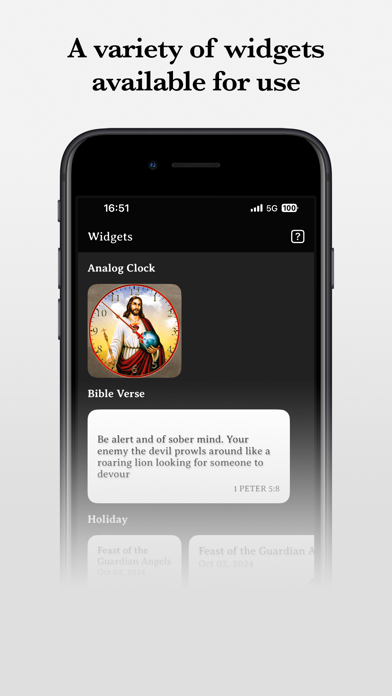

Description by 永欣 赵 Written by the developer, not by AppBrain. Click to read.
Build up and share the Word of God every day!
Bible verses always inspire us at any time.
God bless you!
Features:
- Multiple Bible widgets
- Customizable themes and styles
- Daily auto-refreshing Bible verses
- Complete holiday list and countdown days
Premium Vip
By becoming a member, you can use all app features without restriction and enjoy free future updates, with no ads guaranteed. After confirming your purchase, payment will be charged to your iTunes account. For the annual subscription plan, unless you cancel at least 24 hours before the end of the current billing cycle, the subscription will automatically renew, and your account will be charged for renewal within 24 hours prior to the end of the current billing cycle. You can cancel the subscription in your App Store account settings.
You can cancel the annual subscription service through the following steps: On an Apple device, go to "Settings" → "iTunes & App Store" → select "Apple ID" → click "View Apple ID" → on the Account Settings page, click "Subscriptions" → cancel the subscription.
We are currently in the testing and optimization phase. If you have any suggestions, please contact us via email at byzhkc3@gmail.com.
------
Privacy Policy: https://memesmarkers.com/Bible/privacy/index.html
Premium Agreement:https://memesmarkers.com/Bible/privacy/termsOfUse.html