

Big Number Calculator+
Big Number Calculator+ is made and published by Kunio Takeuchi. AppBrain is an independent app data site and isn't affiliated with Kunio Takeuchi. The app name, icon, screenshots and description belong to Kunio Takeuchi and are shown as published on the App Store.
AppBrain's verdict
Established- Rating on App Store
- 3.67
- 3 ratings
- Last updated
- October 8, 2026
- Size
- 19.0 MB
It doesn't have enough ratings yet to judge what users think.
User feedback
Ratings and reviews on the App StoreComments on Big Number Calculator+ for iOS
We don't have enough comments to show example comments. Please check back later.
Store listing
By Kunio Takeuchi, from the App Store



Description by Kunio Takeuchi Written by the developer, not by AppBrain. Click to read.
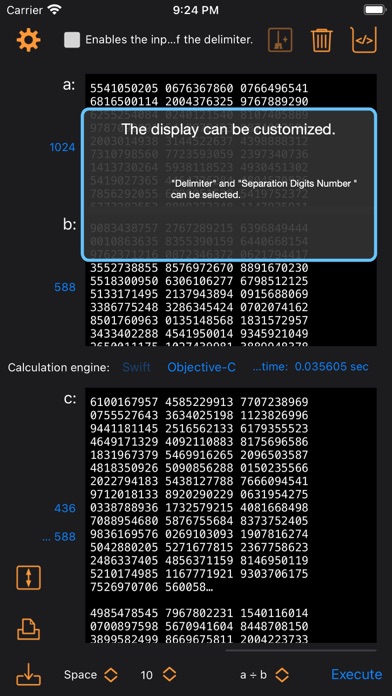
The format that can be used is decimal (integer). The calculation functions that can be used are addition, subtraction, multiplication, and division. The number of digits is limited to 66000 digits. Only plus signs can be used. Minus signs cannot be used.
The calculation engine used in the calculation can be selected from “Swift” and “Objective-C”. You can also view the source code of the calculation engine. Please use at your own risk.
Only numerical values (1,2,3,4,5,6,7,8,9,0) are extracted from the input data. You can optionally enter non-numeric characters. It can be used as a delimiter.
It can be load from a file in addition to direct input.
Input data and calculation results are automatically formatted for printing and saving. The save file is saved in text format (.txt).
"Big Number Calculator" for macOS is also available.
Main Specifications
• iOS 13 and iPadOS 13 or later
Main functions
Maximum number of digits of input data
• 66000 digits
Calculation function
• Addition, subtraction, multiplication, division
The algorithm uses the "brush calculation method".
The division is displayed as “quotient and remainder".
Calculation engine
• “Swift” and “Objective-C” can be selected.
Numeric format
• Decimal number (integer)
Only the plus sign can be used as the sign. Minus signs cannot be used.
Numerical input
• Only numerical values (1,2,3,4,5,6,7,8,9,0) are extracted.
• Characters other than numerical values can be entered in the option settings. Can be used as a delimiter.
Load from file
• The file types that can be load are "txt, rtf, rtfd".
Data replacement and registration
• Input data and calculation results can be replaced by dragging and dropping.
It can also be registered in the register.
Separation
• Separate with the selected delimiter (comma and space).
• Separate by the selected number of separation digits (3, 6, 10, 16, 24).
Any number of separation digits can be entered.
Printing
• Input data and calculation results are automatically formatted.
Save
• Input data and calculation results are automatically formatted.
• The file format is text (.txt) format.
Source code
• The source code of the calculation engine can be displayed.
Please use at your own risk.
Safety and technology
Found in the app by AppBrain- Price
- Free
- App size
- 19.0 MB
- Content rating
- Everyone
Technologies used by Big Number Calculator+
Releases
Updates seen on the App Store- Version
- 1.3.2
- Launched
- November 2020
No changelog data
Alternatives
Similar apps and more from Kunio TakeuchiAlternatives to Big Number Calculator+



More from Kunio Takeuchi


Rankings
App Store top chartsApp Store Rankings for Big Number Calculator+
About the app and developer
About Big Number Calculator+
Big Number Calculator+ is an education app developed by Kunio Takeuchi.
What is the rating of Big Number Calculator+?
Big Number Calculator+ is rated 3.67 out of 5 stars, based on 3 ratings.
Is Big Number Calculator+ free?
Big Number Calculator+ is free. The app size is 18.96 MB. The latest version available is 1.3.2. The last update was on October 8, 2026.
What are the requirements for Big Number Calculator+?
The app has a content rating of Everyone. The app has been available on the App Store since November 2020.
Developer information for Kunio Takeuchi
Address: