

Bill Promptly is made and published by 若雅 吴. AppBrain is an independent app data site and isn't affiliated with 若雅 吴. The app name, icon, screenshots and description belong to 若雅 吴 and are shown as published on the App Store.
AppBrain's verdict
- Last updated
- June 9, 2026
Rankings
App Store top chartsApp Store Rankings for Bill Promptly
This app is not ranked
Competitors
Similar apps and more from 若雅 吴More from 若雅 吴


Releases
Updates seen on the App Store- Version
- 1.0
- Launched
- June 2026
No changelog data
User feedback
Ratings and reviews on the App StoreComments on Bill Promptly for iOS
We don't have enough comments to show example comments. Please check back later.
Technology
Found in the app by AppBrain- Price
- Free
- App size
- 24.5 MB
- Content rating
- Everyone
Technologies used by Bill Promptly
About the app and developer
About Bill Promptly
Bill Promptly is a finance app developed by 若雅 吴.
User Ratings
The app has no ratings yet.
App Information
Bill Promptly is freely available from the App Store. The app size is 24.49 MB. The latest version available is 1.0. The last update was on June 9, 2026.
Technical Requirements
The app has a content rating of Everyone. The app has been available on the App Store since June 2026.
Developer information for 若雅 吴
Address:
Store listing
By 若雅 吴, from the App Store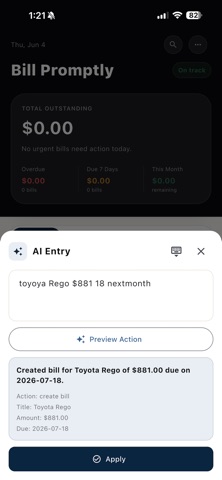


Screenshots by 若雅 吴, from the the App Store listing
Description by 若雅 吴 Written by the developer, not by AppBrain. Click to read.
Bill Promptly helps you stay on top of household bills without turning personal finance into a spreadsheet.
Track rent, electricity, phone, internet, insurance, medical bills, subscriptions, and other regular expenses in one simple place. See what is overdue, what is due soon, what has already been paid, and what needs attention next.
KEY FEATURES
Bill tracking
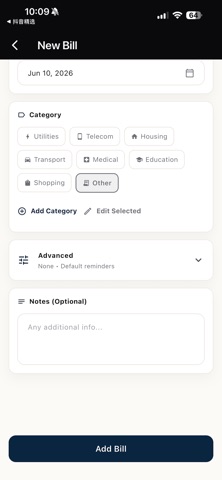
Create bills with due dates, categories, companies, notes, and payment status.
Partial payments
Record multiple payments against a single bill. Bill Promptly automatically calculates paid amount, remaining balance, and payment progress.
Recurring bills
Set monthly or yearly recurring bills and let the app prepare the next bill when the current one is paid.
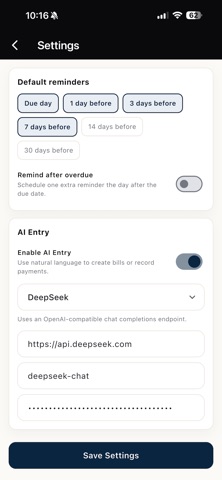
Smart reminders
Configure global reminders or customize reminders for individual bills.
Payment history
Keep a clear timeline of payment dates, methods, reference numbers, notes, and receipt attachments.
Statistics
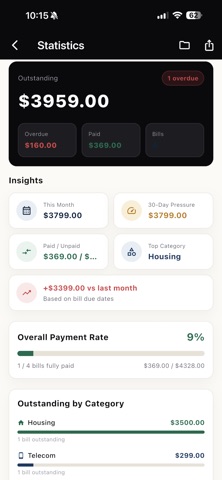
Review overdue totals, upcoming bills, monthly pressure, payment rate, category breakdowns, and recent payment activity.
Search and filters
Find bills by status, category, month, amount, recurrence, partial payment, and due window.
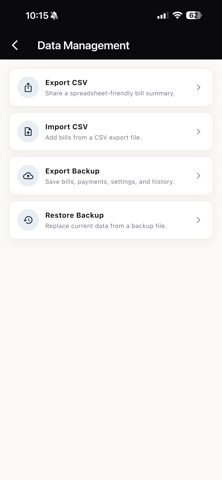
Backup and export
Export CSV files, import CSV records, and create JSON backups for bills, payments, and settings.
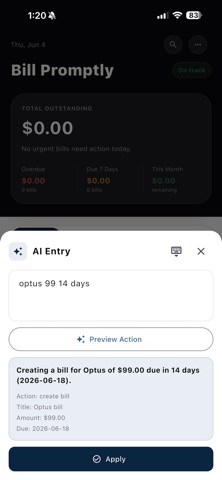
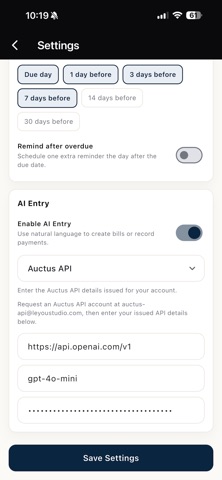
Optional AI Entry
Enable AI Entry in Settings to create bills or record payments from plain language, such as "I paid the electricity bill today." You choose your AI provider and enter your own API key. AI Entry is off by default.
PRIVATE BY DEFAULT
Bill Promptly stores your bill data locally on your device. No account is required for the core app. AI Entry is optional and only sends your entered text and relevant bill context to the AI provider you configure.
Track rent, electricity, phone, internet, insurance, medical bills, subscriptions, and other regular expenses in one simple place. See what is overdue, what is due soon, what has already been paid, and what needs attention next.
KEY FEATURES
Bill tracking
Create bills with due dates, categories, companies, notes, and payment status.
Partial payments
Record multiple payments against a single bill. Bill Promptly automatically calculates paid amount, remaining balance, and payment progress.
Recurring bills
Set monthly or yearly recurring bills and let the app prepare the next bill when the current one is paid.
Smart reminders
Configure global reminders or customize reminders for individual bills.
Payment history
Keep a clear timeline of payment dates, methods, reference numbers, notes, and receipt attachments.
Statistics
Review overdue totals, upcoming bills, monthly pressure, payment rate, category breakdowns, and recent payment activity.
Search and filters
Find bills by status, category, month, amount, recurrence, partial payment, and due window.
Backup and export
Export CSV files, import CSV records, and create JSON backups for bills, payments, and settings.
Optional AI Entry
Enable AI Entry in Settings to create bills or record payments from plain language, such as "I paid the electricity bill today." You choose your AI provider and enter your own API key. AI Entry is off by default.
PRIVATE BY DEFAULT
Bill Promptly stores your bill data locally on your device. No account is required for the core app. AI Entry is optional and only sends your entered text and relevant bill context to the AI provider you configure.