

BillHive: Bill Splitting
BillHive: Bill Splitting is made and published by MATTHEW ROBERT PORTELOS. AppBrain is an independent app data site and isn't affiliated with MATTHEW ROBERT PORTELOS. The app name, icon, screenshots and description belong to MATTHEW ROBERT PORTELOS and are shown as published on the App Store.
AppBrain's verdict
- Last updated
- October 15, 2026
Rankings
App Store top chartsApp Store Rankings for BillHive: Bill Splitting
Competitors
Similar apps and more from MATTHEW ROBERT PORTELOSAlternatives to BillHive: Bill Splitting



More from MATTHEW ROBERT PORTELOS


Releases
Updates seen on the App Store- Version
- 26.10.02
- Launched
- March 2026
No changelog data
User feedback
Ratings and reviews on the App StoreComments on BillHive: Bill Splitting for iOS
We don't have enough comments to show example comments. Please check back later.
Technology
Found in the app by AppBrain- Price
- Free
- App size
- 12.2 MB
- Content rating
- Everyone
Technologies used by BillHive: Bill Splitting
About the app and developer
About BillHive: Bill Splitting
BillHive: Bill Splitting is a finance app developed by MATTHEW ROBERT PORTELOS.
What is the rating of BillHive: Bill Splitting?
BillHive: Bill Splitting has no ratings yet.
Is BillHive: Bill Splitting free?
BillHive: Bill Splitting is free. The app size is 12.24 MB. The latest version available is 26.10.02. The last update was on October 15, 2026.
What are the requirements for BillHive: Bill Splitting?
The app has a content rating of Everyone. The app has been available on the App Store since March 2026.
Developer information for MATTHEW ROBERT PORTELOS
Address:
Frequently asked questions about BillHive: Bill Splitting
Is BillHive: Bill Splitting free?
Yes. BillHive: Bill Splitting is free on the App Store.
Is BillHive: Bill Splitting still available?
Yes. BillHive: Bill Splitting is on the App Store, and the last update we saw was on October 15, 2026.
How large is BillHive: Bill Splitting?
BillHive: Bill Splitting is 12.24 MB.
Is BillHive: Bill Splitting suitable for children?
App Store rates the content of BillHive: Bill Splitting as suitable for everyone.
Who made BillHive: Bill Splitting?
BillHive: Bill Splitting was developed by MATTHEW ROBERT PORTELOS. It is listed in the finance category on the App Store.
What are the best alternatives to BillHive: Bill Splitting?
People looking at BillHive: Bill Splitting also look at these finance apps: Spliteo - Split Expenses, Split Blue - Smart Bill, SplitPlease: Split Bills, Payours: Split Bills, expenses, Splitta - Bill Splitter.
Store listing
By MATTHEW ROBERT PORTELOS, from the App Store


Description by MATTHEW ROBERT PORTELOS Written by the developer, not by AppBrain. Click to read.
BILLS MODE
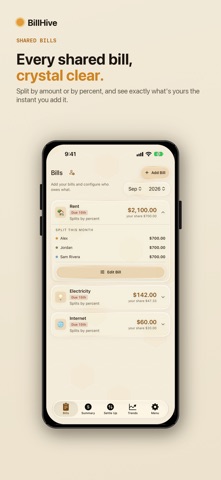
Track recurring household bills month after month. Split by percentage or fixed dollar amounts, set "covered by" relationships, and auto-carry amounts that don't change. A monthly checklist tracks what's been emailed, paid, and collected.
CHECKS MODE
Split a restaurant check in seconds. Scan the receipt with on-device OCR to auto-populate line items, tax, and tip. Assign items to friends, calculate proportional shares, then send a no-account share link so friends can claim their own items from any device.
TRIPS MODE
Create a trip, add members, and log expenses as you go. Attach receipt photos, split costs between any subset of members, and handle multi-payer scenarios. When the trip ends, the debt simplification algorithm minimizes the number of transfers needed. Export a PDF or CSV summary.
COLLECT WHAT YOU'RE OWED
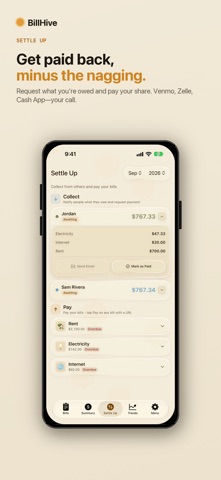
All three modes generate Zelle, Venmo, and Cash App deep-links with the exact amount pre-filled. Send a personalized HTML email summary with one tap, or share a link that lets friends claim items with no account required.
KEY FEATURES
- Three modes: Bills, Checks, and Trips
- On-device receipt OCR (no cloud upload)
- No-account share links for checks and trips
- Zelle, Venmo, and Cash App payment deep-links
- Debt simplification for trips
- Multi-payer and multi-currency expense support
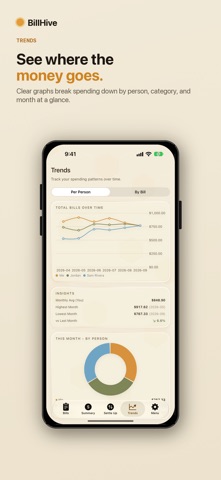
- Month-over-month trend charts
- iCloud sync across devices
- Dark theme with amber accent
- One-time purchase: no subscription, no ads, no tracking
Your data stays on your device and syncs via iCloud. Nothing is sent to any third-party server.