

Bindirgal Pro Keyboard
Bindirgal Pro Keyboard is made and published by AfriNetPro. AppBrain is an independent app data site and isn't affiliated with AfriNetPro. The app name, icon, screenshots and description belong to AfriNetPro and are shown as published on the App Store.
AppBrain's verdict
- Rating on App Store
- 5.00
- 2 ratings
- Last updated
- October 7, 2026
It doesn't have enough ratings yet to judge what users think.
Rankings
App Store top chartsApp Store Rankings for Bindirgal Pro Keyboard
Releases
Updates seen on the App Store- Version
- 1.3
- Launched
- January 2026
No changelog data
User feedback
Ratings and reviews on the App StoreComments on Bindirgal Pro Keyboard for iOS
We don't have enough comments to show example comments. Please check back later.
Technology
Found in the app by AppBrain- Price
- $2.99
- App size
- 785.0 KB
- Content rating
- Everyone
Technologies used by Bindirgal Pro Keyboard
About the app and developer
About Bindirgal Pro Keyboard
Bindirgal Pro Keyboard is an utilities app developed by AfriNetPro.
User Ratings
Bindirgal Pro Keyboard is rated 5.00 out of 5 stars. The rating is based on 2 ratings.
App Information
Bindirgal Pro Keyboard costs $2.99. The app size is 785.00 kB. The latest version available is 1.3. The last update was on October 7, 2026.
Technical Requirements
The app has a content rating of Everyone. The app has been available on the App Store since January 2026.
Developer information for AfriNetPro
Address:
Store listing
By AfriNetPro, from the App Store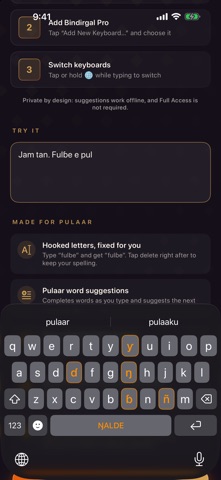
Description by AfriNetPro Written by the developer, not by AppBrain. Click to read.
MADE FOR PULAAR
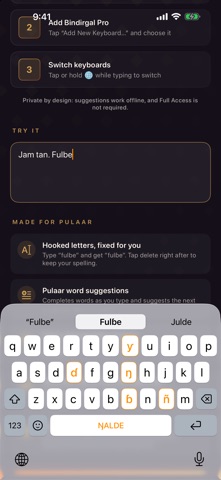
• ɓ ɗ ŋ ñ ƴ on the main keyboard, highlighted so you can find them instantly
• Hold b, d, n or y for ɓ, ɗ, ŋ, ñ, ƴ and prenasals like mb, nd, ng, nj
• Hooked letters fixed for you: type "fulbe", get "fulɓe". Tap delete to undo
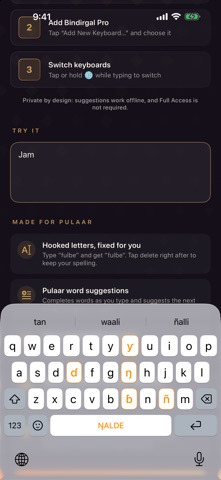
• Word suggestions as you type, and next-word predictions for common phrases
• Learns the words you type most, on your device only
TYPES LIKE THE KEYBOARD YOU KNOW
• Familiar QWERTY layout with numbers, symbols and emoji
• Slide on the space bar (ŊALDE) to move the cursor
• Double-tap space for a period, automatic capitals, caps lock with a double tap on shift
• Light and dark mode, iPhone and iPad, portrait and landscape
PRIVATE BY DESIGN
• Works completely offline
• Does not ask for Full Access
• Nothing you type is collected or sent anywhere
Use Bindirgal Pro in WhatsApp, Messages, Facebook, email, notes — anywhere you type.
SET UP IN SECONDS
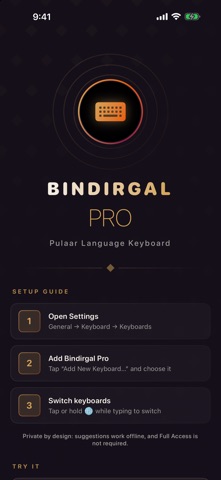
1. Open Settings → General → Keyboard → Keyboards
2. Tap "Add New Keyboard…" and choose Bindirgal Pro
3. Tap or hold the globe key while typing to switch to it
Jam tan! Celebrating the Pulaar language.