

BirdieLab is made and published by Raymond Flores. AppBrain is an independent app data site and isn't affiliated with Raymond Flores. The app name, icon, screenshots and description belong to Raymond Flores and are shown as published on the App Store.
AppBrain's verdict
- Rating on App Store
- 5.00
- 2 ratings
- Last updated
- June 21, 2026
It doesn't have enough ratings yet to judge what users think.
Rankings
App Store top chartsApp Store Rankings for BirdieLab
Competitors
Similar apps and more from Raymond FloresAlternatives to BirdieLab


Releases
Updates seen on the App Store- Version
- 1.4.0
- Launched
- October 2025
No changelog data
User feedback
Ratings and reviews on the App StoreComments on BirdieLab for iOS
We don't have enough comments to show example comments. Please check back later.
Technology
Found in the app by AppBrain- Price
- Free
- App size
- 37.4 MB
- Content rating
- Everyone
Technologies used by BirdieLab
About the app and developer
About BirdieLab
BirdieLab is a sports app developed by Raymond Flores.
User Ratings
BirdieLab is rated 5.00 out of 5 stars. The rating is based on 2 ratings.
App Information
BirdieLab is freely available from the App Store. The app size is 37.36 MB. The latest version available is 1.4.0. The last update was on June 21, 2026.
Technical Requirements
The app has a content rating of Everyone. The app has been available on the App Store since October 2025.
Developer information for Raymond Flores
Address:
Store listing
By Raymond Flores, from the App Store




Description by Raymond Flores Written by the developer, not by AppBrain. Click to read.
Score Every Hole, The Right Way
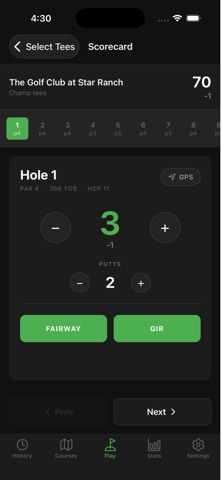
Enter your score, fairways hit, greens in regulation, and putts for each hole as you play. Your total and score-to-par update in real time, so you always know where you stand. Play a full 18, or just the front or back nine.
Live GPS Yardages
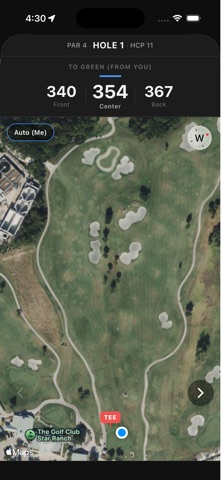
Open the GPS view on any hole and see front, center, and back-of-green distances from your current position or the tee. Drop a layup marker on the course map to measure to a target. Auto mode switches from tee distance to your position as you move down the fairway.
Your Handicap, Calculated Right
BirdieLab computes your USGA handicap index as your rounds accumulate — best N differentials from your last 20 rounds, multiplied by 0.96. The number updates automatically, and you can track how it moves over time.
Stats That Actually Tell You Something
See your average score, average putts, fairway percentage, and GIR percentage across your rounds. A score trend chart shows where your game is heading. Filter by course to compare your performance at each track. Career stats give you lifetime totals at a glance, along with your best and worst rounds.
Find Courses Nearby
Open the Play tab and BirdieLab surfaces courses near you automatically using your location. Search by name for any course in the database. Select your tee box before you start — multiple tees per course, sorted by rating.
Course Info and Reviews
Each course page shows hole-by-hole detail: par, handicap index, and yardages by tee box. Rate courses on overall quality, difficulty, and value. Log the course condition and pace of play, and leave notes for other golfers.
Your Round History
Every saved round is logged with full hole-by-hole detail. Swipe to delete a round. Tap to review your scorecard.
Start tracking. Start improving.