

BitClip is made and published by Rob Jackson. AppBrain is an independent app data site and isn't affiliated with Rob Jackson. The app name, icon, screenshots and description belong to Rob Jackson and are shown as published on the App Store.
AppBrain's verdict
- Rating on App Store
- 5.00
- 4 ratings
- Last updated
- April 9, 2025
- Size
- 11.7 MB
It doesn't have enough ratings yet to judge what users think.
User feedback
Ratings and reviews on the App StoreComments on BitClip for iOS
We don't have enough comments to show example comments. Please check back later.
Store listing
By Rob Jackson, from the App Store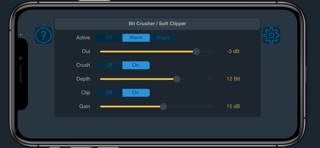

Description by Rob Jackson Written by the developer, not by AppBrain. Click to read.
BitClip is an audio effect plugin that can run standalone, or in any AU compatible host application such as Logic or GarageBand.
Overview
BitClip combines bit-crushing and soft-clipping to create lo-fi distortion effects. From subtle, retro degradation, to gnarly diode-emulated distortion, BitClip can deliver, with a very low CPU cost! In "Warm" mode, BitClip's DSP has been tuned to mimic the sound of actual hardware, instead of just performing a simple bit-crush calculation. As a result, some of the higher frequencies normally associated with the effect are attenuated. Both effects work well in tandem, especially when trying to bring the character of old hardware samplers and drum machines to sounds that would otherwise be too "pristine".
Parameters
Active - Set to Off for bypass / no processing. Warm mode adds a bit of vintage character to the processing, attenuating some high frequencies, although this is not a simple LPF. Bright mode essentially bypasses the Warm mode processing with no added tonal colouration.
Out - Sets the output level. This can be used to attenuate the overall volume of the effect. For example, you can smash the Gain going into the clipper, then back-off the Out level so the track doesn't dominate your mix. At the maximum setting, no attenuation is applied.
Crush - Toggles bit-crushing On or Off.
Depth - Sets the desired bit-depth of the crushing from 16 Bit down to 4 Bit in 1 Bit intervals. In vintage hardware, devices would often be 8 or 12 Bit, whereas BitClip allows you to explore unusual values in-between. For example, 5 Bit provides much more clarity than 4 Bit, but can still sound satisfyingly crunchy!
Clip - Toggles soft-clipping On or Off.
Gain - Sets the gain applied to the signal going into the soft-clipper. Depending on the level of the incoming signal, lower settings may not sound obvious, but clipping will still occur, creating a subtle distortion effect and preventing any signal through that's over 0dB. With up to 48dB of gain on tap, BitClip can drive pretty much anything into nasty diode-like distortion!
For more info and support please visit:
www.waverley-instruments.com/robjackson
Safety and technology
Found in the app by AppBrain- Price
- $1.99
- App size
- 11.7 MB
- Content rating
- Everyone
Technologies used by BitClip
Releases
Updates seen on the App Store- Version
- 1.0.1
- Launched
- April 2025
No changelog data
Alternatives
Similar apps and more from Rob JacksonMore from Rob Jackson



Rankings
App Store top chartsApp Store Rankings for BitClip
About the app and developer
About BitClip
BitClip is a music app developed by Rob Jackson.
User Ratings
BitClip is rated 5.00 out of 5 stars. The rating is based on 4 ratings.
App Information
BitClip costs $1.99. The app size is 11.68 MB. The latest version available is 1.0.1. The last update was on April 9, 2025.
Technical Requirements
The app has a content rating of Everyone. The app has been available on the App Store since April 2025.
Developer information for Rob Jackson
Address: