


AppBrain's verdict
- Rating on App Store
- 5.00
- 2 ratings
- Last updated
- September 10, 2026
- Size
- 2.26 MB
It doesn't have enough ratings yet to judge what users think.
User feedback
Ratings and reviews on the App StoreComments on BitMeter: Data Usage Widget for iOS
We don't have enough comments to show example comments. Please check back later.
Store listing
By Michael Burgoon, from the App StoreDescription by Michael Burgoon Written by the developer, not by AppBrain. Click to read.
WHAT YOU GET
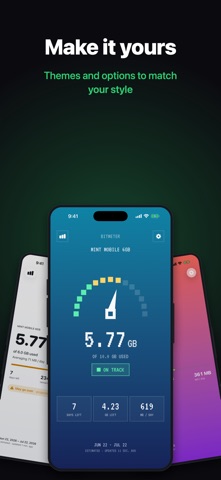
• A clear dashboard - data used in big, readable numbers, plus days left, data remaining, and a daily budget so you know if you'll make it to your reset date.
• Home & lock screen widgets - glance at your remaining data anytime, without opening the app.
• On-track projection - BitMeter watches your recent pace and colors the screen green, amber, or red so an overage never sneaks up on you.
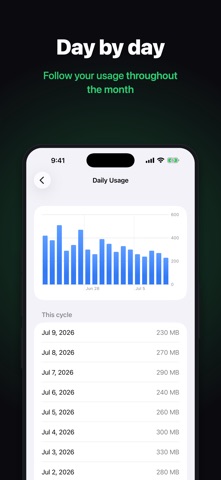
• Daily history - see your day-by-day usage, and step back through previous cycles.
• Usage alerts - get a heads up as you approach your limit.
• Ask Siri - "How much data do I have left?" works through Siri and Shortcuts.
• Set up in seconds - enter your plan's allowance and reset date and you're done. Installing mid-cycle? Enter what you've already used so your totals start accurate.
PRIVATE BY DESIGN
No accounts. No sign-ups. No analytics or tracking. Everything stays on your device and is never sent anywhere. Your data is yours.
AN HONEST ESTIMATE
iOS doesn't let apps read your carrier's official usage, so BitMeter measures your cellular data on your device while it runs. Keep it installed and the numbers stay accurate. No app can read your carrier's exact numbers, and we're upfront about that instead of pretending otherwise.
PREMIUM (one-time purchase)
Unlock a few extras with a single purchase — no subscription:
• Rollover - model AT&T, Verizon, or T-Mobile style rollover and see your banked data.
• Multiple plans - track more than one SIM or data plan and switch between them.
• Smart alerts - set several usage milestones and a pace warning that flags a likely overage before it happens.
• Color themes - style the dashboard and widget with palettes like OLED, Dracula, Gruvbox, Neon, and Solar.
• Fonts - pick the typeface for your dashboard and widget.
• Bit Mode - a retro pixel look with a speedometer gauge and CRT styling for the dashboard and home screen widgets.
Everything else stays free, forever.
(an app by goonbits)
Safety and technology
Found in the app by AppBrain- Price
- Free
- App size
- 2.26 MB
- Content rating
- Everyone
Technologies used by BitMeter: Data Usage Widget
Releases
Updates seen on the App Store- Version
- 1.2
- Launched
- July 2026
No changelog data
Alternatives
Similar apps and more from Michael BurgoonAlternatives to BitMeter: Data Usage Widget


Rankings
App Store top chartsApp Store Rankings for BitMeter: Data Usage Widget
About the app and developer
About BitMeter: Data Usage Widget
BitMeter: Data Usage Widget is an utilities app developed by Michael Burgoon.
User Ratings
BitMeter: Data Usage Widget is rated 5.00 out of 5 stars. The rating is based on 2 ratings.
App Information
BitMeter: Data Usage Widget is freely available from the App Store. The app size is 2.26 MB. The latest version available is 1.2. The last update was on September 10, 2026.
Technical Requirements
The app has a content rating of Everyone. The app has been available on the App Store since July 2026.
BitMeter: Data Usage Widget is made and published by Michael Burgoon. AppBrain is an independent app data site and isn't affiliated with Michael Burgoon. The app name, icon, screenshots and description belong to Michael Burgoon and are shown as published on the App Store.
Developer information for Michael Burgoon
Address:
Frequently asked questions about BitMeter: Data Usage Widget
Is BitMeter: Data Usage Widget free?
Yes. BitMeter: Data Usage Widget is free on the App Store.
Is BitMeter: Data Usage Widget still available?
Yes. BitMeter: Data Usage Widget is on the App Store, and the last update we saw was on September 10, 2026.
How large is BitMeter: Data Usage Widget?
BitMeter: Data Usage Widget is 2.26 MB.
Is BitMeter: Data Usage Widget suitable for children?
App Store rates the content of BitMeter: Data Usage Widget as suitable for everyone.
How do people rate BitMeter: Data Usage Widget?
BitMeter: Data Usage Widget scores 5.00 out of 5 stars, from 2 ratings on the App Store.
Who made BitMeter: Data Usage Widget?
BitMeter: Data Usage Widget was developed by Michael Burgoon. It is listed in the utilities category on the App Store.
What are the best alternatives to BitMeter: Data Usage Widget?
People looking at BitMeter: Data Usage Widget also look at these utilities apps: Datamon, Fraction Calculator Widget, DataLeft, AudioBuffer, WiFi Sonar: Network Scanner.