

BizXpenseTracker Pro
BizXpenseTracker Pro is made and published by Silverware Software, LLC. AppBrain is an independent app data site and isn't affiliated with Silverware Software, LLC. The app name, icon, screenshots and description belong to Silverware Software, LLC and are shown as published on the App Store.
AppBrain's verdict
EstablishedLoved by users- Rating on App Store
- 4.62
- 444 ratings
- Last updated
- January 7, 2026
- Size
- 71.6 MB
Users love it: 4.6 stars from 444 ratings.
User feedback
Ratings and reviews on the App StoreComments on BizXpenseTracker Pro for iOS
We don't have enough comments to show example comments. Please check back later.
Store listing
By Silverware Software, LLC, from the App Store


Description by Silverware Software, LLC Written by the developer, not by AppBrain. Click to read.
BizXpenseTracker (BXT) is finely tuned, exceptionally reliable and has been helping users track their expenses, mileage and time since 2010
* Apple named BizXpenseTracker "Noteworthy"
* Selected as a "very useful app" by Apple in: Apps for Business
* Inc. Magazine Recommended
Amex Recommends: http://tinyurl.com/AmexTopPick
WHY BizXpenseTracker IS BETTER
* NOW in its 11th year
* Elegant user interface
* The most powerful and flexible Reporting features available
* Organize your entries into logs for maximum organization
* Quick and easy on-screen filtering to get the most from your tracked data
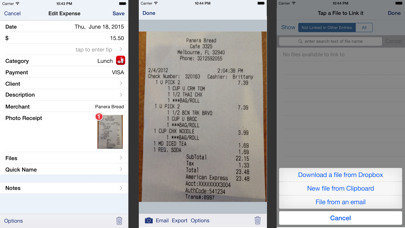
* File Linking feature allows you to link files received via email
EASE OF USE
* Completely customize your app and make it your own
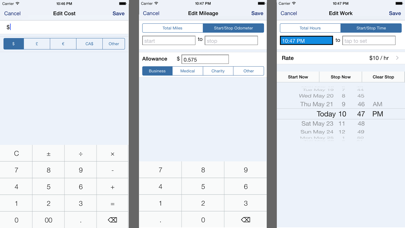
* Record your entries with easy to use screens that show your frequently used items
* Customize categories and sub-categories
* Custom keyboard with calculator functions
* Smart functions to make data entry FAST ( ie For each category, the last payment type is remembered)
REPORTING
* Flexible and Powerful
* Choose the attractive PDF format or CSV for importing into Excel
* Over two dozen built-in templates
* Email your reports and photo receipts
* Export your reports to Dropbox, iCloud or to your desktop via wi-fi
* Include photo receipt images in the same file as the PDF report
* Accountants love our reports!
PHOTO RECEIPTS
* Capture multiple images per entry
* Easily Crop images
PREFERENCES
* The MOST extensive set of preferences available
* Hide those fields you do not need
ON-SCREEN FILTERING
* Sort entries by Date,Category,Payment or Client
* Extensive on-screen filtering
MILEAGE
* Track mileage the way you want
1. LIVE mileage tracking - the app will track your every move - just tell the app when you depart and when you arrive. The app will do the rest
2. Enter Start/Stop odometer reading
3. Enter the start and end addresses and the app will determine the travel distance
4. See optional fully automatic AutoTrack feature below
* If using odometer, will pre-fill start mileage with last stop mileage
* Access Frequent trips from the QUICK menu
* Supports Multiple Vehicles
TIME
* Create custom rates using a rate type of
hourly, per visit, or per day
* Categorize by: Work, Vacation, Sick or Other
BUSINESS SPECIFIC
* Per Diem
* Commuter mileage
INTERNATIONAL
* Supports ALL major currencies
* Extensive support for VAT
BACKUP AND SAFE KEEPING
* Backup your data to iCloud, Dropbox or directly to your desktop
* Set Backup to “Automatic” to iCloud or Dropbox
* Set Password or use TouchID
-----
Required Subscription
A subscription to Unlimited Usage or AutoTrack (which includes unlimited usage) is required after adding 25 free entries
Subscription Details:
* Choose between Unlimited Usage or AutoTrack (includes unlimited usage)
* AutoTrack is a feature that will automatically track your drives. All you need to do is carry your device with you.
* Payment charged to iTunes account.
* Automatically renews unless cancelled at least 24-hours before the end of the current period
* Account will be charged for renewal within 24-hours prior to the end of the current period
* Either subscription is available monthly or yearly
Optional Subscription - HumanScan:
* Human Scan will allow you to take a picture of a receipt and have an actual human extract the key information and update your expense entry. You do NOT need this add-on if you simply want to take photos of your receipt as the app already has that built-in
Questions/Comments:
Just tap the Email the Author link in the Prefs screen
Safety and technology
Found in the app by AppBrain- Price
- Free
- App size
- 71.6 MB
- Content rating
- Everyone
Technologies used by BizXpenseTracker Pro
Releases
Updates seen on the App Store- Version
- 1.8.5
- Launched
- May 2021
No changelog data
Alternatives
Similar apps and more from Silverware Software, LLCAlternatives to BizXpenseTracker Pro








More from Silverware Software, LLC





Rankings
App Store top chartsApp Store Rankings for BizXpenseTracker Pro
About the app and developer
About BizXpenseTracker Pro
BizXpenseTracker Pro is a business app developed by Silverware Software, LLC.
User Ratings
BizXpenseTracker Pro is rated 4.62 out of 5 stars. The rating is based on 440 ratings.
App Information
BizXpenseTracker Pro is freely available from the App Store. The app size is 71.64 MB. The latest version available is 1.8.5. The last update was on January 7, 2026.
Technical Requirements
The app has a content rating of Everyone. The app has been available on the App Store since May 2021.
Developer information for Silverware Software, LLC
Address: