

BlackLock: Blackout Study AI
BlackLock: Blackout Study AI is made and published by GOAT STEW LLC. AppBrain is an independent app data site and isn't affiliated with GOAT STEW LLC. The app name, icon, screenshots and description belong to GOAT STEW LLC and are shown as published on the App Store.
AppBrain's verdict
- Rating on App Store
- 5.00
- 2 ratings
- Last updated
- July 14, 2026
It doesn't have enough ratings yet to judge what users think.
Rankings
App Store top chartsApp Store Rankings for BlackLock: Blackout Study AI
Competitors
Similar apps and more from GOAT STEW LLCMore from GOAT STEW LLC


Releases
Updates seen on the App Store- Version
- 1.2.0
- Launched
- February 2026
No changelog data
User feedback
Ratings and reviews on the App StoreComments on BlackLock: Blackout Study AI for iOS
We don't have enough comments to show example comments. Please check back later.
Technology
Found in the app by AppBrain- Price
- Free
- App size
- 19.7 MB
- Content rating
- Everyone
Technologies used by BlackLock: Blackout Study AI
About the app and developer
About BlackLock: Blackout Study AI
BlackLock: Blackout Study AI is a lifestyle app developed by GOAT STEW LLC.
User Ratings
BlackLock: Blackout Study AI is rated 5.00 out of 5 stars. The rating is based on 2 ratings.
App Information
BlackLock: Blackout Study AI is freely available from the App Store. The app size is 19.68 MB. The latest version available is 1.2.0. The last update was on July 14, 2026.
Technical Requirements
The app has a content rating of Everyone. The app has been available on the App Store since February 2026.
Developer information for GOAT STEW LLC
Address:
Frequently asked questions about BlackLock: Blackout Study AI
Is BlackLock: Blackout Study AI free?
Yes. BlackLock: Blackout Study AI is free on the App Store.
Is BlackLock: Blackout Study AI still available?
Yes. BlackLock: Blackout Study AI is on the App Store, and the last update we saw was on July 14, 2026.
How large is BlackLock: Blackout Study AI?
BlackLock: Blackout Study AI is 19.68 MB.
Is BlackLock: Blackout Study AI suitable for children?
App Store rates the content of BlackLock: Blackout Study AI as suitable for everyone.
How do people rate BlackLock: Blackout Study AI?
BlackLock: Blackout Study AI scores 5.00 out of 5 stars, from 2 ratings on the App Store.
Who made BlackLock: Blackout Study AI?
BlackLock: Blackout Study AI was developed by GOAT STEW LLC. It is listed in the lifestyle category on the App Store.
Store listing
By GOAT STEW LLC, from the App Store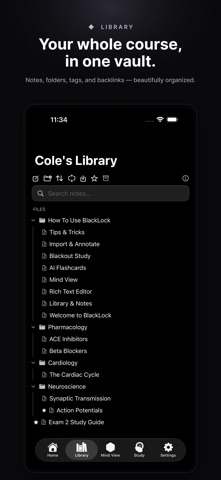


Description by GOAT STEW LLC Written by the developer, not by AppBrain. Click to read.
The all-in-one study system that connects your ideas and turns them into mastery.
BlackLock isn't just a notes app, it's a thinking tool. Capture rich notes, link concepts, visualize relationships, and instantly transform your material into flashcards and quizzes — all in one seamless workspace.
Notes That Think With You
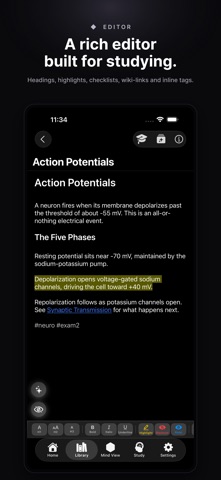
Write in a powerful rich text editor with headers, bold, italic, highlights, checklists, and more.
Use [[backlinks]] and #tags to connect ideas naturally. As your knowledge grows, backlinks build automatically — turning scattered notes into a structured web of understanding.
Mind View (Pro Feature)
See your knowledge as a living, interactive graph.
Hexagonal nodes float in a physics-based layout, revealing how your ideas connect. Filter by tags, group by color, and fine-tune layout forces to explore your thinking from every angle.
Your notes don't just sit in folders — they form a network.
AI-Powered Flashcards (Pro Feature)
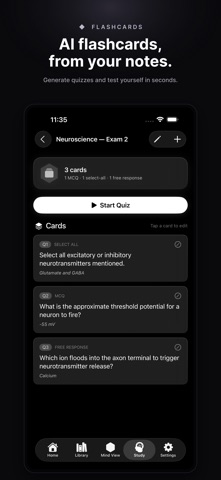
Turn highlights into study material instantly.
Generate multiple choice, select-all-that-apply, or free response flashcards with one tap. Study in quiz mode with instant feedback and score tracking so you always know where you stand.
Blackout Study Mode (Pro Feature)
Transform any note into active recall practice.
Use a precision slider to control how much content is hidden. BlackLock intelligently prioritizes key terms, nouns, and verbs to maximize retention.
Mark essential concepts with the Always Blackout highlighter so they're hidden every time — no matter the setting.
Import & Annotate
Bring everything into one place.
Import PDFs, images, and PowerPoint slides. Annotate with Apple Pencil using built-in markup tools, and keep your study materials seamlessly integrated with your notes.
BlackLock helps you move from collecting information to mastering it.
BlackLock Pro Features are available after purchase.
EULA - https://www.apple.com/legal/internet-services/itunes/dev/stdeula/