

BLEASS Dragonfly is made and published by BLEASS. AppBrain is an independent app data site and isn't affiliated with BLEASS. The app name, icon, screenshots and description belong to BLEASS and are shown as published on the App Store.
AppBrain's verdict
Established- Best rank
- #84
- Top Paid, Canada
- Rating on App Store
- 4.79
- 19 ratings
- Last updated
- October 3, 2025
It doesn't have enough ratings yet to judge what users think. Its best ranking is #84 in Top Paid, Music in Canada.
Rankings
App Store top charts- Highest rank
- #84
- Chart
- Top Paid
- Music
- Country
- Canada
App Store Rankings for BLEASS Dragonfly
Top rankings
| Rank | Country | Category | List |
|---|---|---|---|
| 84 | Canada | Music | Top Paid |
Ranking history in Canada
Competitors
Similar apps and more from BLEASSAlternatives to BLEASS Dragonfly






More from BLEASS


Releases
Updates seen on the App Store- Version
- 1.2.2
- Launched
- October 2021
No changelog data
User feedback
Ratings and reviews on the App StoreComments on BLEASS Dragonfly for iOS
We don't have enough comments to show example comments. Please check back later.
Technology
Found in the app by AppBrain- Price
- $7.99
- App size
- 27.0 MB
- Content rating
- Everyone
Technologies used by BLEASS Dragonfly
About the app and developer
About BLEASS Dragonfly
BLEASS Dragonfly is a music app developed by BLEASS.
User Ratings
BLEASS Dragonfly is rated 4.79 out of 5 stars. The rating is based on 19 ratings.
App Information
BLEASS Dragonfly costs $7.99. The app size is 26.98 MB. The latest version available is 1.2.2. The last update was on October 3, 2025.
Technical Requirements
The app has a content rating of Everyone. The app has been available on the App Store since October 2021.
Developer information for BLEASS
Address:
Store listing
By BLEASS, from the App Store


Description by BLEASS Written by the developer, not by AppBrain. Click to read.
BLEASS Dragonfly automatically syncs the tremolo effect applied on a track using various triggers:
First, you can use the pitch tracking module on either the input audio track (“self mode”) or a sidechained audio track (“sidechain mode”). You also can use the midi input to trigger Dragonfly with accuracy: the tremolo will automatically sync with the notes’ frequencies. Finally, a manual mode allows you to set a fixed frequency.
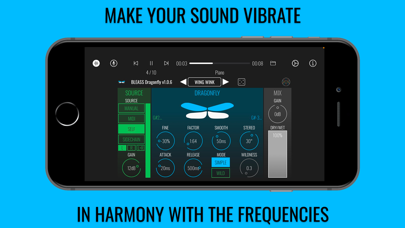
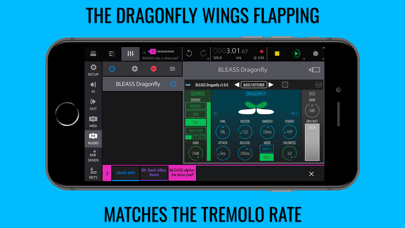
Then you can finetune your settings by adjusting the fine, factor, smoothness, stereo, attack & release. The “Wild” mode applies a waveshaper to the signal to produce a subtle saturation. The final tremolo effect rate is mirrored by the flapping wings of the Dragonfly.
BLEASS Dragonfly is also available for Mac & Windows (AU / VST3)
https://www.bleass.com/dragonfly/
________________________________________________
Technical description:
SOURCE stage:
- MANUAL: Tremolo rate is set by the Rate knob. Tremolo amplitude is set by the Amplitude knob.
- MIDI: Tremolo rate corresponds to the rate of the lowest MIDI note received by the plugin. Tremolo amplitude corresponds to the velocity value of this note.
- SELF: Pitch tracking on the input signal gives the tremolo rate. Tremolo amplitude matches the input signal’s amplitude.
- SIDECHAIN: Pitch tracking on the sidechain signal gives the tremolo rate. Tremolo amplitude matches the sidechain signal’s amplitude.
- SOURCE CHANNEL: Sets the channel to be analysed for SELF and SIDECHAIN modes.
- AMPLITUDE: Sets tremolo amplitude in MANUAL mode.
- GAIN: Sets the input gain in MIDI, SELF and SIDECHAIN modes.
DRAGONFLY stage:
- RATE: Sets tremolo rate in MANUAL mode.
- FINE: Offsets the detected pitch value by +/- 0.5 semitone in MIDI, SELF and SIDECHAIN mode.
- FACTOR: Detected or set rate is multiplied by this factor to give the final tremolo rate.
- SMOOTH: Sets the smoothing duration of rate variations.
- STEREO: Sets phase difference between left and right channels.
- ATTACK: Attack duration of the effect.
- RELEASE: Release duration of the effect.
- MODE: SIMPLE is a basic tremolo. WILD uses complex waveshaping for warm and saturated effect.
- WILDNESS: Sets waveshaping strength in WILD mode.
- VISUALISATION: Dragonfly wings are animated to match the rate and amplitude of the effect. Green label on the left indicates the input MIDI note and rate. Blue label on the right indicates the applied MIDI note and Rate.
MIX stage:
- GAIN: Output gain of the effect.
- DRY/WET: Dry/wet balance.
NOTE: This is an AUv3 effect which needs a compatible host that ideally offers audio sidechain or MIDI FX routing (such as AUM, Cubasis 3 or Logic)