

Block Time Calculator
Block Time Calculator is made and published by inanc atil. AppBrain is an independent app data site and isn't affiliated with inanc atil. The app name, icon, screenshots and description belong to inanc atil and are shown as published on the App Store.
AppBrain's verdict
- Last updated
- October 16, 2026
Rankings
App Store top chartsApp Store Rankings for Block Time Calculator
Competitors
Similar apps and more from inanc atilAlternatives to Block Time Calculator


More from inanc atil


Releases
Updates seen on the App Store- Version
- 1.2.1
- Launched
- May 2026
No changelog data
User feedback
Ratings and reviews on the App StoreComments on Block Time Calculator for iOS
We don't have enough comments to show example comments. Please check back later.
Technology
Found in the app by AppBrain- Price
- $0.99
- App size
- 30.9 MB
- Content rating
- Everyone
Technologies used by Block Time Calculator
About the app and developer
About Block Time Calculator
Block Time Calculator is an utilities app developed by inanc atil.
User Ratings
The app has no ratings yet.
App Information
Block Time Calculator costs $0.99. The app size is 30.89 MB. The latest version available is 1.2.1. The last update was on October 16, 2026.
Technical Requirements
The app has a content rating of Everyone. The app has been available on the App Store since May 2026.
Developer information for inanc atil
Address:
Store listing
By inanc atil, from the App Store


Description by inanc atil Written by the developer, not by AppBrain. Click to read.
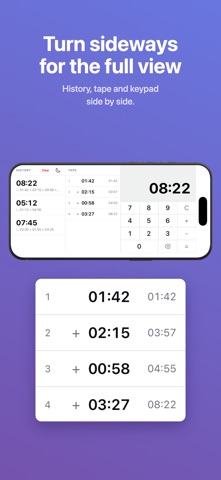
Digits fill in from the right, like an ATM: 4, 1, 5 gives 04:15. There's no colon key. Minutes carry over at 60, so 01:45 + 00:30 comes out as 02:15, not 01:75.
What's in it:
• A tape listing every time you've entered, with a running subtotal beside each one. Typed one wrong? Tap the line to fix it, or tap its + or − to flip it, and the total updates.
• A history of finished sums, each with the working underneath. Tap one to start a new calculation from that total.
• The total stays on screen after you press =, so you can keep adding legs.
• Dark and light themes.
No ads, no menus. One screen.