

Block Times - App Control
Block Times - App Control is made and published by GP Tech Vision Limited. AppBrain is an independent app data site and isn't affiliated with GP Tech Vision Limited. The app name, icon, screenshots and description belong to GP Tech Vision Limited and are shown as published on the App Store.
AppBrain's verdict
- Last updated
- September 16, 2026
Rankings
App Store top chartsApp Store Rankings for Block Times - App Control
Competitors
Similar apps and more from GP Tech Vision LimitedAlternatives to Block Times - App Control




Releases
Updates seen on the App Store- Version
- 2.1
- Launched
- April 2026
No changelog data
User feedback
Ratings and reviews on the App StoreComments on Block Times - App Control for iOS
We don't have enough comments to show example comments. Please check back later.
Technology
Found in the app by AppBrain- Price
- Free
- App size
- 30.5 MB
- Content rating
- Everyone
Technologies used by Block Times - App Control
About the app and developer
About Block Times - App Control
Block Times - App Control is a productivity app developed by GP Tech Vision Limited.
User Ratings
The app has no ratings yet.
App Information
Block Times - App Control is freely available from the App Store. The app size is 30.52 MB. The latest version available is 2.1. The last update was on September 16, 2026.
Technical Requirements
The app has a content rating of Everyone. The app has been available on the App Store since April 2026.
Developer information for GP Tech Vision Limited
Address:
Frequently asked questions about Block Times - App Control
Is Block Times - App Control free?
Yes. Block Times - App Control is free on the App Store.
Is Block Times - App Control still available?
Yes. Block Times - App Control is on the App Store, and the last update we saw was on September 16, 2026.
How large is Block Times - App Control?
Block Times - App Control is 30.52 MB.
Is Block Times - App Control suitable for children?
App Store rates the content of Block Times - App Control as suitable for everyone.
Who made Block Times - App Control?
Block Times - App Control was developed by GP Tech Vision Limited. It is listed in the productivity category on the App Store.
What are the best alternatives to Block Times - App Control?
People looking at Block Times - App Control also look at these productivity apps: Lock In: Focus, Accountability, Totem: Screen Time Control, Focus Planner: To-Do List, Zadie: Daily Planner & Habits, TractorPal.
Store listing
By GP Tech Vision Limited, from the App Store


Description by GP Tech Vision Limited Written by the developer, not by AppBrain. Click to read.
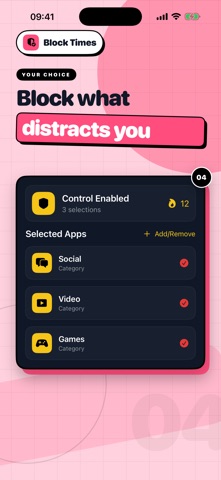
Choose the apps and categories that pull your attention away, add a Block Time to your calendar, and let Block Times apply your choices automatically. Set a one-off block or repeat it every week, including overnight.
HOW IT WORKS
1. Select the apps or categories you want to control.
2. Choose a start and finish time on the calendar.
3. Turn on Block Weekly for a regular routine and add optional start and finish reminders.
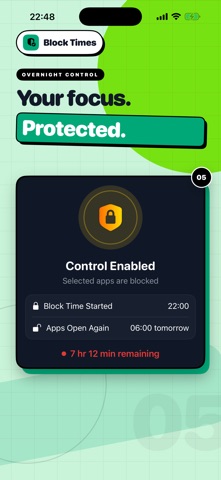
4. Let Block Times protect that part of your day. Apps become available again when their scheduled blocks end.
BUILT AROUND YOUR ROUTINE
• Choose different apps for different Block Times, with one-off, weekly and overnight schedules.
• Skip individual dates or stop future repeats while keeping your history.
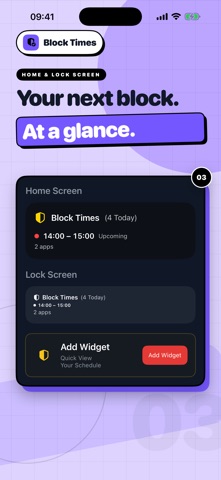
• See today's block count and your next block in Home Screen and Lock Screen widgets.
• Review scheduled Block Time by day and your daily average over the previous seven complete days.
• Get start and finish reminders, follow your control streak and keep historical App Access records from earlier versions.
START FREE
Free users can schedule one app block each day. Block Times Premium supports unlimited daily app blocks, with monthly, yearly and lifetime purchase options.
Block Times is designed for personal self-management. It uses Apple's Screen Time controls to block the apps you select on your own device.
Terms of Use: https://www.blocktimes.app/terms-and-conditions
Privacy Policy: https://www.blocktimes.app/privacy-policy