AppBrain
AppBrain
  • Apps
  • Apps being viewed right now Trending apps today Most popular apps All-time most installed apps Top rated apps iPhone and iPad apps
  • Intelligence ▾
    Intelligence overview → Track any Android app or your whole market
    Track & analyze
    Keyword Tracker & OptimizerTrack & improve Play rankings App Performance ReportOne-off PDF for any app StatisticsFree Android & Play market stats
    Promote your app
    Featured Apps App Links
  • Intelligence
  • Pricing
  • Dashboard
  • Sign up
  • Log in
App Store Apps > Productivity > BlockGain - Screentime Control
BlockGain - Screentime Control icon

BlockGain - Screentime Control

1.0.2
Navin Muthu M
0.00
0 reviews
Free

BlockGain - Screentime Control Screenshot 1 of 9
BlockGain - Screentime Control Screenshot 2 of 9
BlockGain - Screentime Control Screenshot 3 of 9
BlockGain - Screentime Control Screenshot 4 of 9
BlockGain - Screentime Control Screenshot 5 of 9
BlockGain - Screentime Control Screenshot 6 of 9
BlockGain - Screentime Control Screenshot 7 of 9
BlockGain - Screentime Control Screenshot 8 of 9
BlockGain - Screentime Control Screenshot 9 of 9
Screenshots by Navin Muthu M, from the the App Store listing
View on the App Store

AppBrain's verdict

Last updated
November 10, 2026
Size
28.0 MB
Official page on the App Store

User feedback

Ratings and reviews on the App Store

Comments on BlockGain - Screentime Control for iOS

We don't have enough comments to show example comments. Please check back later.

Store listing

By Navin Muthu M, from the App Store
Description by Navin Muthu M Written by the developer, not by AppBrain. Click to read.
BlockGain is a study timer that keeps your distracting apps closed while you focus.

Pick a timer or Pomodoro rounds, choose the apps that pull you away, and start. Until the timer ends, those apps stay blocked. When it's done, they open again. No willpower needed.

FOCUS TIMER
• Simple timer or Pomodoro rounds, with breaks built in
• See exactly how your session splits into focus and breaks
• Block the apps and websites you choose, using Apple's Screen Time
• Add time, or leave early when you really need to

STRICT MODE
For when you mean it. No stop button and no way to unblock until the timer ends.

YOUTUBE STUDY MODE
Watch only the study channels you pick, in BlockGain's own Study tab, while YouTube stays blocked.

SCHEDULES AND ALARMS
• Set your study times once: weekdays, weekends, mornings, evenings
• Get a reminder as each one starts
• Or turn on alarm reminders: a real alarm that rings even on silent, with a picture and sound you choose, and one tap to start your timer

SEE YOUR PROGRESS
• How long you really focused today and this week
• Every day against your daily goal
• Keep your study streak going

FREE FOR EVERY STUDENT
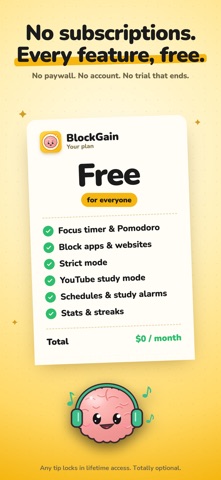
No subscription, no paywall, no account. The timer, blocking and schedules are always free. Strict mode, YouTube study mode and leaving a session early are free with a short ad.

Your study data stays on your phone.

Safety and technology

Found in the app by AppBrain
Price
Free
App size
28.0 MB
Content rating
Everyone

Technologies used by BlockGain - Screentime Control

Releases

Updates seen on the App Store
Version
1.0.2
Launched
November 2026

No changelog data

Alternatives

Similar apps and more from Navin Muthu M

Alternatives to BlockGain - Screentime Control

Focus Era - Pomodoro timer icon Focus Era - Pomodoro timer
Rania Khuffash
0.0
Free
Kofe Flow: Pomodoro Timer icon Kofe Flow: Pomodoro Timer
Rahul m
5.0
Free
3 ratings
Read to Unlock: App Blocker icon Read to Unlock: App Blocker
Oleksandr Khomin
5.0
Free
9 ratings
DaysUp! icon DaysUp!
Ajiro Tech Inc.
0.0
Free
Nima: Block Reels & FYP icon Nima: Block Reels & FYP
9INE LTD
0.0
Free
Pomodoro Timer & Focus・pomo icon Pomodoro Timer & Focus・pomo
Jakub Kalamarz
0.0
Free
Pomodoro: Focus & Deep Work icon Pomodoro: Focus & Deep Work
Alina Bohuslavska
4.7
Free
6 ratings
Productivity System: timeto.me icon Productivity System: timeto.me
Ivan Medvedev
5.0
Free
8 ratings

Rankings

App Store top charts

App Store Rankings for BlockGain - Screentime Control

This app is not ranked

About the app and developer

About BlockGain - Screentime Control

BlockGain - Screentime Control is a productivity app developed by Navin Muthu M.

User Ratings

The app has no ratings yet.

App Information

BlockGain - Screentime Control is freely available from the App Store. The app size is 27.96 MB. The latest version available is 1.0.2. The last update was on November 10, 2026.

Technical Requirements

The app has a content rating of Everyone. The app has been available on the App Store since November 2026.

BlockGain - Screentime Control is made and published by Navin Muthu M. AppBrain is an independent app data site and isn't affiliated with Navin Muthu M. The app name, icon, screenshots and description belong to Navin Muthu M and are shown as published on the App Store.

Developer information for Navin Muthu M

Navin Muthu M

Address:

Frequently asked questions about BlockGain - Screentime Control

Is BlockGain - Screentime Control free?

Yes. BlockGain - Screentime Control is free on the App Store.

Is BlockGain - Screentime Control still available?

Yes. BlockGain - Screentime Control is on the App Store, and the last update we saw was on November 10, 2026.

How large is BlockGain - Screentime Control?

BlockGain - Screentime Control is 27.96 MB.

Is BlockGain - Screentime Control suitable for children?

App Store rates the content of BlockGain - Screentime Control as suitable for everyone.

Who made BlockGain - Screentime Control?

BlockGain - Screentime Control was developed by Navin Muthu M. It is listed in the productivity category on the App Store.

What are the best alternatives to BlockGain - Screentime Control?

People looking at BlockGain - Screentime Control also look at these productivity apps: Focus Era - Pomodoro timer, Kofe Flow: Pomodoro Timer, Read to Unlock: App Blocker, DaysUp!, Nima: Block Reels & FYP.

Share BlockGain - Screentime Control

Popular Productivity Apps Top new apps Apps other people are watching Price drops on Google Play Today's trending apps
Focus Era - Pomodoro timer icon Focus Era - Pomodoro timer
Kofe Flow: Pomodoro Timer icon Kofe Flow: Pomodoro Timer
Read to Unlock: App Blocker icon Read to Unlock: App Blocker
DaysUp! icon DaysUp!
Nima: Block Reels & FYP icon Nima: Block Reels & FYP
Pomodoro Timer & Focus・pomo icon Pomodoro Timer & Focus・pomo
Pomodoro: Focus & Deep Work icon Pomodoro: Focus & Deep Work
Productivity System: timeto.me icon Productivity System: timeto.me
Overview Alternatives Reviews Rankings Technology
AppBrain Intelligence premium content

Subscribe now to get full and unlimited access to AppBrain Intelligence. You'll have access to:

  • App Intelligence dashboard (performance timeline, competitor comparison, country rankings, insight cards)
  • Detailed ranking data per app
  • Full timeline per developer
  • Device market shares data per country
  • Unlimited keyword tracking
1 Month

$75/mo
(billed every month)

SAVE 0%
Subscribe
3 Months

$65/mo
($195 billed every 3 months)

SAVE 13%
Subscribe
1 Year

$57.50/mo
($690 billed every year)

SAVE 23%
Subscribe
Each subscription will automatically renew 3 days before the expiration date for the same time period. Subscriptions can be cancelled at any time before the renewal.

AppBrain is an app data site, we track rankings, ratings, installs for all apps and games on Google Play and the App Store. AppBrain doesn't host app files or APKs, all install links go directly to the official store. All trademarks are owned by their respective owners.

More apps

  • Top Android apps being viewed
  • Disney Game Night
  • GaonGram lite
  • Brain Waves Pro Binaural Beats

App statistics

  • Android statistics
  • Google Play Developer stats
  • Trending Android Apps
  • Trending iOS apps
  • Top popular Apps
  • Buy the best Android phone
  • Buy & sell app businesses

About AppBrain

  • Contact
  • Privacy
  • Documentation
  • DMCA takedowns
  • Blog
  • Top Free Games Apps for your iPhone or iPad
© 2010-2026 - AppBrain