

Blood Pressure Grapher
Blood Pressure Grapher is made and published by Ai Imai. AppBrain is an independent app data site and isn't affiliated with Ai Imai. The app name, icon, screenshots and description belong to Ai Imai and are shown as published on the App Store.
AppBrain's verdict
Established- Rating on App Store
- 4.00
- 2 ratings
- Last updated
- January 14, 2024
- Size
- 16.8 MB
It doesn't have enough ratings yet to judge what users think.
User feedback
Ratings and reviews on the App StoreComments on Blood Pressure Grapher for iOS
We don't have enough comments to show example comments. Please check back later.
Store listing
By Ai Imai, from the App Store

Description by Ai Imai Written by the developer, not by AppBrain. Click to read.
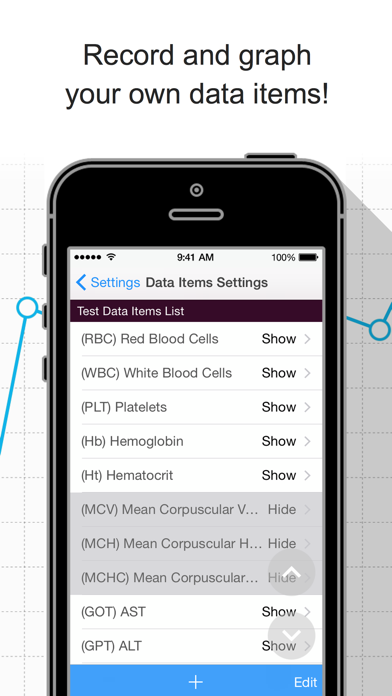
- Diets, blood test results, and medical expenses data can also be recorded.
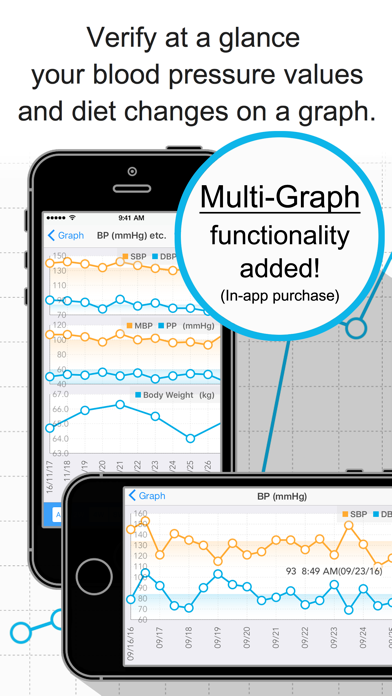
- Verify at a glance your records on a graph.
- Data export functionality is available.
- Check your latest measurements with widgets.
- Receive notifications for your scheduled doctor visits and BP measurement times.
- Multiple graphs on one screen.
- Record numerical values in one go using one single screen.
- Use it easily with just one hand! (Set the most frequently used buttons at the bottom of the screen, Right-swipe to go back to the previous screen.)
- Execute quick operations offline (excluding the data export functionality).
*1:
An indicator of arteriosclerosis risk
- MBP: Mean Blood Pressure
- PP: Pulse Pressure
*2:
An indicator of stroke and heart disease risk
- ME Diff: ME difference
- ME Ave: ME Average
§ Recorded Data Items
The following data items are recorded by default. (Any of the default data items can be hidden.)
Apart from these data items, you can also record your own data items!
Blood Pressure Data Items:
- Morning BP
- Evening BP
- Blood Pressure & Pulse(3)~(8)*
- Morning-Evening Difference (Auto-calc)
- Morning-Evening Average (Auto-calc)
- Medication Check(Morning)
- Medication Check(Evening)
- Medication Check(3)~(8)*
- Memo
"Blood Pressure & Pulse" items and "Medication Check" items can be recorded as many as eight times a day.
Diet Data Items:
- Body Weight
- Body Fat Percentage
- Body Fat (Auto-calc)
- BMI (Auto-calc)
- Running*
- Walking*
- Calories (Taken)*
- Calories (Burned)*
Test Data Items:
- Red Blood Cells (RBC)*
- White Blood Cells (WBC)*
- Platelets (PLT)*
- Hemoglobin (Hb)*
- Hematocrit (Ht)*
- Mean Corpuscular Volume (MCV)*
- Mean Corpuscular Hemoglobin (MCH)*
- Mean Corpuscular Hemoglobin Concentration (MCHC)*
- AST (GOT)*
- ALT (GPT)*
- Gamma GTP*
- Total Protein (TP)*
- Albumin (ALB)*
- Total Cholesterol (TC)*
- HDL Cholesterol (HDL-C)*
- LDL Cholesterol (LDL-C)*
- Triglyceride (TG)*
- Hemoglobin A1c (HbA1c)*
- Blood Sugar (FPG)*
*: Data items initially set as hidden.
§ Medical Visits Scheduling Screen
By recording the medical institutions you are due to visit, as well as the date and time of your appointments, you can configure the app to send you notifications at a specified time.
The time of the notifications can be changed in the Settings screen.
§ Data Records Screen
This screen records the numerical values related to your BP, diet and so on.
Configuration changes for adding new input data items, etc. can be made from the "Data Items Settings" on the Settings screen.
§ Graph Screen
This screen allows you to verify the numerical data recorded on the Data Records screen by plotting it on a graph.
§ Settings Screen
This screen allows you to configure basic information, display settings, record master data, etc.
Please set your "Gender" and "Height". These values will be used for calculating the normal range of your test data items and your BMI.
To use the hospital visits scheduling functionality and the medical expenses data export functionality, please record your medical institutions information from the "Medical Institutions (Pharmacies) List."
§ Data Export Functionality
This functionality allows you to output BP data, diet data, test data, and medical expenses information recorded on the app onto files in CSV format, so they can be transferred to PCs, etc.
This data can then be used by processing it on spreadsheet software such as Excel.
The export functionality uses AirDrop and the e-mail app included with iOS. Cloud storage services (iCloud, etc. if installed.) are also available.
Third party e-mail apps (Gmail, etc.) may appear on the list; however, some apps may not be able to attach CSV files, so we recommend using the e-mail app that is included with iOS.
Safety and technology
Found in the app by AppBrain- Price
- Free
- App size
- 16.8 MB
- Content rating
- Everyone
Technologies used by Blood Pressure Grapher
Releases
Updates seen on the App Store- Version
- 2.7.5
- Launched
- December 2016
No changelog data
Alternatives
Similar apps and more from Ai ImaiAlternatives to Blood Pressure Grapher


More from Ai Imai


Rankings
App Store top chartsApp Store Rankings for Blood Pressure Grapher
About the app and developer
About Blood Pressure Grapher
Blood Pressure Grapher is a medical app developed by Ai Imai.
User Ratings
Blood Pressure Grapher is rated 4.00 out of 5 stars. The rating is based on 2 ratings.
App Information
Blood Pressure Grapher is freely available from the App Store. The app size is 16.75 MB. The latest version available is 2.7.5. The last update was on January 14, 2024.
Technical Requirements
The app has a content rating of Everyone. The app has been available on the App Store since December 2016.
Developer information for Ai Imai
Address: