

Blur Cut is made and published by Wonjungmin Kim. AppBrain is an independent app data site and isn't affiliated with Wonjungmin Kim. The app name, icon, screenshots and description belong to Wonjungmin Kim and are shown as published on the App Store.
AppBrain's verdict
- Last updated
- July 10, 2025
Rankings
App Store top chartsApp Store Rankings for Blur Cut
Competitors
Similar apps and more from Wonjungmin KimMore from Wonjungmin Kim


Releases
Updates seen on the App Store- Version
- 1.0
- Launched
- July 2025
No changelog data
User feedback
Ratings and reviews on the App StoreComments on Blur Cut for iOS
We don't have enough comments to show example comments. Please check back later.
Technology
Found in the app by AppBrain- Price
- Free
- App size
- 9.86 MB
- Content rating
- Everyone
Technologies used by Blur Cut
About the app and developer
About Blur Cut
Blur Cut is a photo & video app developed by Wonjungmin Kim.
User Ratings
The app has no ratings yet.
App Information
Blur Cut is freely available from the App Store. The app size is 9.86 MB. The latest version available is 1.0. The last update was on July 10, 2025.
Technical Requirements
The app has a content rating of Everyone. The app has been available on the App Store since July 2025.
Developer information for Wonjungmin Kim
Address:
Frequently asked questions about Blur Cut
Is Blur Cut free?
Yes. Blur Cut is free on the App Store.
Is Blur Cut still available?
Yes. Blur Cut is on the App Store, and the last update we saw was on July 10, 2025.
How large is Blur Cut?
Blur Cut is 9.86 MB.
Is Blur Cut suitable for children?
App Store rates the content of Blur Cut as suitable for everyone.
Who made Blur Cut?
Blur Cut was developed by Wonjungmin Kim. It is listed in the photo & video category on the App Store.
Store listing
By Wonjungmin Kim, from the App Store


Description by Wonjungmin Kim Written by the developer, not by AppBrain. Click to read.
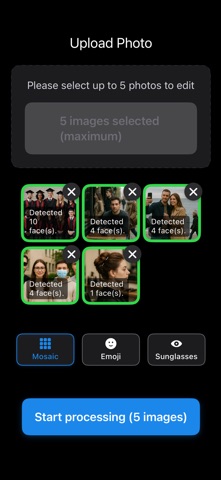
Precision On-Device ML Face Detection: Automatically find every face in your photo
Three Masking Styles: Blur, emojis, or sunglasses in one tap
Batch Editing Mode: Process multiple photos at once—save time
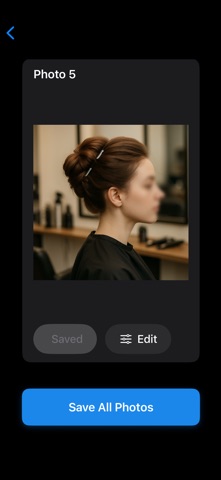
Live Preview: See effects immediately before saving
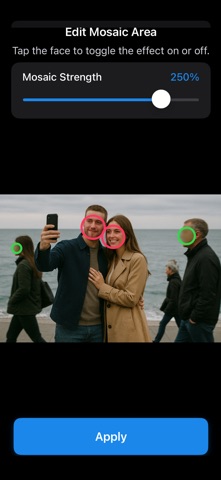
Intensity Control: Adjust opacity of blur, emoji, or sunglasses masks
Selective Face Editing: Tap to apply or remove masks on your own and others’ faces in group shots
No Watermarks: Export clean images without branding
How It Works
Select photos from your album
AI detects all faces on-device
Choose blur, emoji or sunglasses mask
Tap each face to apply or remove the effect
Adjust mask intensity as desired
Tap Save to store in Camera Roll
Download Blur Cut now and protect both your and your friends’ privacy completely offline!