Blur Photo & Text: Censor App
Blur Photo & Text: Censor App is made and published by Arda Emin Cimen. AppBrain is an independent app data site and isn't affiliated with Arda Emin Cimen. The app name, icon, screenshots and description belong to Arda Emin Cimen and are shown as published on the App Store.
AppBrain's verdict
- Last updated
- August 18, 2026
Rankings
App Store top chartsApp Store Rankings for Blur Photo & Text: Censor App
Competitors
Similar apps and more from Arda Emin CimenMore from Arda Emin Cimen
Releases
Updates seen on the App Store- Version
- 1.0.3
- Launched
- October 2025
No changelog data
User feedback
Ratings and reviews on the App StoreComments on Blur Photo & Text: Censor App for iOS
We don't have enough comments to show example comments. Please check back later.
Technology
Found in the app by AppBrain- Price
- Free
- App size
- 32.3 MB
- Content rating
- Everyone
Technologies used by Blur Photo & Text: Censor App
About the app and developer
About Blur Photo & Text: Censor App
Blur Photo & Text: Censor App is a photo & video app developed by Arda Emin Cimen.
What is the rating of Blur Photo & Text: Censor App?
Blur Photo & Text: Censor App has no ratings yet.
Is Blur Photo & Text: Censor App free?
Blur Photo & Text: Censor App is free. The app size is 32.35 MB. The latest version available is 1.0.3. The last update was on August 18, 2026.
What are the requirements for Blur Photo & Text: Censor App?
The app has a content rating of Everyone. The app has been available on the App Store since October 2025.
Developer information for Arda Emin Cimen
Address:
Store listing
By Arda Emin Cimen, from the App StoreDescription by Arda Emin Cimen Written by the developer, not by AppBrain. Click to read.
Whether you want to hide faces, censor text, conceal license plates, or focus on a specific subject, this app provides the professional tools you need.
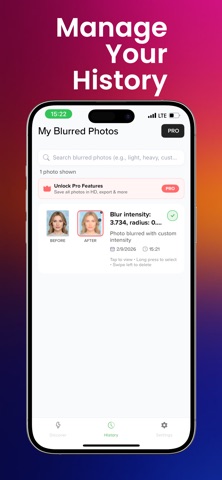
KEY FEATURES: • Smart Blurring: Hide sensitive info like credit cards, faces, or documents. • Live Preview: See the blur effect in real-time before applying changes. • 3 Quick Presets: Choose from Light, Medium, or Heavy blur for one-tap edits. • Custom Control: Adjust intensity and radius sliders for the perfect look. • Pixelate & Censor: Use mosaic effects to obscure specific areas securely. • Edit History: Compare original vs. blurred images side-by-side.
Perfect for social media sharing, protecting personal information, or adding a depth-of-field effect to your portraits.
Protect your privacy and enhance your photos today!
Terms Of Use: https://www.apple.com/legal/internet-services/itunes/dev/stdeula/ Privacy Policy: https://bernsoftware.com/blur-text-image-edit-fast-privacy-policy/