BlurIt: Blur Faces & Censor is an overall app developed by Quentin Dommerc.
Download Statistics
User Ratings
BlurIt: Blur Faces & Censor is rated 5.00 out of 5 stars. The rating is based on one rating ratings.
App Information
BlurIt: Blur Faces & Censor is FREE to download. The APK download size is 50.59 MB. The latest version available is 2026.6.26. The last update was on June 30, 2026.
Technical Requirements
The app has a content rating of Everyone. The app has been available on Google Play February 2026.
Description
BlurIt is the fastest way to blur faces, hide screenshots, censor text, and redact photos & PDFs on iPhone — 100% on-device, no cloud uploads. Automatically detect and blur faces, pixelate license plates, redact sensitive text, and anonymize images with on-device AI. One-time Pro, no subscription. No tracking, no ads.
PRIVACY FIRST Your photos never leave your phone. BlurIt processes everything locally using on-device AI, so your images stay private. No servers, no uploads, no tracking.
SMART AUTO-DETECTION BlurIt uses advanced on-device AI to automatically detect faces and text in your photos. Just open an image and let the app do the work. You can review and adjust every detection before applying.
BATCH PROCESSING Need to blur multiple photos at once? Select several images, review each one, and export them all in one go. Perfect for cleaning up a whole album before sharing.
PDF REDACTION Need to redact a PDF? Open any PDF document, navigate between pages, and blur sensitive content just like you would on a photo. Export the redacted PDF when you are done — all processed locally on your device.
MANUAL TOOLS Need to blur something the auto-detection missed? Draw a rectangle around any area, or use the freehand brush to paint over it. Perfect for license plates, addresses, or anything else you want to keep private.
INVERSE MODE Want to blur everything except a face or region? Toggle inverse mode to blur the entire photo while keeping your selected areas sharp. Great for creating focused portraits or highlighting specific details.
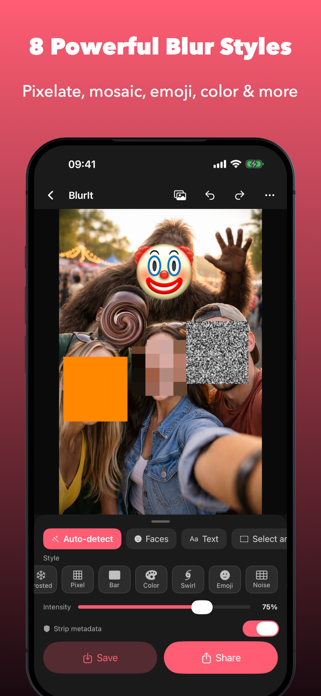
8 BLUR STYLES Choose the style that fits your needs: - Gaussian blur for a smooth, natural look - Frosted glass for a translucent overlay - Pixelate for a classic mosaic effect - Black bar for a bold, redacted style - Color fill to cover with any solid color - Swirl for a creative distortion effect - Emoji cover to replace regions with fun emoji - Noise for a static-like grain overlay
PER-REGION CUSTOMIZATION Tap any detected region to customize it individually. Override the global blur style, pick a specific emoji or fill color — all per region. Resize regions with drag handles for pixel-perfect control.
SHARE EXTENSION Blur photos without even opening the app. Select a photo from your gallery or any other app, tap Share, and choose BlurIt. Edit and save in seconds.
SIMPLE AND FAST No account required. No complicated settings. Open a photo, blur what you need, and share it. BlurIt is designed to get out of your way and let you protect your privacy quickly.
METADATA STRIPPING Optionally strip EXIF data (location, camera info, timestamps) from your exported photos for an extra layer of privacy.
FREE TO USE BlurIt is free with Gaussian blur included. An optional one-time Pro upgrade unlocks all 8 styles, per-region customization, inverse mode, and removes the watermark — yours forever.
Whether you are sharing photos on social media, sending screenshots for work, or just keeping your personal images private, BlurIt gives you full control over what the world sees.
Download BlurIt now — protect your privacy in seconds.
Each subscription will automatically renew 3 days before the expiration date for
the same time period. Subscriptions can be cancelled at any time before the renewal.