



AppBrain's verdict
- Last updated
- October 11, 2026
- Size
- 41.7 MB
User feedback
Ratings and reviews on the App StoreComments on BlurSnap: Blur Background for iOS
We don't have enough comments to show example comments. Please check back later.
Store listing
By Vishal Kalkani, from the App StoreDescription by Vishal Kalkani Written by the developer, not by AppBrain. Click to read.
Make your photos stand out with beautiful background blur, portrait effects, and AI-powered photo editing features. BlurSnap helps you create stunning photos by bringing attention to your subject and giving your images a professional, polished look.
Whether you want to blur a photo background, enhance a portrait, create a soft bokeh effect, or explore creative photo effects, BlurSnap gives you simple tools to transform your pictures.
## Blur Photo Background
Create beautiful photos by blurring the background while keeping the main subject in focus. Give your portraits, selfies, and everyday pictures a more professional appearance with background blur effects.
Use photo blur tools to soften distracting backgrounds and make your subject stand out. Adjust the effect to match your preferred style, from subtle background softness to a stronger depth effect.
## AI-Powered Photo Editing
Explore AI-powered features designed to make photo editing easier and more creative. Improve your editing workflow and experiment with new ways to enhance your pictures.
Use the available AI tools to help create attractive photo results with less manual effort. Whether you are editing a portrait or trying a new visual style, BlurSnap brings creative editing tools together in one place.
## Portrait Blur and Focus Effects
Give your portraits a clean, focused appearance with portrait blur effects. Draw attention to faces, people, and other important subjects by softening the surrounding background.
BlurSnap is useful for editing selfies, profile pictures, personal portraits, and photos you want to share with friends and family.
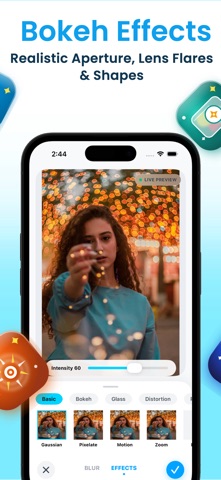
## Beautiful Bokeh Effects
Create a soft background appearance with bokeh-inspired photo effects. Experiment with different blur styles to give your images a more artistic look.
Use background blur and focus effects to create photos that feel more expressive, polished, and visually appealing.
## Adjust Blur Intensity
Personalize your photo edits by adjusting the blur effect to suit your image. Choose a softer look for subtle portraits or a stronger effect when you want the background to become less distracting.
Fine-tune your results using the editing controls available in the app and create a look that matches your personal style.
## Creative Photo Editing
BlurSnap helps you explore different ways to enhance your pictures. Edit portraits, selfies, profile photos, and other images with the available background and photo effects.
Create images for social profiles, personal collections, creative projects, and everyday sharing. Keep your editing workflow simple and focus on the result you want to achieve.
## Easy Photo Editing Workflow
Getting started is simple:
1. Select a photo from your photo library.
2. Choose a background blur or another available photo effect.
3. Adjust the effect to achieve your preferred look.
4. Review your edited image.
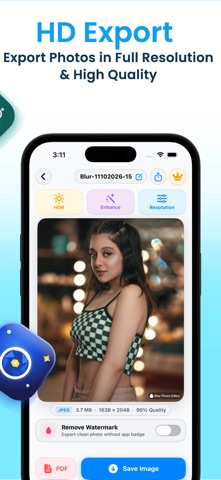
5. Save your finished photo.
The straightforward workflow makes it easy to experiment with different effects and refine your pictures.
## Make Your Photos Stand Out
A distracting background can take attention away from the main subject. With BlurSnap, you can explore background blur, portrait effects, and AI-powered editing tools to create images that better match your vision.
Use BlurSnap for portraits, selfies, profile pictures, and creative photo editing whenever you want to give your images a fresh look.
## Why Choose BlurSnap?
- Background blur effects for your photos
- Portrait-style blur and focus effects
- AI-powered photo editing features
- Bokeh-inspired visual effects
- Adjustable blur intensity, where supported
- Simple photo editing workflow
- Creative effects for portraits and everyday pictures
Privacy Policy: https://sites.google.com/view/kalkani-privacy-policy/home
Terms of Use (EULA): https://www.apple.com/legal/internet-services/itunes/dev/stdeula/
Safety and technology
Found in the app by AppBrain- Price
- Free
- App size
- 41.7 MB
- Content rating
- Low
Technologies used by BlurSnap: Blur Background
Releases
Updates seen on the App Store- Version
- v2
- Launched
- April 2026
No changelog data
Alternatives
Similar apps and more from Vishal KalkaniAlternatives to BlurSnap: Blur Background


More from Vishal Kalkani


Rankings
App Store top chartsApp Store Rankings for BlurSnap: Blur Background
About the app and developer
About BlurSnap: Blur Background
BlurSnap: Blur Background is a photo & video app developed by Vishal Kalkani.
User Ratings
The app has no ratings yet.
App Information
BlurSnap: Blur Background is freely available from the App Store. The app size is 41.71 MB. The latest version available is v2. The last update was on October 11, 2026.
Technical Requirements
The app has a content rating of Low Maturity. The app has been available on the App Store since April 2026.
BlurSnap: Blur Background is made and published by Vishal Kalkani. AppBrain is an independent app data site and isn't affiliated with Vishal Kalkani. The app name, icon, screenshots and description belong to Vishal Kalkani and are shown as published on the App Store.
Developer information for Vishal Kalkani
Address:
Frequently asked questions about BlurSnap: Blur Background
Is BlurSnap: Blur Background free?
Yes. BlurSnap: Blur Background is free on the App Store.
Is BlurSnap: Blur Background still available?
Yes. BlurSnap: Blur Background is on the App Store, and the last update we saw was on October 11, 2026.
How large is BlurSnap: Blur Background?
BlurSnap: Blur Background is 41.71 MB.
Is BlurSnap: Blur Background suitable for children?
App Store gives BlurSnap: Blur Background a low maturity rating, so it is meant for older children and up.
Who made BlurSnap: Blur Background?
BlurSnap: Blur Background was developed by Vishal Kalkani. It is listed in the photo & video category on the App Store.
What are the best alternatives to BlurSnap: Blur Background?
People looking at BlurSnap: Blur Background also look at these photo & video apps: Portrait Lens Cinematic Selfie, Portrait Lens AI: Blur Image, Background Remover -Remove Bg., Hidden Photo Vault: LP, blur background - DSLR focus.