

Boatie Logbook
Boatie Logbook is made and published by MSSW Solutions Ltd. AppBrain is an independent app data site and isn't affiliated with MSSW Solutions Ltd. The app name, icon, screenshots and description belong to MSSW Solutions Ltd and are shown as published on the App Store.
AppBrain's verdict
- Last updated
- October 22, 2026
Rankings
App Store top chartsApp Store Rankings for Boatie Logbook
Competitors
Similar apps and more from MSSW Solutions LtdAlternatives to Boatie Logbook


More from MSSW Solutions Ltd


Releases
Updates seen on the App Store- Version
- 1.1.1
- Launched
- August 2026
No changelog data
User feedback
Ratings and reviews on the App StoreComments on Boatie Logbook for iOS
We don't have enough comments to show example comments. Please check back later.
Technology
Found in the app by AppBrain- Price
- Free
- App size
- 112.1 MB
- Content rating
- Everyone
Technologies used by Boatie Logbook
About the app and developer
About Boatie Logbook
Boatie Logbook is a navigation app developed by MSSW Solutions Ltd.
User Ratings
The app has no ratings yet.
App Information
Boatie Logbook is freely available from the App Store. The app size is 112.15 MB. The latest version available is 1.1.1. The last update was on October 22, 2026.
Technical Requirements
The app has a content rating of Everyone. The app has been available on the App Store since August 2026.
Developer information for MSSW Solutions Ltd
Address:
Frequently asked questions about Boatie Logbook
Is Boatie Logbook free?
Yes. Boatie Logbook is free on the App Store.
Is Boatie Logbook still available?
Yes. Boatie Logbook is on the App Store, and the last update we saw was on October 22, 2026.
How large is Boatie Logbook?
Boatie Logbook is 112.15 MB.
Is Boatie Logbook suitable for children?
App Store rates the content of Boatie Logbook as suitable for everyone.
Who made Boatie Logbook?
Boatie Logbook was developed by MSSW Solutions Ltd. It is listed in the navigation category on the App Store.
What are the best alternatives to Boatie Logbook?
People looking at Boatie Logbook also look at these navigation apps: iStreams Portland, NightPilot, iStreams West Country, iStreams Lyme Bay, iStreams Irish Sea.
Store listing
By MSSW Solutions Ltd, from the App Store

Description by MSSW Solutions Ltd Written by the developer, not by AppBrain. Click to read.
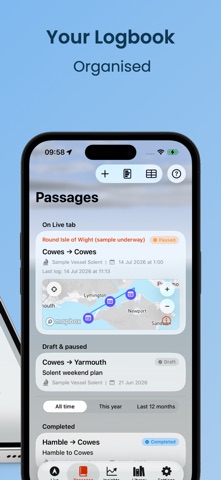
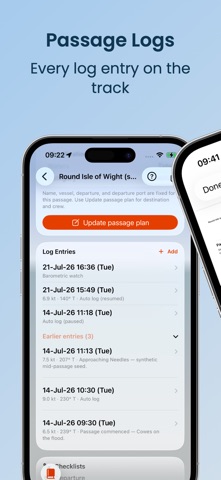
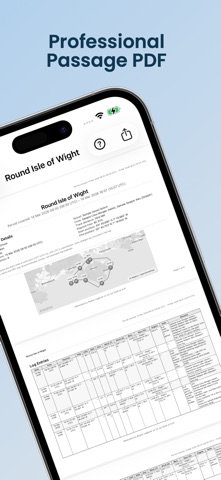
Start the log when you slip lines, capture weather and position at each watch change, review the track afterwards, and export a clean PDF for the boat's paperwork, insurance, or certification.
Designed offline-first. Core logging works without an internet signal — because that's what cruising is actually like. Every new download includes a 10-day preview before you choose a plan.
— BASIC (one-time purchase) —
• Passages with departure / destination, crew, vessel, and timed log entries
• GPS track recording with pause, resume, and map review on Apple Maps
• Units: nautical miles, knots, hPa, degrees T or M, and more
• Man Overboard feature with map annotation, bearing and range, and haptic cues
• Join shared passages as crew (code or QR) and receive your own signed-off log
• Crew cards — share your profile for a skipper to scan onto the roster
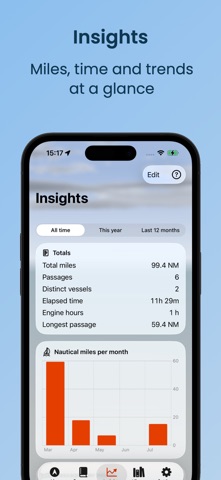
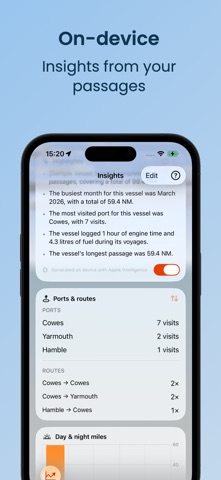
• Passage PDF export, Insights dashboard, and barometric pressure with weather advisories
• Export a passage map or short animated track for Messages and social media. Pick feed or story sizes, optional satellite view
• Apple Watch: speed, course, elapsed time, and MOB from the wrist
• iPhone and iPad with iCloud sync across devices
• Manually document past passages with self-declared miles and hours
• Share an image or animation of your track on your socials
— EXTENDED SUBSCRIPTION —
• Mapbox passage maps with offline regions — your track on a marine-style basemap for the log (not primary navigation)
• NMEA 0183 (TCP/UDP/WebSocket) and SignalK to auto-fill log entries from onboard instruments
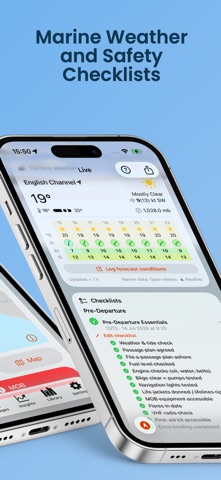
• Weather forecast and Passage Weather Brief at ports
• Photo attachments, on-device dictation (nothing leaves the device), and AI field suggestions from notes (iOS 26+)
• Pre-departure, arrival, and general checklists per vessel
• Add a timed GPX track as a completed passage so voyages recorded elsewhere can live in Boatie Logbook too
• Boatie Log archive import/export and CSV export
• Ports library with search and one-tap import; add crew from Contacts
• Watch event presets and dictated quick-log; crew Watch entries merge into the skipper's log
• Engine hours and fuel usage Insights widgets
• Show community sourced seamarks (OpenSeaMap) as an overlay to your track maps
• Import GPX tracks from other Apps/Devices to keep your Passage Log history up to date
— PREMIUM SUBSCRIPTION —
Everything in Extended, plus:
• Invite crew to a passage — share a join code or QR as skipper
• Marine weather and Passage Brief (wave, swell, moon)
• AIS targets on the Live map (NMEA or SignalK)
• Mile Builder: examiner-ready mile summary with filters and PDF per crew member
• Your miles and crew breakdown Insights for qualification tracking
• Vessel maintenance log with engine-hours and next-due alerts — anti-foul, rigging, anodes, flares, gas certificates, engine service, and more
• Passage Live Activity on Lock Screen and Dynamic Island
— WHO IT'S FOR —
• Skippers documenting sea time for certification, charter applications, or insurance
• Crew building miles on deliveries and club cruises
• Anyone who's scribbled "1200 — changed course 240°" on a soggy notebook
• Delivery skippers who want one PDF per passage and a CSV archive of the season
• Cruisers who want weather, sea state, and position in one place
— PRIVACY —
Your log data is yours. Photos and dictation never leave the device. Track data syncs via your iCloud account (not my servers) unless you export it. I don't sell data or run ads.
Policy: https://msswsolutions.com/boatie-logbook-privacy-policy/
Terms & Conditions: https://msswsolutions.com/boatie-logbook-terms-and-conditions/
Subscriptions renew automatically unless cancelled at least 24 hours before the end of the current period. You can manage or cancel any time in your App Store account settings or within the app.
Questions or feature requests? Contact me via the Settings->Support link in the app — I read everything.