

BoloSign - eSign PDF Documents
BoloSign - eSign PDF Documents is made and published by CLOSER INNOVATION LABS CORP. AppBrain is an independent app data site and isn't affiliated with CLOSER INNOVATION LABS CORP. The app name, icon, screenshots and description belong to CLOSER INNOVATION LABS CORP. and are shown as published on the App Store.
AppBrain's verdict
- Rating on App Store
- 5.00
- 6 ratings
- Last updated
- October 6, 2026
It doesn't have enough ratings yet to judge what users think.
Rankings
App Store top chartsApp Store Rankings for BoloSign - eSign PDF Documents
Competitors
Similar apps and more from CLOSER INNOVATION LABS CORP.More from CLOSER INNOVATION LABS CORP.

Releases
Updates seen on the App Store- Version
- 5.3.0
- Launched
- October 2024
No changelog data
User feedback
Ratings and reviews on the App StoreComments on BoloSign - eSign PDF Documents for iOS
We don't have enough comments to show example comments. Please check back later.
Technology
Found in the app by AppBrain- Price
- Free
- App size
- 93.3 MB
- Content rating
- Everyone
Technologies used by BoloSign - eSign PDF Documents
About the app and developer
About BoloSign - eSign PDF Documents
BoloSign - eSign PDF Documents is a business app developed by CLOSER INNOVATION LABS CORP.
User Ratings
BoloSign - eSign PDF Documents is rated 5.00 out of 5 stars. The rating is based on 6 ratings.
App Information
BoloSign - eSign PDF Documents is freely available from the App Store. The app size is 93.29 MB. The latest version available is 5.3.0. The last update was on October 6, 2026.
Technical Requirements
The app has a content rating of Everyone. The app has been available on the App Store since October 2024.
Developer information for CLOSER INNOVATION LABS CORP.
Address:
Store listing
By CLOSER INNOVATION LABS CORP., from the App Store






Description by CLOSER INNOVATION LABS CORP. Written by the developer, not by AppBrain. Click to read.
HOW BOLOSIGN WORKS | eSign & Fill PDF Documents on the go.
1. Create your digital signature: Design a unique, personalized electronic signature directly from your device, ensuring secure and authentic document processing.
2. Upload your documents: Seamlessly add documents from your device, Google Drive, DropBox, or scan directly using your device camera.
3. Easy signing: BoloSign offers easy signing with a simple user-friendly interface, so you can e-sign as many documents as you need.
SEAMLESS DOCUMENT MANAGEMENT
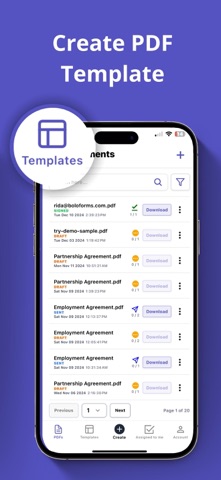
1. Upload and organize files: Prepare and send out documents with specific “Sign Here” markers, showing exactly where to add a signature, initials, or additional details.
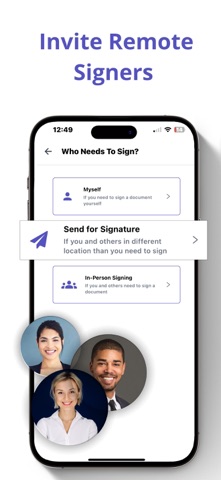
2. Control signer workflow: Set the order and customize the signing process for multiple recipients, whether they’re signing remotely or in person.
3. Real-time notifications: Receive instant alerts on document progress, including completed signatures or reminders to sign.
4. Reminders and voiding: Send a reminder for a quick response or void documents if changes are needed, all with one simple tap.
BOLOSIGN | LEGAL, SECURE, AND COMPLIANT
BoloSign complies with global eSignature regulations, ensuring that every signed document is legally binding and safe. Our app meets global security standards, so your documents are protected:
* Legally binding eSignatures with secure encryption.
* Complete audit trails to track who signed, when, and where.
* Trusted protection, backed by ISO-compliant data encryption.
SUPPORTED FILE TYPES
BoloSign’s app is versatile, working with various document formats, including:
* PDFs
* Word documents
* Other Text-based files
COMMON DOCUMENTS SIGNED WITH BOLOSIGN
Use BoloSign to e-sign a wide range of document types:
* Non-disclosure agreements (NDAs)
* Sales contracts
* Health and medical consent forms
* Financial agreements
* Rental and lease agreements
* Parental permission forms
* Waivers for events and activities
If you have questions or need support, feel free to contact our team at support@boloforms.com.
Explore the advantages of BoloSign and elevate your digital signing experience today. Visit www.boloforms.com to learn more.
Terms of Use: https://www.apple.com/legal/internet-services/itunes/dev/stdeula/
Privacy Policy: https://www.boloforms.com/privacy-policy/