AppBrain
AppBrain
  • Apps
  • Apps being viewed right now Trending apps today Most popular apps All-time most installed apps Top rated apps iPhone and iPad apps
  • Intelligence ▾
    Intelligence overview → Track any Android app or your whole market
    Track & analyze
    Keyword Tracker & OptimizerTrack & improve Play rankings App Performance ReportOne-off PDF for any app StatisticsFree Android & Play market stats
    Promote your app
    Featured Apps App Links
  • Intelligence
  • Pricing
  • Dashboard
  • Sign up
  • Log in
App Store Apps > Productivity > BoltPDF: Fill, Sign & Edit PDF
BoltPDF: Fill, Sign & Edit PDF icon

BoltPDF: Fill, Sign & Edit PDF

2.0.0
OBZENA LLC
4.52
25 reviews
Free

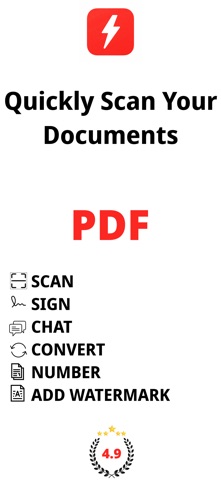
BoltPDF: Fill, Sign & Edit PDF Screenshot 1 of 8
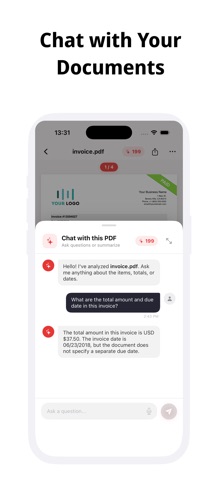
BoltPDF: Fill, Sign & Edit PDF Screenshot 2 of 8
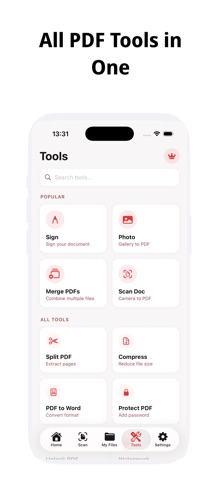
BoltPDF: Fill, Sign & Edit PDF Screenshot 3 of 8
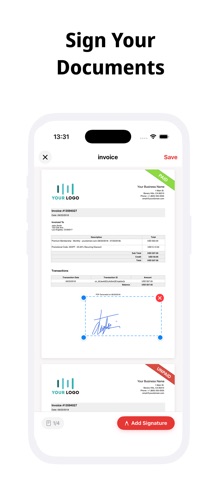
BoltPDF: Fill, Sign & Edit PDF Screenshot 4 of 8
BoltPDF: Fill, Sign & Edit PDF Screenshot 5 of 8
BoltPDF: Fill, Sign & Edit PDF Screenshot 6 of 8
BoltPDF: Fill, Sign & Edit PDF Screenshot 7 of 8
BoltPDF: Fill, Sign & Edit PDF Screenshot 8 of 8
Screenshots by OBZENA LLC, from the the App Store listing
View on the App Store

AppBrain's verdict

Rating on App Store
4.52
25 ratings
Last updated
March 11, 2026
Size
35.4 MB

It doesn't have enough ratings yet to judge what users think.

Official page on the App Store

User feedback

Ratings and reviews on the App Store

Comments on BoltPDF: Fill, Sign & Edit PDF for iOS

We don't have enough comments to show example comments. Please check back later.

Store listing

By OBZENA LLC, from the App Store
Description by OBZENA LLC Written by the developer, not by AppBrain. Click to read.
BoltPDF - PDF Editor & Scanner

Manage your documents professionally. All PDF tools in one app.
BoltPDF makes PDF tasks on your iPhone and iPad fast, secure, and easy. Scan, sign, convert, merge documents, and much more - nothing is uploaded to a server, everything stays on your device.

SIGN & EDIT
Easily sign your contracts, forms, and documents. Draw with your finger, add text, fill in fields. No paper needed.

SCAN & CONVERT
Scan documents with your camera and instantly convert them to PDF. Get clean, professional results with automatic edge detection. You can also create PDFs from your photo gallery.

PDF TOOLS

Merge PDFs - Combine multiple files into a single document
Split PDF - Separate desired pages into separate files
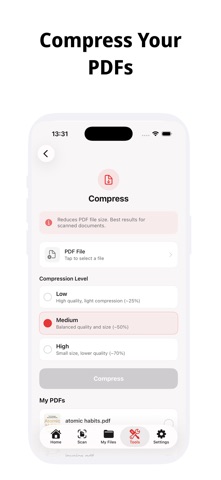
Compress File - Reduce PDF size while maintaining quality
Add Password / Unlock - Protect your documents with a password
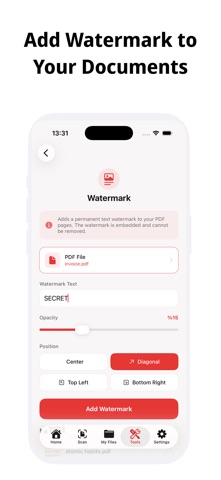
Add Watermark - Add a brand or text watermark
Page Numbering - Automatically number your pages
PDF to Word - Convert your PDFs to editable Word documents
Image → PDF - Convert your JPG and PNG files to PDF

PRIVACY COMES FIRST
BoltPDF runs entirely on your device. Your documents are never sent to a server or stored in the cloud. Your privacy is our priority.

FAST & INTUITIVE
Start using it in minutes. Clean interface, fast processing, no unnecessary complexity.

Subscription and Purchase Options
BoltPDF offers monthly subscription, annual subscription, one-time purchase, or lifetime usage options. Purchases are managed through your App Store account. Subscriptions can be canceled at any time.

Terms of Use: https://phototopdf.app/term-of-use
Privacy Policy: https://phototopdf.app/privacy-policy

Safety and technology

Found in the app by AppBrain
Price
Free
App size
35.4 MB
Content rating
Everyone

Technologies used by BoltPDF: Fill, Sign & Edit PDF

Releases

Updates seen on the App Store
Version
2.0.0
Launched
August 2025

No changelog data

Alternatives

Similar apps and more from OBZENA LLC

Alternatives to BoltPDF: Fill, Sign & Edit PDF

Convert Photo to PDF Document icon Convert Photo to PDF Document
MARCIS PRIEDITIS
5.0
Free
2 ratings
Habit Time Tracker - Flowtic icon Habit Time Tracker - Flowtic
ERIK WILLIAM YOUNG
4.8
Free
12 ratings
Image to PDF: Photo to PDF icon Image to PDF: Photo to PDF
Kevin Rupareliya
5.0
Free
4 ratings
Finalmente icon Finalmente
Federico Zivolo
4.9
Free
10 ratings
Dumbphone : Limit Distractions icon Dumbphone : Limit Distractions
Umer Ahmed
4.4
Free
51 ratings
PDF Converter Scanner Printer icon PDF Converter Scanner Printer
杨胜 朱
4.3
Free
25 ratings
Digital Habits: Focus icon Digital Habits: Focus
CENTRE FOR DIGITAL HABITS CIC
4.9
Free
18 ratings
SonicScript: Text to Speech icon SonicScript: Text to Speech
MefjuDev LLC
4.8
Free
21 ratings

More from OBZENA LLC

Antique Identifier - Antiqly icon Antique Identifier - Antiqly
OBZENA LLC
4.2
Free
98 ratings
PDF Watch Viewer: WristFile icon PDF Watch Viewer: WristFile
OBZENA LLC
4.9
Free
13 ratings
Sports Card Scanner: Cardex AI icon Sports Card Scanner: Cardex AI
OBZENA LLC
4.5
Free
11 ratings
Coin Identifier: Coinara AI icon Coin Identifier: Coinara AI
OBZENA LLC
4.1
Free
7 ratings
AI Song Generator - Lriza icon AI Song Generator - Lriza
OBZENA LLC
4.0
Free
4 ratings
Object Removal: Pic Eraser icon Object Removal: Pic Eraser
OBZENA LLC
3.0
Free
4 ratings
Invoice & Estimate Maker: INVO icon Invoice & Estimate Maker: INVO
OBZENA LLC
5.0
Free
4 ratings
Send Fax from Phone - Faxend icon Send Fax from Phone - Faxend
OBZENA LLC
5.0
Free
3 ratings

Rankings

App Store top charts

App Store Rankings for BoltPDF: Fill, Sign & Edit PDF

This app is not ranked

About the app and developer

About BoltPDF: Fill, Sign & Edit PDF

BoltPDF: Fill, Sign & Edit PDF is a productivity app developed by OBZENA LLC.

User Ratings

BoltPDF: Fill, Sign & Edit PDF is rated 4.52 out of 5 stars. The rating is based on 25 ratings.

App Information

BoltPDF: Fill, Sign & Edit PDF is freely available from the App Store. The app size is 35.36 MB. The latest version available is 2.0.0. The last update was on March 11, 2026.

Technical Requirements

The app has a content rating of Everyone. The app has been available on the App Store since August 2025.

BoltPDF: Fill, Sign & Edit PDF is made and published by OBZENA LLC. AppBrain is an independent app data site and isn't affiliated with OBZENA LLC. The app name, icon, screenshots and description belong to OBZENA LLC and are shown as published on the App Store.

Developer information for OBZENA LLC

OBZENA LLC

Address:

Frequently asked questions about BoltPDF: Fill, Sign & Edit PDF

Is BoltPDF: Fill, Sign & Edit PDF free?

Yes. BoltPDF: Fill, Sign & Edit PDF is free on the App Store.

Is BoltPDF: Fill, Sign & Edit PDF still available?

Yes. BoltPDF: Fill, Sign & Edit PDF is on the App Store, and the last update we saw was on March 11, 2026.

How large is BoltPDF: Fill, Sign & Edit PDF?

BoltPDF: Fill, Sign & Edit PDF is 35.36 MB.

Is BoltPDF: Fill, Sign & Edit PDF suitable for children?

App Store rates the content of BoltPDF: Fill, Sign & Edit PDF as suitable for everyone.

How do people rate BoltPDF: Fill, Sign & Edit PDF?

BoltPDF: Fill, Sign & Edit PDF scores 4.52 out of 5 stars, from 25 ratings on the App Store.

Who made BoltPDF: Fill, Sign & Edit PDF?

BoltPDF: Fill, Sign & Edit PDF was developed by OBZENA LLC. It is listed in the productivity category on the App Store.

What are the best alternatives to BoltPDF: Fill, Sign & Edit PDF?

People looking at BoltPDF: Fill, Sign & Edit PDF also look at these productivity apps: Convert Photo to PDF Document, Habit Time Tracker - Flowtic, Image to PDF: Photo to PDF, Finalmente, Dumbphone : Limit Distractions.

Share BoltPDF: Fill, Sign & Edit PDF

Price drops on Google Play Today's trending apps Top new apps Popular Productivity Apps Apps other people are watching
Convert Photo to PDF Document icon Convert Photo to PDF Document
Habit Time Tracker - Flowtic icon Habit Time Tracker - Flowtic
Image to PDF: Photo to PDF icon Image to PDF: Photo to PDF
Finalmente icon Finalmente
Dumbphone : Limit Distractions icon Dumbphone : Limit Distractions
PDF Converter Scanner Printer icon PDF Converter Scanner Printer
Digital Habits: Focus icon Digital Habits: Focus
SonicScript: Text to Speech icon SonicScript: Text to Speech
Overview Alternatives Reviews Rankings Technology
AppBrain Intelligence premium content

Subscribe now to get full and unlimited access to AppBrain Intelligence. You'll have access to:

  • App Intelligence dashboard (performance timeline, competitor comparison, country rankings, insight cards)
  • Detailed ranking data per app
  • Full timeline per developer
  • Device market shares data per country
  • Unlimited keyword tracking
  • AI assistant access via MCP (Claude, Cursor or any MCP client)
1 Month

$75/mo
(billed every month)

SAVE 0%
Subscribe
3 Months

$65/mo
($195 billed every 3 months)

SAVE 13%
Subscribe
1 Year

$57.50/mo
($690 billed every year)

SAVE 23%
Subscribe
Each subscription will automatically renew 3 days before the expiration date for the same time period. Subscriptions can be cancelled at any time before the renewal.

AppBrain is an app data site, we track rankings, ratings, installs for all apps and games on Google Play and the App Store. AppBrain doesn't host app files or APKs, all install links go directly to the official store. All trademarks are owned by their respective owners.

More apps

  • Top Android apps being viewed
  • City Smash: Sandbox Simulator
  • Vegas Sweeps 777 Online Casino
  • Spolvero: Trace Art Projector

App statistics

  • Android statistics
  • Google Play Developer stats
  • Trending Android Apps
  • Trending iOS apps
  • Top popular Apps
  • Buy the best Android phone
  • Buy & sell app businesses

About AppBrain

  • Contact
  • Privacy
  • Documentation
  • DMCA takedowns
  • Blog
  • How to improve the earnings of your ad units
© 2010-2026 - AppBrain