

Bome Network
Bome Network is made and published by Bome Software GmbH & Co. KG. AppBrain is an independent app data site and isn't affiliated with Bome Software GmbH & Co. KG. The app name, icon, screenshots and description belong to Bome Software GmbH & Co. KG and are shown as published on the App Store.
AppBrain's verdict
Established- Rating on App Store
- 4.20
- 5 ratings
- Last updated
- August 8, 2026
It doesn't have enough ratings yet to judge what users think.
Rankings
App Store top chartsApp Store Rankings for Bome Network
Competitors
Similar apps and more from Bome Software GmbH & Co. KGAlternatives to Bome Network






Releases
Updates seen on the App Store- Version
- 1.7.0
- Launched
- October 2021
No changelog data
User feedback
Ratings and reviews on the App StoreComments on Bome Network for iOS
We don't have enough comments to show example comments. Please check back later.
Technology
Found in the app by AppBrain- Price
- Free
- App size
- 7.37 MB
- Content rating
- Everyone
Technologies used by Bome Network
About the app and developer
About Bome Network
Bome Network is a music app developed by Bome Software GmbH & Co. KG.
What is the rating of Bome Network?
Bome Network is rated 4.20 out of 5 stars, based on 5 ratings.
Is Bome Network free?
Bome Network is free. The app size is 7.37 MB. The latest version available is 1.7.0. The last update was on August 8, 2026.
What are the requirements for Bome Network?
The app has a content rating of Everyone. The app has been available on the App Store since October 2021.
Developer information for Bome Software GmbH & Co. KG
Address:
Frequently asked questions about Bome Network
Is Bome Network free?
Yes. Bome Network is free on the App Store.
Is Bome Network still available?
Yes. Bome Network is on the App Store, and the last update we saw was on August 8, 2026.
How large is Bome Network?
Bome Network is 7.37 MB.
Is Bome Network suitable for children?
App Store rates the content of Bome Network as suitable for everyone.
How do people rate Bome Network?
Bome Network scores 4.20 out of 5 stars, from 5 ratings on the App Store.
Who made Bome Network?
Bome Network was developed by Bome Software GmbH & Co. KG. It is listed in the music category on the App Store.
What are the best alternatives to Bome Network?
People looking at Bome Network also look at these music apps: Midiflow, mRecall, CC PAL, MidiPad 2, MIDI Designer Pro X.
Store listing
By Bome Software GmbH & Co. KG, from the App Store




Description by Bome Software GmbH & Co. KG Written by the developer, not by AppBrain. Click to read.
Bome Network is designed to make MIDI Networking as simple as possible -- and you can focus on your creative projects!
** Communicate with BomeBoxes **
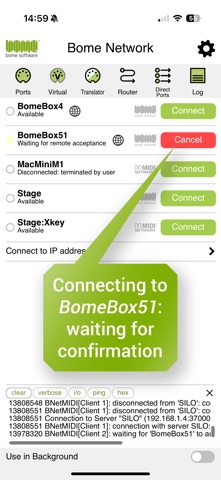
Use the BomeBox' integrated Wireless Access Point to directly network wirelessly with one or more BomeBoxes. Any MIDI app on your device can now send and receive MIDI with the paired BomeBox(es). Additionally, you can directly forward selected MIDI ports and devices connected to a remote BomeBox: Remote Direct MIDI.
** Remote Direct MIDI **
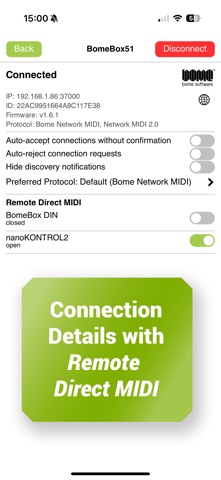
Remote Direct MIDI is a powerful feature, yet simple to use: for paired devices, the Bome Network app sees all MIDI devices connected to the BomeBox via USB and MIDI-DIN. You decide which remote device(s) you want to access. One click is sufficient to subscribe to a device. Every subscribed device will be visible to other apps as a virtual MIDI input+output port.
** Access the BomeBox Web Config **
A handy feature for BomeBox owners: the world icon brings up the web config of the respective BomeBox in your web browser.
** MIDI Router **
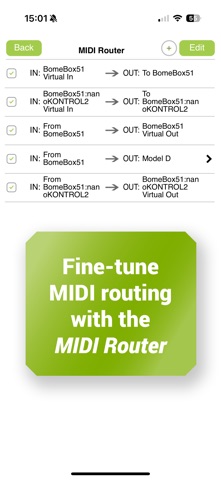
The MIDI Router gives you complete control of the MIDI Routing from other apps to your paired network MIDI devices, the Remote Direct MIDI ports, and physical MIDI devices connected to your iPhone / iPad. You can easily merge, split, and duplicate MIDI streams.
** In-App-Purchase: Bome Network Pro **
The Pro option will let you extend your Bome Network app to Bome Network enabled computers and other iPhones and iPads. All computers and devices in the network running Bome Network Pro will be auto-discovered. Pairing is done with one button click. Moreover, Remote Direct MIDI and the MIDI Router are also available for paired computers and mobile devices, giving you endless configuration options for a MIDI network from one single app.
** In-App-Purchase: Unlimited Named MIDI Ports **
With the Unlimited Named MIDI Ports option, you can create your own named virtual MIDI ports, and use them in the MIDI Router and other applications on your device. This enables you to easily create duplicate MIDI streams or organize your MIDI ports with more meaningful port names.
** In-App-Purchase: Bome MIDI Translator BN **
This Add-On is a player for Bome MIDI Translator Pro projects. All translations available in the desktop software are also available on your device.
** Network MIDI 2.0 **
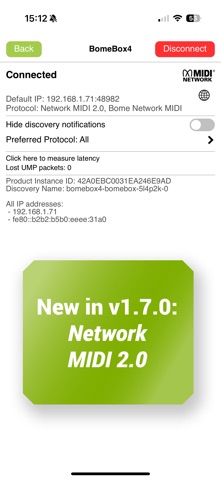
Bome Network supports this new official standard for sending and receiving MIDI 1.0 and MIDI 2.0 over networks. Bome Network only supports the MIDI 1.0 protocol at this point, but will translate as necessary when connected to a pure MIDI 2.0 device.
** Tailor Bome Network to Your Needs **
Self-explaining configuration options let you select the type of notifications you want to receive, configure the network name, dark vs. light user interface, and the display zoom. The background mode makes sure that the Bome Network MIDI routing remains active when using other apps.
** No RTP-MIDI **
Bome Network does not support the RTP-MIDI protocol (aka Apple Network MIDI) at this time.
** Support **
If you are not sure whether your envisioned MIDI setup will work with the Bome Network app, our support staff will always have professional advice on forum.bome.com . And don't miss our video tutorials on youtube.com/bomesoftware!
Terms of Use: https://www.apple.com/legal/internet-services/itunes/dev/stdeula/