

Book Highlighter
Book Highlighter is made and published by Alessandro Raccuglia Giaminardi. AppBrain is an independent app data site and isn't affiliated with Alessandro Raccuglia Giaminardi. The app name, icon, screenshots and description belong to Alessandro Raccuglia Giaminardi and are shown as published on the App Store.
AppBrain's verdict
- Last updated
- September 21, 2026
Rankings
App Store top chartsApp Store Rankings for Book Highlighter
Competitors
Similar apps and more from Alessandro Raccuglia GiaminardiMore from Alessandro Raccuglia Giaminardi


Releases
Updates seen on the App Store- Version
- 1.2.0
- Launched
- June 2026
No changelog data
User feedback
Ratings and reviews on the App StoreComments on Book Highlighter for iOS
We don't have enough comments to show example comments. Please check back later.
Technology
Found in the app by AppBrain- Price
- $0.99
- App size
- 3.07 MB
- Content rating
- Everyone
Technologies used by Book Highlighter
About the app and developer
About Book Highlighter
Book Highlighter is a books app developed by Alessandro Raccuglia Giaminardi.
What is the rating of Book Highlighter?
Book Highlighter has no ratings yet.
Is Book Highlighter free?
Book Highlighter costs $0.99. The app size is 3.07 MB. The latest version available is 1.2.0. The last update was on September 21, 2026.
What are the requirements for Book Highlighter?
The app has a content rating of Everyone. The app has been available on the App Store since June 2026.
Developer information for Alessandro Raccuglia Giaminardi
Alessandro Raccuglia Giaminardi
Address:
Store listing
By Alessandro Raccuglia Giaminardi, from the App Store
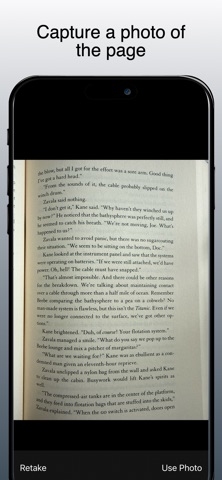
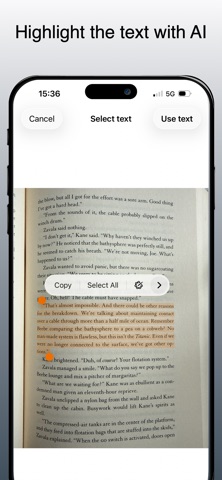

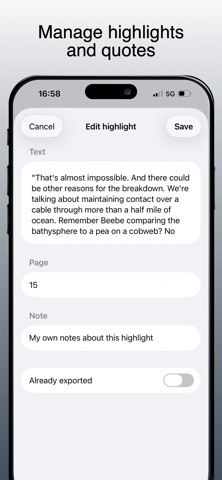

Description by Alessandro Raccuglia Giaminardi Written by the developer, not by AppBrain. Click to read.
Build a personal library, capture the quotes you want to keep, add page numbers and notes, then export everything as clean Markdown when you are ready.
Capture highlights your way
Take a photo of a book page, choose an image from your library, or type a passage manually. When you use an image, Book Highlighter uses Apple's built-in Live Text technology so you can select exactly the text you want from the page.
Organize by book
Search for books by title, author, or ISBN using Open Library, or add a Google Books API key in Settings to use Google Books. Each book can include metadata such as author, year, publisher, ISBN, and cover image. You can add highlights, page numbers, optional notes, and a personal note for the book.
Import from other apps
Book Highlighter includes an iOS share extension. Select text in another app, open the share sheet, choose Book Highlighter, then save the passage to one of your existing books.
Export clean Markdown
Write each book to folders you choose as complete Markdown files, or use the standard iOS share sheet for one-shot Markdown, plain text, CSV, RTF, and PDF exports. Generated Markdown files include book metadata, page headings, quotes, notes, and dates, and are overwritten when you update them from the app.
Backup and restore
Create a JSON backup of your books and highlights, save it wherever you prefer, and import it later with smart merge to avoid duplicate books and duplicate highlights.
Private by design
Book Highlighter stores your library locally on your device. There is no account, no analytics, and no developer-controlled server for your books, highlights, or notes. Network requests are used only when you search book metadata through Open Library or, if configured by you, Google Books.
Book Highlighter is made for readers who still love physical books but want their best passages available in a durable, portable digital format.