




AppBrain's verdict
- Last updated
- November 10, 2026
- Size
- 5.76 MB
User feedback
Ratings and reviews on the App StoreComments on Book Scanner - Scan to Text for iOS
We don't have enough comments to show example comments. Please check back later.
Store listing
By Layerz Corp., from the App StoreDescription by Layerz Corp. Written by the developer, not by AppBrain. Click to read.
SCAN THE WAY YOU READ
• A guide frame shows what will be captured; text and image capture on the same screen
• Recognition runs on the device; nothing is uploaded
• Headers, footers and page numbers are removed; paragraphs that continue on the next page are joined
• Choose the recognition language per book
• Photograph the cover and the title is picked up from it
• The screen stays on while you scan
READ, DON'T SQUINT
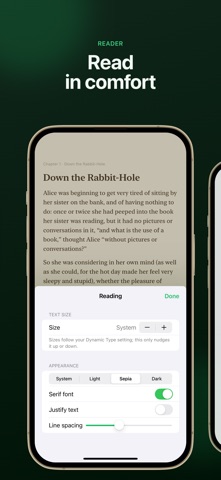
• Page-turn reader with adjustable text size, serif or sans-serif type, line spacing, and light, sepia and dark themes
• Search the whole book: every match with its chapter and context, marked on the page
• Text follows your Dynamic Type setting
• Two-page spread on iPad
• Your place in every book is remembered
TYPE ALONG (LABS)
• An experimental feature: turn it on in Settings › Labs
• Copy a book by typing it, one paragraph at a time, in the same type and theme as the reader
• Every right character fills in and a mistake shows in red, so you see exactly where you slipped
• Speed and accuracy as you type; pick up where you left off
• Korean and other input methods compose in place
KEEP EVERYTHING TOGETHER
• Library with list and grid views, search by title and author, sort by recently added or recently read
• On iPad, a sidebar with Recently Read, Currently Reading and Finished, and the book beside your shelf
• Reading progress on every book
• iCloud sync between your iPhone, iPad and Mac (optional)
• Highlight sentences and add notes; find them again in the book's index
• See any book as a PDF, highlights included
BOOK SCANNER PRO
Pro unlocks unlimited books and OCR with no page limit, Auto Scan that adds pages as you turn them, PDF export with your highlights, and editing of recognized text. Available as a yearly or monthly subscription or a one-time Lifetime purchase; one purchase covers iPhone, iPad and Mac.
PRIVACY
Your scans stay on your device and, if you turn on sync, in your own iCloud. Book Scanner has no accounts, no ads and no tracking.
Subscriptions renew automatically unless cancelled at least 24 hours before the end of the current period. Payment is charged to your Apple Account; manage or cancel your subscription in your App Store account settings.
Terms of Use: https://www.apple.com/legal/internet-services/itunes/dev/stdeula/
Privacy Policy: https://layerz.app/bookscanner/privacy
Safety and technology
Found in the app by AppBrain- Price
- Free
- App size
- 5.76 MB
- Content rating
- Everyone
Technologies used by Book Scanner - Scan to Text
Releases
Updates seen on the App Store- Version
- 1.4.0
- Launched
- September 2026
No changelog data
Alternatives
Similar apps and more from Layerz Corp.Alternatives to Book Scanner - Scan to Text


More from Layerz Corp.


Rankings
App Store top chartsApp Store Rankings for Book Scanner - Scan to Text
About the app and developer
About Book Scanner - Scan to Text
Book Scanner - Scan to Text is a productivity app developed by Layerz Corp.
User Ratings
The app has no ratings yet.
App Information
Book Scanner - Scan to Text is freely available from the App Store. The app size is 5.76 MB. The latest version available is 1.4.0. The last update was on November 10, 2026.
Technical Requirements
The app has a content rating of Everyone. The app has been available on the App Store since September 2026.
Book Scanner - Scan to Text is made and published by Layerz Corp. AppBrain is an independent app data site and isn't affiliated with Layerz Corp. The app name, icon, screenshots and description belong to Layerz Corp. and are shown as published on the App Store.
Developer information for Layerz Corp.
Address:
Frequently asked questions about Book Scanner - Scan to Text
Is Book Scanner - Scan to Text free?
Yes. Book Scanner - Scan to Text is free on the App Store.
Is Book Scanner - Scan to Text still available?
Yes. Book Scanner - Scan to Text is on the App Store, and the last update we saw was on November 10, 2026.
How large is Book Scanner - Scan to Text?
Book Scanner - Scan to Text is 5.76 MB.
Is Book Scanner - Scan to Text suitable for children?
App Store rates the content of Book Scanner - Scan to Text as suitable for everyone.
Who made Book Scanner - Scan to Text?
Book Scanner - Scan to Text was developed by Layerz Corp. It is listed in the productivity category on the App Store.
What are the best alternatives to Book Scanner - Scan to Text?
People looking at Book Scanner - Scan to Text also look at these productivity apps: Snagbox: Bookmark & Link Saver, Cutter Closet, JobGuard AI, Nox - Personal Data Vault, DocFind: Search Inside PDFs.