

Book Spin
Book Spin is made and published by ANTHONY SAMUAL COHN-RICHARDBY. AppBrain is an independent app data site and isn't affiliated with ANTHONY SAMUAL COHN-RICHARDBY. The app name, icon, screenshots and description belong to ANTHONY SAMUAL COHN-RICHARDBY and are shown as published on the App Store.
AppBrain's verdict
- Last updated
- September 2, 2026
Rankings
App Store top chartsApp Store Rankings for Book Spin
Competitors
Similar apps and more from ANTHONY SAMUAL COHN-RICHARDBYAlternatives to Book Spin




More from ANTHONY SAMUAL COHN-RICHARDBY

Releases
Updates seen on the App Store- Version
- 1.0
- Launched
- September 2026
No changelog data
User feedback
Ratings and reviews on the App StoreComments on Book Spin for iOS
We don't have enough comments to show example comments. Please check back later.
Technology
Found in the app by AppBrain- Price
- Free
- App size
- 2.38 MB
- Content rating
- Everyone
Technologies used by Book Spin
About the app and developer
About Book Spin
Book Spin is a books app developed by ANTHONY SAMUAL COHN-RICHARDBY.
What is the rating of Book Spin?
Book Spin has no ratings yet.
Is Book Spin free?
Book Spin is free. The app size is 2.38 MB. The latest version available is 1.0. The last update was on September 2, 2026.
What are the requirements for Book Spin?
The app has a content rating of Everyone. The app has been available on the App Store since September 2026.
Developer information for ANTHONY SAMUAL COHN-RICHARDBY
Address:
Frequently asked questions about Book Spin
Is Book Spin free?
Yes. Book Spin is free on the App Store.
Is Book Spin still available?
Yes. Book Spin is on the App Store, and the last update we saw was on September 2, 2026.
How large is Book Spin?
Book Spin is 2.38 MB.
Is Book Spin suitable for children?
App Store rates the content of Book Spin as suitable for everyone.
Who made Book Spin?
Book Spin was developed by ANTHONY SAMUAL COHN-RICHARDBY. It is listed in the books category on the App Store.
What are the best alternatives to Book Spin?
People looking at Book Spin also look at these books apps: Bookspine – Reading Widget, Kurani - Shqip & Arabisht, SlowRead: Book Tracker & TBR, AntiStress Adult Coloring Book, Book Towers - Reading Tracker.
Store listing
By ANTHONY SAMUAL COHN-RICHARDBY, from the App Store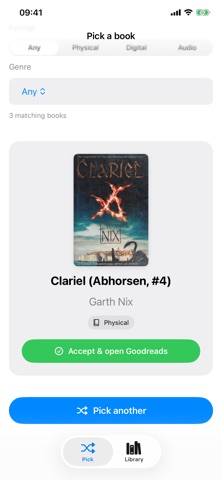

Description by ANTHONY SAMUAL COHN-RICHARDBY Written by the developer, not by AppBrain. Click to read.
Import your Goodreads to-read shelf, add books by scanning a barcode, or type one in. Filter by genre and format — physical, digital, or audio — then spin. When you accept a pick, Book Spin opens it on Goodreads so you can mark it currently reading, and removes it from your local TBR.
WHAT YOU CAN DO
• Spin a random book from your library
• Filter by genre and by format (physical, digital, audio)
• Import a Goodreads library export (CSV) — only to-read titles are added
• Scan an ISBN barcode or type the ISBN to look a book up
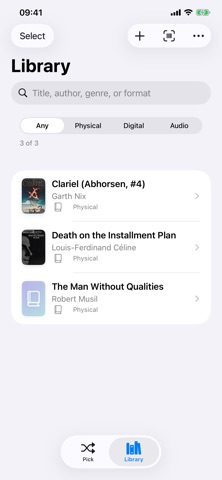
• Add or edit titles by hand, with covers, notes, genres, and formats
• Search your library by title, author, genre, or format
• Tag several books at once with genres or formats
• Share a CSV into the app from Safari, Files, or Downloads
GETTING YOUR GOODREADS LIST IN
The Goodreads app can’t export your library. In Safari, go to Goodreads → My Books → Import and export → Export Library. When the CSV is ready, download it and share it to Book Spin.
YOUR BOOKS STAY ON YOUR DEVICE
Your library is stored on your iPhone. Book Spin is not affiliated with Goodreads or Amazon.