

Boxmi - Password Manager
Boxmi - Password Manager is made and published by 景元 肖. AppBrain is an independent app data site and isn't affiliated with 景元 肖. The app name, icon, screenshots and description belong to 景元 肖 and are shown as published on the App Store.
AppBrain's verdict
Established- Rating on App Store
- 4.60
- 5 ratings
- Last updated
- October 25, 2026
It doesn't have enough ratings yet to judge what users think.
Rankings
App Store top chartsApp Store Rankings for Boxmi - Password Manager
Competitors
Similar apps and more from 景元 肖Alternatives to Boxmi - Password Manager





More from 景元 肖




Releases
Updates seen on the App Store- Version
- 5.0.1
- Launched
- October 2019
No changelog data
User feedback
Ratings and reviews on the App StoreComments on Boxmi - Password Manager for iOS
We don't have enough comments to show example comments. Please check back later.
Technology
Found in the app by AppBrain- Price
- Free
- App size
- 13.4 MB
- Content rating
- High
Technologies used by Boxmi - Password Manager
About the app and developer
About Boxmi - Password Manager
Boxmi - Password Manager is a productivity app developed by 景元 肖.
User Ratings
Boxmi - Password Manager is rated 4.60 out of 5 stars. The rating is based on 5 ratings.
App Information
Boxmi - Password Manager is freely available from the App Store. The app size is 13.40 MB. The latest version available is 5.0.1. The last update was on October 25, 2026.
Technical Requirements
The app has a content rating of High Maturity. The app has been available on the App Store since October 2019.
Developer information for 景元 肖
Address:
Store listing
By 景元 肖, from the App Store


Description by 景元 肖 Written by the developer, not by AppBrain. Click to read.
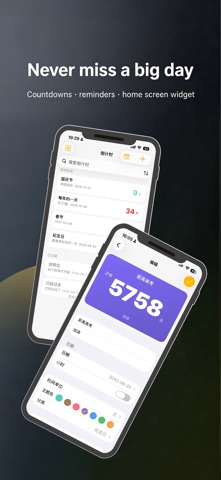
Passwords, diary and countdowns — three in one, in your own private vault. Your data never leaves your phone.
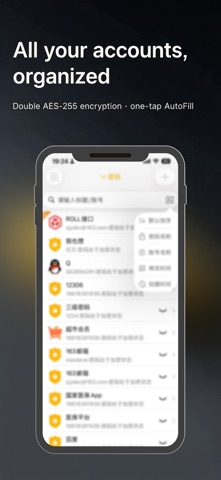
Boxmi uploads nothing to the internet: passwords are protected with double-layer AES-256 encryption and work with iOS AutoFill for one-tap sign-in; the app lock adds multiple layers of protection with Face ID / Touch ID; the diary feels like writing on real paper; big days turn into home screen widgets. Works fully offline, and iCloud backup keeps everything safe when you switch phones.
▶ App Lock & Privacy
• Face ID / Touch ID / pattern — three ways to unlock, and the lock comes first every time
• Disguised icon: hide Boxmi behind a calculator or a weather app — no one will ever guess
• Intruder log: failed unlock attempts are recorded automatically, so you always know who touched your phone
▶ Password Manager
• Tap + to create in seconds, with a built-in random strong-password generator
• iOS AutoFill: logins fill themselves in apps and in the browser
• Show/hide passwords, one-tap copy, and extra verification for key accounts
• Swipe to delete without fear — the trash bin restores anything, anytime
▶ Private Diary
• Weather, mood and location on one screen, with photos and voice notes
• Lined, wavy, dotted or grid paper, with font size and line spacing to taste
• Export as PDF / image / TXT in one tap
▶ Countdown & Widgets
• Adjusts automatically between days / months / years, and recognizes holidays and lunar dates
• Home screen widget with a circular progress ring — days remaining at a glance
• Automatic reminders on the day itself, so no big date slips by
▶ Data Security
• Everything stays on your device — nothing uploaded, nothing collected; works fine even with network access off
• Encryption keys are protected by the iOS Keychain
• Dual backup channels: iCloud and encrypted text files — switch phones without losing a thing
Free to use, with zero ads and zero in-app purchases — security shouldn't come interrupted by ads.
Found an issue or have an idea? Reach us via "Feedback" in the app or at xiaodeve@163.com.