BPMN Master is made and published by
Volodymyr Sichka.
AppBrain is an independent app data site and isn't affiliated with Volodymyr Sichka.
The app name, icon, screenshots and description belong to Volodymyr Sichka and are shown as
published on the App Store.
About BPMN Master
BPMN Master is a productivity app developed by Volodymyr Sichka.
User Ratings
The app has no ratings yet.
App Information
BPMN Master costs $19.99. The app size is 3.05 MB. The latest version available is 1.8. The last update was on October 24, 2026.
Technical Requirements
The app has a content rating of Everyone. The app has been available on the App Store since August 2026.
Description by Volodymyr Sichka(from the App Store)
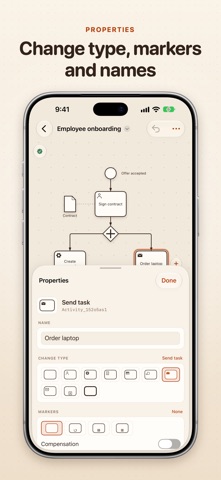
BPMN Master is a native BPMN 2.0 diagram editor for iPhone, iPad and Mac. Open process diagrams made in other modeling tools, edit them with touch, mouse or keyboard, and save them back as standard .bpmn files.
FULL BPMN 2.0 NOTATION • Events with all 13 triggers, interrupting and non-interrupting • Every task type with loop, multi-instance and compensation markers • Exclusive, parallel, inclusive, event-based and complex gateways • Pools and lanes, collapsed and expanded sub-processes, call activities • Data objects and data stores, text annotations and groups • Sequence, message and association flows, default and conditional flows
YOUR FILES STAY INTACT The whole file is kept as it was written, so vendor extensions and elements other tools rely on survive a save untouched. Files saved without a diagram layout open with a generated one instead of an error.
FAST EDITING • Tap an element in the library and it is added and connected to the selection, so a flow is built tap by tap • A "+" beside the selected element adds the next step in one tap • Drag elements from the library straight onto the canvas • Connections route around shapes and follow when you move them • Resize pools, lanes and groups; lanes stay a tight stack • Align and distribute, copy and paste as standard BPMN, undo everything
FIND YOUR WAY • Command palette (⌘K) for every action, element type and diagram element • Find (⌘F) by name, annotation text or ID • Minimap, zoom to fit and zoom to selection • Single-key shortcuts: type S, T, T, G, E to sketch a whole flow
CATCH MISTAKES EARLY The diagram is checked as you edit: missing flows, unreachable elements, dead ends, detached boundary events and broken references are marked right on the canvas.
SHARE AND PRINT Export to PNG and PDF, print with automatic page fitting, and view the XML source with syntax highlighting. On Mac, press Space on a .bpmn file in Finder to preview the diagram with Quick Look.
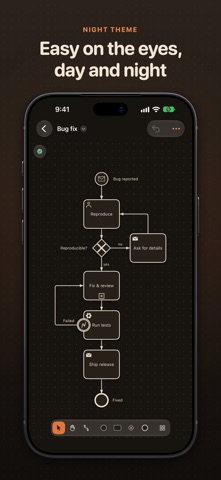
AT HOME ON EVERY DEVICE A full-window canvas with floating controls, side panels on Mac and iPad and sheets on iPhone, light and dark themes, and seven interface languages: English, German, French, Ukrainian, Spanish, Japanese and Portuguese.
LEGAL • Privacy Policy: https://vybgss.github.io/bpmn-master-docs/privacy-policy.html • Terms of Use: https://www.apple.com/legal/internet-services/itunes/dev/stdeula/
Each subscription will automatically renew 3 days before the expiration date for
the same time period. Subscriptions can be cancelled at any time before the renewal.