Download Android Apps and Games
AppBrain
  • Apps
  • Apps being viewed right now Trending apps today Most popular apps All-time most downloaded apps Top rated apps
  • Intelligence ▾
    Intelligence overview → Track any Android app or your whole market
    Track & analyze
    Keyword Tracker & OptimizerTrack & improve Play rankings App Performance ReportOne-off PDF for any app StatisticsFree Android & Play market stats
    Promote your app
    Featured Apps App Links
  • Intelligence
  • Pricing
  • Dashboard
  • Sign up
  • Log in
Last updated on: 2026-06-09
App Store Apps > Productivity > bProgress - Manage Daily Tasks
bProgress - Manage Daily Tasks icon

bProgress - Manage Daily Tasks

4.5.3
Huizhou Walden Information Technology Co., Ltd.
4.50
30 reviews
$0.99

bProgress - Manage Daily Tasks Screenshot 1 of 10
bProgress - Manage Daily Tasks Screenshot 2 of 10
bProgress - Manage Daily Tasks Screenshot 3 of 10
bProgress - Manage Daily Tasks Screenshot 4 of 10
bProgress - Manage Daily Tasks Screenshot 5 of 10
bProgress - Manage Daily Tasks Screenshot 6 of 10
bProgress - Manage Daily Tasks Screenshot 7 of 10
bProgress - Manage Daily Tasks Screenshot 8 of 10
bProgress - Manage Daily Tasks Screenshot 9 of 10
bProgress - Manage Daily Tasks Screenshot 10 of 10
Download from the App Store

About bProgress - Manage Daily Tasks

bProgress - Manage Daily Tasks is an overall app developed by Huizhou Walden Information Technology Co., Ltd..

How many times has bProgress - Manage Daily Tasks been downloaded?

What is the rating of bProgress - Manage Daily Tasks?

bProgress - Manage Daily Tasks is rated 4.50 out of 5 stars, based on 30 ratings.

Is bProgress - Manage Daily Tasks free?

bProgress - Manage Daily Tasks costs $0.99 to download. The APK download size is 4.51 MB. The latest version available is 4.5.3. The last update was on January 13, 2022.

What are the requirements for bProgress - Manage Daily Tasks?

The app has a content rating of Everyone. The app has been available on Google Play January 2020.

Description
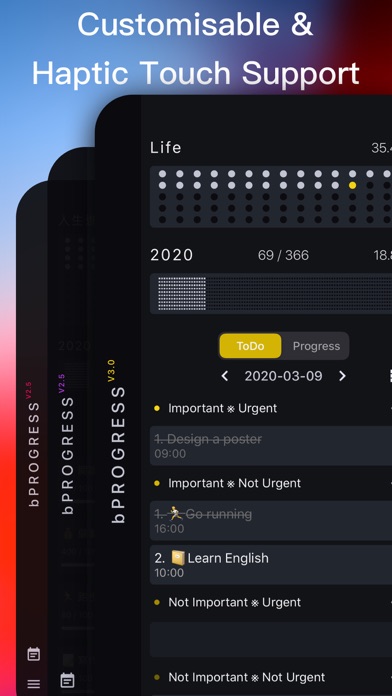
bProgress is a productivity tool that combines progress management with schedule planning, bringing comfortable experience for users

※ Introduction

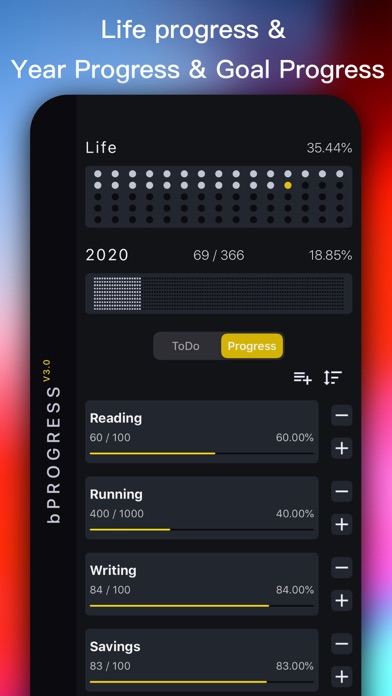
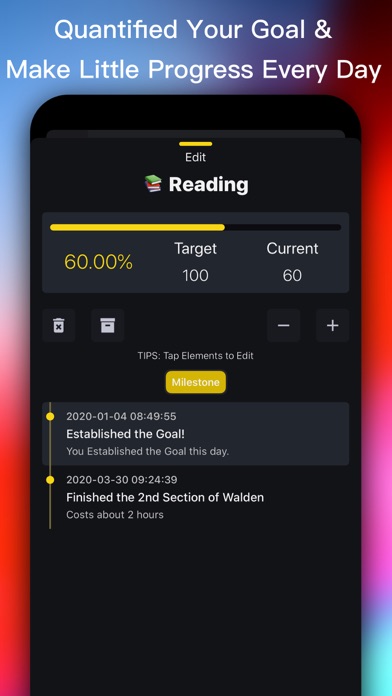
- Create your goals, quantify them in numbers, percentages, and progress bars, and support archiving (recovery) your goals

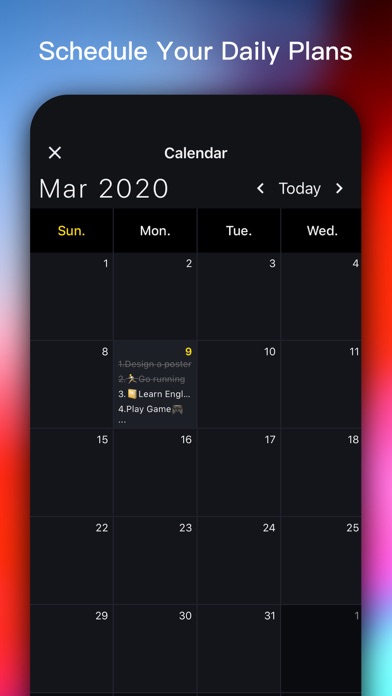
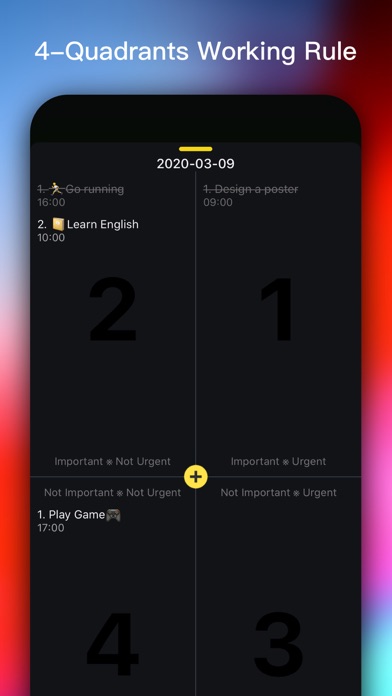
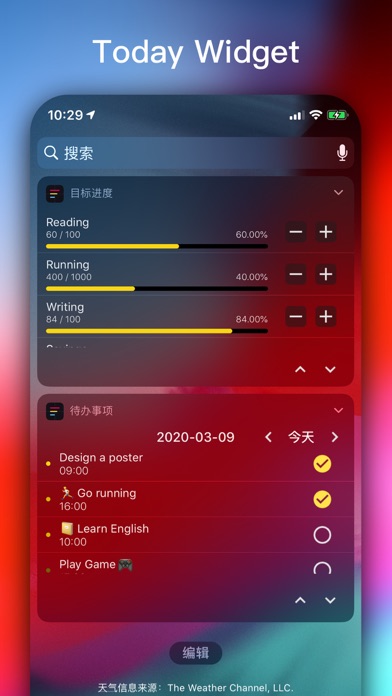
- Working calendar, can set your daily ToDo items or plans, with a four-quadrant model (see below for details) which can be provided for priority management of ToDo items(plans), and can be associated with the progress of the goal. When the task is completed, the goal can be updated

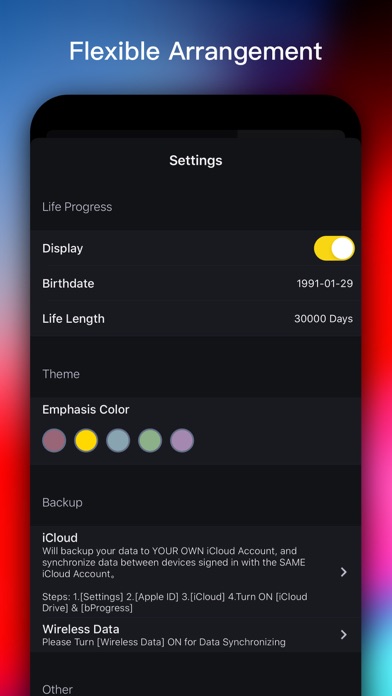
- Special feature: life progress, set your birth date, know how your life has gone

- Special feature: annual progress, you can see how much the year has passed, you can click on the annual progress area to enter the "working calendar"

Does feature

- Haptic Touch Touch experience, all gestures will trigger the phone's own vibration feedback. After countless tests, by adjusting the vibration feedback strength for making the feedback more comfortable

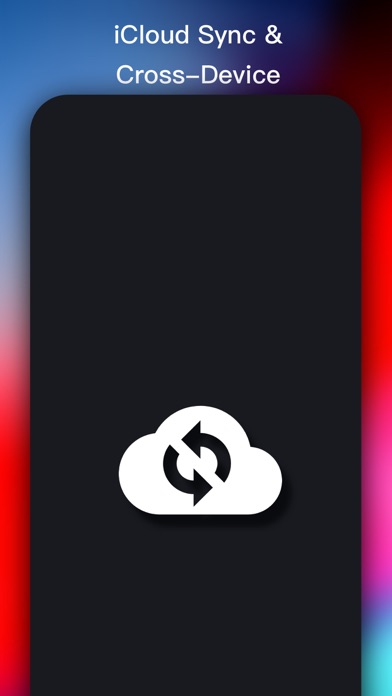
- Support iCloud data backup, through the data synchronization of multiple devices, make real-time synchronization easier, no longer need to worry about losing data. (Setup steps: 1. [Settings] 2. [Apple ID] 3. [iCloud] 4. Enable [iCloud cloud disk] & [bProgress]. Make sure the network is turned on and iCloud has enough space left)

※ Suitable for people

- love lightweight management tools, fear of complex tools, and don't want to spend too much time fiddling with fancy features, then it's for you!

- freelancer, I'm a freelancer, every day I will be in my calendar on the wall to record their daily work plan, in order to bring the work flow, so "time schedule" is developed as a daily work plan management tools, convenient own at the same time, also hope to bring the same need user help.

I want to develop good habits and self-monitoring. Quantifying my goals is a very straightforward way. There are no extra steps.

Other Introduction

-four quadrant work rules

The four-quadrant rule is a time management theory put forward by Stephen covey, a famous management scientist. Stephen covey has divided work into two different degrees of importance and urgency, basically into four quadrants: [urgent and important], [important but not urgent], [urgent but not important], [neither urgent nor important]. In order of processing: first urgent and important, then important but not urgent, then urgent but not important, and finally neither urgent nor important.

The core of the traditional time management method is "urgency"

The core of efficient time management: first priority, then priority

(from baidu)

※ FAQs

- how do I start iCloud backup

First, make sure your app's network access is open, then turn it on 1. [Settings] 2. [Apple ID] 3. [iCloud] 4

- how do I open a work calendar

Work calendars can be accessed by clicking on the calendar button in the left sidebar, or by clicking on annual progress

- how do I add a daily to-do list

After opening the work calendar, click the corresponding date (you can drag to select the corresponding date), enter the "four quadrant" panel, and add items according to the priority of the to-do items [double click]. After the addition is completed, 1. You can [click] items for editing; 2. You can [swipe right] in the list to switch the status of items (ongoing and completed); 3

- How to change the languages

In the left sidebar, click the "menu" button, select "Settings", find the "Language" option in Settings, and click to go to Settings

- Notification

Temporary does not support

- Length of life (currently 30,000 days)

Not support yet

- Theme

Not support yet

Thanks for your support. Have a nice day

Bee, 2020-01-17

Service Support

WeChat Official account: FreelancerX

E-mail: bsn.huang@gmail.com
Show more Show less

More data about bProgress - Manage Daily Tasks

Price $0.99
Rating 4.50 based on 30 ratings
Ranking Not ranked
Version 4.5.3
App download size 4.51 MB
Suitable for Everyone

Alternative downloads for the bProgress - Manage Daily Tasks app

Tiny Planner - Daily Organizer icon Tiny Planner - Daily Organizer
TinyWork Apps
4.7
Free
195 ratings
FocusDots · Focus What Matters icon FocusDots · Focus What Matters
particlemade
4.4
$1.99
18 ratings
Quick Notes & Draft - Nanonote icon Quick Notes & Draft - Nanonote
Santu Dey
4.6
Free
247 ratings
Super To-Do's icon Super To-Do's
Howlin Interactive, Inc.
4.4
Free
938 ratings
aTimeLogger Time Tracker icon aTimeLogger Time Tracker
BGCI
4.7
$4.99
1.1K ratings
gTasks Pro for Google Tasks icon gTasks Pro for Google Tasks
JulyApps Ltd
4.6
$19.99
1.2K ratings
Sortify: Pocket Planner icon Sortify: Pocket Planner
Shubham Arya
4.8
Free
13 ratings
Remote Keyboard icon Remote Keyboard
峰 朱
4.4
Free
87 ratings

More from Huizhou Walden Information Technology Co., Ltd.

Walden - Calendar/ToDo/Notes icon Walden - Calendar/ToDo/Notes
Huizhou Walden Information Technology Co., Ltd.
4.8
Free
41 ratings
RacketMate - Tennis Pickleball icon RacketMate - Tennis Pickleball
Huizhou Walden Information Technology Co., Ltd.
3.4
Free
16 ratings
PomoLite - Focus Timer Keeper icon PomoLite - Focus Timer Keeper
Huizhou Walden Information Technology Co., Ltd.
4.9
Free
7 ratings
简记单词 - 艾宾浩斯记忆法 icon 简记单词 - 艾宾浩斯记忆法
Huizhou Walden Information Technology Co., Ltd.
4.6
Free
7 ratings

Changelog of bProgress - Manage Daily Tasks

No changelog data

Developer information for Huizhou Walden Information Technology Co., Ltd.

Huizhou Walden Information Technology Co., Ltd.

Address:

Share bProgress - Manage Daily Tasks

Comments on bProgress - Manage Daily Tasks for iOS

We don't have enough comments to show example comments. Please check back later.

App Store Rankings for bProgress - Manage Daily Tasks

This app is not ranked

Technologies used by bProgress - Manage Daily Tasks

Today's trending apps Apps other people are watching Popular Overall Apps on sale Top new apps
Tiny Planner - Daily Organizer icon Tiny Planner - Daily Organizer
FocusDots · Focus What Matters icon FocusDots · Focus What Matters
Quick Notes & Draft - Nanonote icon Quick Notes & Draft - Nanonote
Super To-Do's icon Super To-Do's
aTimeLogger Time Tracker icon aTimeLogger Time Tracker
gTasks Pro for Google Tasks icon gTasks Pro for Google Tasks
Sortify: Pocket Planner icon Sortify: Pocket Planner
Remote Keyboard icon Remote Keyboard

Back to top
AppBrain Intelligence premium content

Subscribe now to get full and unlimited access to AppBrain Intelligence. You'll have access to:

  • App Intelligence dashboard (performance timeline, competitor comparison, country rankings, insight cards)
  • Detailed ranking data per app
  • Full timeline per developer
  • Device market shares data per country
1 Month

$75/mo
(billed every month)

SAVE 0%
Subscribe
3 Months

$65/mo
($195 billed every 3 months)

SAVE 13%
Subscribe
1 Year

$57.50/mo
($690 billed every year)

SAVE 23%
Subscribe
Each subscription will automatically renew 3 days before the expiration date for the same time period. Subscriptions can be cancelled at any time before the renewal.

AppBrain is a directory focused on discovering great apps and games. We give statistics, rankings and search options that Google Play and the App Store don't have. All trademarks are owned by their respective owners. AppBrain doesn't offer APKs or binaries, and always lets users install the official version from Google Play or the App Store.

More apps

  • Top Android apps being viewed
  • BT Tennis Controller for Android
  • Trust No One Demo
  • CTC-Go

Android Statistics

  • Android statistics
  • Google Play Developer stats
  • Trending Android Apps
  • Top popular Apps
  • Buy the best Android phone

About AppBrain

  • Contact
  • Privacy
  • Documentation
  • DMCA takedowns
  • Articles
  • Blog
  • Android Interstitial Ads: Best practices to optimize your app's earnings
© 2010-2026 - AppBrain