

Braces Bands : Braces Timer
Braces Bands : Braces Timer is made and published by Kimgrowth. AppBrain is an independent app data site and isn't affiliated with Kimgrowth. The app name, icon, screenshots and description belong to Kimgrowth and are shown as published on the App Store.
AppBrain's verdict
- Rating on App Store
- 4.33
- 3 ratings
- Last updated
- October 7, 2026
It doesn't have enough ratings yet to judge what users think.
Rankings
App Store top chartsApp Store Rankings for Braces Bands : Braces Timer
Competitors
Similar apps and more from KimgrowthAlternatives to Braces Bands : Braces Timer
 Aligner STEPS





More from Kimgrowth


Releases
Updates seen on the App Store- Version
- 1.4.86
- Launched
- July 2025
No changelog data
User feedback
Ratings and reviews on the App StoreComments on Braces Bands : Braces Timer for iOS
We don't have enough comments to show example comments. Please check back later.
Technology
Found in the app by AppBrain- Price
- Free
- App size
- 96.6 MB
- Content rating
- Everyone
Technologies used by Braces Bands : Braces Timer
About the app and developer
About Braces Bands : Braces Timer
Braces Bands : Braces Timer is a lifestyle app developed by Kimgrowth.
What is the rating of Braces Bands : Braces Timer?
Braces Bands : Braces Timer is rated 4.33 out of 5 stars, based on 3 ratings.
Is Braces Bands : Braces Timer free?
Braces Bands : Braces Timer is free. The app size is 96.57 MB. The latest version available is 1.4.86. The last update was on October 7, 2026.
What are the requirements for Braces Bands : Braces Timer?
The app has a content rating of Everyone. The app has been available on the App Store since July 2025.
Developer information for Kimgrowth
Address:
Frequently asked questions about Braces Bands : Braces Timer
Is Braces Bands : Braces Timer free?
Yes. Braces Bands : Braces Timer is free on the App Store.
Is Braces Bands : Braces Timer still available?
Yes. Braces Bands : Braces Timer is on the App Store, and the last update we saw was on October 7, 2026.
How large is Braces Bands : Braces Timer?
Braces Bands : Braces Timer is 96.57 MB.
Is Braces Bands : Braces Timer suitable for children?
App Store rates the content of Braces Bands : Braces Timer as suitable for everyone.
How do people rate Braces Bands : Braces Timer?
Braces Bands : Braces Timer scores 4.33 out of 5 stars, from 3 ratings on the App Store.
Who made Braces Bands : Braces Timer?
Braces Bands : Braces Timer was developed by Kimgrowth. It is listed in the lifestyle category on the App Store.
What are the best alternatives to Braces Bands : Braces Timer?
People looking at Braces Bands : Braces Timer also look at these lifestyle apps: Aligner STEPS, 살롱엘, DIREP, Yoga Asana Journal, Affirm Me: Daily Affirmations.
Store listing
By Kimgrowth, from the App Store



Description by Kimgrowth Written by the developer, not by AppBrain. Click to read.
Braces Bands is an app designed to help you build a healthy habit of wearing your orthodontic elastics (rubber bands).
Track your wear time, set daily goals, and make consistent progress in your braces journey.
** Key Features
- Wear Timer : Start or stop the timer with a single tap to easily log your wear time.
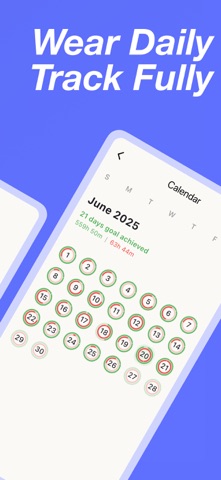
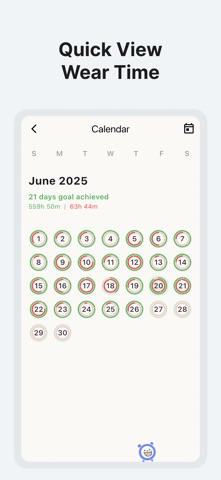
- Wear Calendar : See your daily records at a glance and stay motivated.
- Re-wear Reminder : Get notified if you forget to wear your bands for too long.
- Goal & Reminder Settings : Customize your daily wear goal and re-wear alert interval.
- Edit Wear Time : Forgot to start the timer? No problem—just tap the calendar to edit your wear time later.
- Band Replacement Reminder : Set a replacement schedule—start date, interval, and alert times—to get notified and log each band change.
- Aligner Mode : Track your Invisalign or clear aligner trays. Enter total and current tray numbers, see progress on your calendar.
- Dental Appointment Reminder : Save your next visit and get alerted before you go. Appointment days are marked right on your calendar.
- Visit Notes : Keep your dentist's instructions and band or wire changes as dated notes you can revisit anytime.
- Teeth Photos : Snap or pick photos for any calendar date to track how your teeth change. Days with photos are marked right on your calendar. (Up to 3 per day)
** How to Use
When you open the app, the timer starts in wearing mode.
Tap the timer when you take off your bands—like during meals or brushing—to log non-wear time.
Set your daily goal and reminder interval to stay on track.
Forgot to use the timer? Edit your records anytime via the calendar.
**Premium Features
- Remove Ads : Enjoy the app without any ads.
- Home Widget : Check your wear status right from your home screen.
- Cloud Backup : Automatically back up your wear records, replacement records, goal/reminder settings, and teeth photos using your social login account, and restore them anytime by signing in with the same account on a new device.
(Note: Restoring purchases and restoring cloud backups are different processes. Cloud backup restoration is done through your signed-in social account, while your Premium subscription must be purchased/restored separately on the store you're using.)
**Subscription Notice
Subscription automatically renews unless cancelled at least 24 hours before the end of the current period.
You can manage or cancel subscriptions in your Apple ID account settings after purchase.
Active subscriptions cannot be cancelled during the current billing period.
Start tracking your wear time today, and build a healthy habit that sticks!
Terms of Use (EULA): https://www.apple.com/legal/internet-services/itunes/dev/stdeula/
Privacy Policy: https://kbpzdm.com/apps/braces-bands/privacy