

Brain Rescue: Screen Time
Brain Rescue: Screen Time is made and published by 春城 贾. AppBrain is an independent app data site and isn't affiliated with 春城 贾. The app name, icon, screenshots and description belong to 春城 贾 and are shown as published on the App Store.
AppBrain's verdict
New- Rating on App Store
- 5.00
- 1 ratings
- Last updated
- September 8, 2026
Brain Rescue: Screen Time came out 57 days ago. It doesn't have enough ratings yet to judge what users think.
Rankings
App Store top chartsApp Store Rankings for Brain Rescue: Screen Time
Competitors
Similar apps and more from 春城 贾Alternatives to Brain Rescue: Screen Time


More from 春城 贾


Releases
Updates seen on the App Store- Version
- 1.0
- Launched
- September 2026
No changelog data
User feedback
Ratings and reviews on the App StoreComments on Brain Rescue: Screen Time for iOS
We don't have enough comments to show example comments. Please check back later.
Technology
Found in the app by AppBrain- Price
- Free
- App size
- 22.0 MB
- Content rating
- Everyone
Technologies used by Brain Rescue: Screen Time
About the app and developer
About Brain Rescue: Screen Time
Brain Rescue: Screen Time is a productivity app developed by 春城 贾.
User Ratings
Brain Rescue: Screen Time is rated 5.00 out of 5 stars. The rating is based on one rating ratings.
App Information
Brain Rescue: Screen Time is freely available from the App Store. The app size is 22.03 MB. The latest version available is 1.0. The last update was on September 8, 2026.
Technical Requirements
The app has a content rating of Everyone. The app has been available on the App Store since September 2026.
Developer information for 春城 贾
Address:
Store listing
By 春城 贾, from the App Store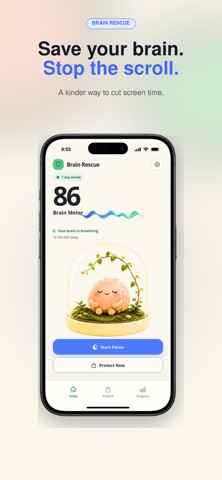


Description by 春城 贾 Written by the developer, not by AppBrain. Click to read.
Brain Rescue is a kinder screen time app that helps you interrupt doomscrolling, protect your focus, and build phone habits that last. Choose the apps and websites that pull you in, set a daily budget or schedule, and let Nori—your tiny brain companion—reflect how your day is going.
No shame. No all-or-nothing rules. Just enough friction to turn an automatic tap into an intentional choice.
RESCUE YOUR ATTENTION
* Block selected apps and websites with Apple’s Screen Time controls
* Create a daily limit or schedule for work, study, mornings, and bedtime
* Start 15-, 25-, or 45-minute focus sessions whenever you need a clear head
* Use mindful passes when you genuinely need a few minutes
* See your Brain Meter and understand what changed it
MAKE PROGRESS VISIBLE
* Watch Nori’s habitat become brighter as your habits improve
* Track screen time, focus minutes, streaks, and mindful passes
* Review 7-day trends to spot the times and routines that trip you up
* See how much time you may be reclaiming as your baseline develops
DESIGNED TO FEEL HUMAN
Brain Rescue doesn’t punish you for using your phone. It helps you pause, choose, and get back to what matters. The goal isn’t zero screen time—it’s screen time you meant to use.
PRIVATE BY DESIGN
Your selected apps, websites, and Screen Time activity are processed on your device. No account is required for the core experience, and your detailed usage data stays on your phone.
START FREE
Use one protection profile, one schedule, a daily budget, Brain Meter, focus sessions, mindful passes, and 7-day progress for free. Upgrade to Brain Rescue Plus for unlimited profiles and schedules, deeper trends, stricter options, and more Nori habitats.
Ready to rescue your attention?
Set your first screen time plan and give your brain a little room to breathe.
1. This service is a subscription based paid service, which means you will prepay for future subscription usage. You can currently choose to use this service on a quarterly basis. At the end of each subscription period, your subscription will automatically renew by default, unless you cancel the automatic renewal yourself or we cancel the service.
2. Unsubscribe: To cancel the renewal, please cancel at least 24 hours in advance. You can unsubscribe by opening System Settings, clicking on Apple ID, clicking on Subscription, selecting Premium, and then unsubscribing.
3. Restore purchase: If you receive a prompt saying "You have already subscribed to this project" during the payment process and confirm that you have completed the purchase before, you can click "Restore Purchase" in the upper right corner to restore the purchase.
Membership Service Agreement and Automatic Renewal Agreement:
https://gcn1s2rmayw3.feishu.cn/wiki/YgqKwPdJmiH0ulkF92kco1CznCg?from=from_copylink
Privacy Policy:
https://gcn1s2rmayw3.feishu.cn/wiki/SGBIwmUWCiPWoWktE5sclLRgnol?from=from_copylink