

Brainee: Second Brain Notes
Brainee: Second Brain Notes is made and published by Serhii Hryn. AppBrain is an independent app data site and isn't affiliated with Serhii Hryn. The app name, icon, screenshots and description belong to Serhii Hryn and are shown as published on the App Store.
AppBrain's verdict
- Rating on App Store
- 5.00
- 3 ratings
- Last updated
- October 17, 2026
- Size
- 100.3 MB
It doesn't have enough ratings yet to judge what users think.
User feedback
Ratings and reviews on the App StoreComments on Brainee: Second Brain Notes for iOS
We don't have enough comments to show example comments. Please check back later.
Store listing
By Serhii Hryn, from the App Store



Description by Serhii Hryn Written by the developer, not by AppBrain. Click to read.
No sign-up, no ads, no tracking. Open the app and start capturing. You get the structure of a big workspace app without having to build a system first. Plan a trip or keep a private journal with ready-made project types.
BRAIN DUMP NOW, SORT IT LATER
— Toss anything into the Inbox and move it to a project when you're ready
— Share links, photos and PDFs from any app straight to a project, folder or the Inbox
— Long-press the app icon to take a photo, add a task, write a note or create an event
— Saved links get a preview card with title and image
ORGANIZE YOUR LIFE IN AREAS & PROJECTS
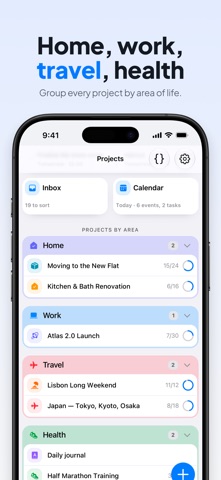
— Areas for the big parts of life: Work, Personal, Health, Travel, Finance, Home
— Projects inside each Area, with status, due date and a progress ring
— Each project keeps its Tasks, Notes, Events, Files and Links together
— Nested folders and tags keep every list tidy
— Linked items connect a task to its note, file or event
— Re-file in seconds with drag and drop, multi-select and Move to Project
TASKS, NOTES & FILES IN ONE PLACE
— Tasks with priorities, due dates, subtasks and multiple reminders
— Recurring tasks that repeat by due date or by completion date
— Rich notes with headings, lists, checklists, quotes and photos
— Images and PDFs with thumbnails, a photo gallery and a PDF reader
PLAN YOUR DAYS
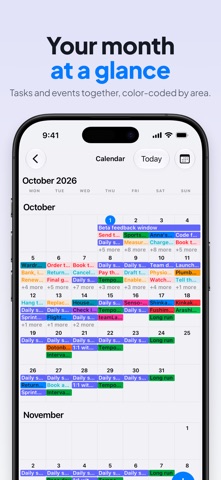
— Calendar with Day, 3-Day, Week and Month views, for all projects or just one
— Upcoming: your tasks and events in one list, with search and filters by Project, Area, type and priority
— Overdue and No date groups keep late and undated items in view
— Home Screen widget shows what's next. Check off tasks without opening the app.
— 12-hour or 24-hour time, in the app and the widget
PLAN A TRIP
— Trip projects come ready with an Itinerary by day, To Do, Packing list, Documents, Places, Links, Photos and Notes
— Packing list with one-tap suggestions: documents & money, electronics, toiletries, clothing and more
— Turn a shared map link into a Place
— Pick a cover photo and watch the countdown to departure
KEEP A PRIVATE JOURNAL
— Journal projects hold dated entries, written with the same text styles as notes
— Backdate an entry to any past day and time
— Add a mood (Bright, Good, Steady, Tense or Low) and photos from your camera or library
— Keep a day streak, and switch the chart between a 6-month heatmap, a month calendar and 2 weeks of mood bars
— Scroll your entries as a timeline, with photos on each card, or search them all
— Entries stay on your device, like the rest of your Brainee data
— Switch a project between General, Trip and Journal at any time. Nothing is moved or deleted; each type just shows a different view.
PRIVATE BY DESIGN
— Works offline: your data lives on your device
— No account, no ads, no tracking
— A few extras, like link previews, trip cover photo search and purchases, need an internet connection
— Dark and light mode, haptic feedback, iPhone and iPad
— Available in English and Spanish
FREE & PREMIUM
Brainee is free to start: up to 3 Areas and 5 Projects, with limits on items per project.
Premium unlocks unlimited Areas, Projects, tasks, notes, events, folders, links and Inbox items, plus files up to 100 MB and image compression.
Subscribe monthly or yearly, or pay once with Lifetime. Subscriptions renew automatically unless canceled at least 24 hours before the end of the current period. Manage or cancel them in your App Store account settings.
Your brain is for having ideas, not holding them. Let Brainee hold them for you.
Terms of Use (EULA): https://www.apple.com/legal/internet-services/itunes/dev/stdeula/
Privacy Policy: https://trybrainee.app/privacy
Safety and technology
Found in the app by AppBrain- Price
- Free
- App size
- 100.3 MB
- Content rating
- Everyone
Technologies used by Brainee: Second Brain Notes
Releases
Updates seen on the App Store- Version
- 2.8.0
- Launched
- February 2026
No changelog data
Alternatives
Similar apps and more from Serhii Hryn


Rankings
App Store top chartsApp Store Rankings for Brainee: Second Brain Notes
About the app and developer
About Brainee: Second Brain Notes
Brainee: Second Brain Notes is a productivity app developed by Serhii Hryn.
User Ratings
Brainee: Second Brain Notes is rated 5.00 out of 5 stars. The rating is based on 3 ratings.
App Information
Brainee: Second Brain Notes is freely available from the App Store. The app size is 100.28 MB. The latest version available is 2.8.0. The last update was on October 17, 2026.
Technical Requirements
The app has a content rating of Everyone. The app has been available on the App Store since February 2026.
Developer information for Serhii Hryn
Address: