

BRCu Skill Eval
BRCu Skill Eval is made and published by Gregory Branche. AppBrain is an independent app data site and isn't affiliated with Gregory Branche. The app name, icon, screenshots and description belong to Gregory Branche and are shown as published on the App Store.
AppBrain's verdict
Established- Rating on App Store
- 4.79
- 14 ratings
- Last updated
- June 1, 2025
- Size
- 37.4 MB
It doesn't have enough ratings yet to judge what users think.
User feedback
Ratings and reviews on the App StoreComments on BRCu Skill Eval for iOS
We don't have enough comments to show example comments. Please check back later.
Store listing
By Gregory Branche, from the App Store



Description by Gregory Branche Written by the developer, not by AppBrain. Click to read.
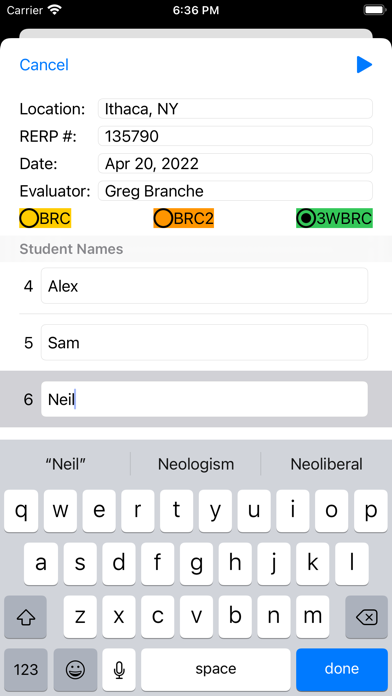
Rather than use the paper score sheet with a clipboard, pencil, and stopwatch, the app allows a certified RiderCoach to score the evaluation completely electronically. Scoring is assessed by tapping controls on the iPhone or iPad screen, with a logical progression of scoring screens provided throughout the evaluation. For evaluations 3, 4, and 5, an on-screen stopwatch is provided, but you are not required to use it – the time can be entered manually if you choose to do so. The Standard Distance for evaluation 3 is calculated automatically. During the skill evaluation, a student’s score is continually updated and displayed on that student’s evaluation page so that the RiderCoach has an immediate view of that student’s status. At the end of the evaluation, each student's score can be reviewed with the student (using an individual score sheet display on screen), and a standard MSF score sheet (individual, or group, or both) can be produced with the necessary annotations. This PDF form can be printed, shared, filed, etc. using standard iOS features.
A subscription is required to (1) start a new evaluation, (2) continue an evaluation that was interrupted before being completed, (3) make any changes while reviewing a completed evaluation, or (4) create a PDF of the MSF score sheet for any completed evaluation. Subscription options are offered from which to choose an appropriate subscription for your needs. (Note that you must have an active internet connection for the purchase offer and purchase completion to succeed.) If you only coach occasionally (e.g. two classes a year), the "Good for a day" non-renewing subscription may be all you need. It allows the user to use the app for 24 hours from the time of purchase, but does NOT automatically renew at the end of that 24-hour subscription period. The other subscription options include monthly, quarterly, semi-annually, and annually. All of these auto-renewing subscriptions offer the first month of usage for free, to allow you to evaluate the app to determine if it is appropriate for your needs. Each will auto-renew at the end of the subscription period, using the payment method you have associated with your App Store account. You can change or terminate your subscription at any time up to 24 hours before the end of your subscription using your device's subscription management features in the Setting app.
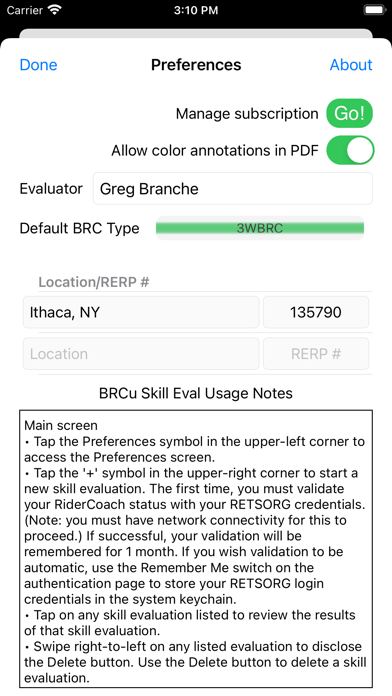
After selecting the appropriate subscription, I recommend spending a little time becoming familiar with the behavior of the app, versus learning to use it on-the-fly during a live evaluation. Rudimentary instructions are provided on the Preferences screen for the individual scenes provided in the app describing the behavior and navigation of each one.
Benefits of using the app vs. paper/clipboard/stopwatch:
• Eliminate score sheets flying around in the breeze.
• Calculate scores automatically and reduce mathematical errors.
• Eliminate possibility of the paper score sheet getting wet and unusable. (However, you should still be concerned about the water resistance of your device.)
• Correct errors more cleanly.
• Reduce possibility of transposing scores into the wrong column on the group score sheet.
Thank you for considering the use of my contribution to motorcycle safety training, and for your efforts in the advancement of the sport that we love.
Safety and technology
Found in the app by AppBrain- Price
- Free
- App size
- 37.4 MB
- Content rating
- Everyone
Technologies used by BRCu Skill Eval
Releases
Updates seen on the App Store- Version
- 3.0
- Launched
- May 2021
No changelog data
Alternatives
Similar apps and more from Gregory BrancheAlternatives to BRCu Skill Eval





Rankings
App Store top chartsApp Store Rankings for BRCu Skill Eval
About the app and developer
About BRCu Skill Eval
BRCu Skill Eval is a productivity app developed by Gregory Branche.
User Ratings
BRCu Skill Eval is rated 4.79 out of 5 stars. The rating is based on 14 ratings.
App Information
BRCu Skill Eval is freely available from the App Store. The app size is 37.43 MB. The latest version available is 3.0. The last update was on June 1, 2025.
Technical Requirements
The app has a content rating of Everyone. The app has been available on the App Store since May 2021.
Developer information for Gregory Branche
Address:
Frequently asked questions about BRCu Skill Eval
Is BRCu Skill Eval free?
Yes. BRCu Skill Eval is free on the App Store.
Is BRCu Skill Eval still available?
Yes. BRCu Skill Eval is on the App Store, and the last update we saw was on June 1, 2025.
How large is BRCu Skill Eval?
BRCu Skill Eval is 37.43 MB.
Is BRCu Skill Eval suitable for children?
App Store rates the content of BRCu Skill Eval as suitable for everyone.
How do people rate BRCu Skill Eval?
BRCu Skill Eval scores 4.79 out of 5 stars, from 14 ratings on the App Store.
Who made BRCu Skill Eval?
BRCu Skill Eval was developed by Gregory Branche. It is listed in the productivity category on the App Store.
What are the best alternatives to BRCu Skill Eval?
People looking at BRCu Skill Eval also look at these productivity apps: Zoho Solo: Invoice & Booking, Iron Butt Scoring App, ILLINOIS Chapter of the IAAI, FieldMap Pro, Taplet.