

Bricks Scan: Scan to PDF
Bricks Scan: Scan to PDF is made and published by Freddy Diaz. AppBrain is an independent app data site and isn't affiliated with Freddy Diaz. The app name, icon, screenshots and description belong to Freddy Diaz and are shown as published on the App Store.
AppBrain's verdict
- Last updated
- April 16, 2026
Rankings
App Store top chartsApp Store Rankings for Bricks Scan: Scan to PDF
Competitors
Similar apps and more from Freddy DiazAlternatives to Bricks Scan: Scan to PDF


More from Freddy Diaz


Releases
Updates seen on the App Store- Version
- 1.0.2
- Launched
- April 2026
No changelog data
User feedback
Ratings and reviews on the App StoreComments on Bricks Scan: Scan to PDF for iOS
We don't have enough comments to show example comments. Please check back later.
Technology
Found in the app by AppBrain- Price
- Free
- App size
- 26.4 MB
- Content rating
- Everyone
Technologies used by Bricks Scan: Scan to PDF
About the app and developer
About Bricks Scan: Scan to PDF
Bricks Scan: Scan to PDF is a business app developed by Freddy Diaz.
User Ratings
The app has no ratings yet.
App Information
Bricks Scan: Scan to PDF is freely available from the App Store. The app size is 26.39 MB. The latest version available is 1.0.2. The last update was on April 16, 2026.
Technical Requirements
The app has a content rating of Everyone. The app has been available on the App Store since April 2026.
Developer information for Freddy Diaz
Address:
Store listing
By Freddy Diaz, from the App Store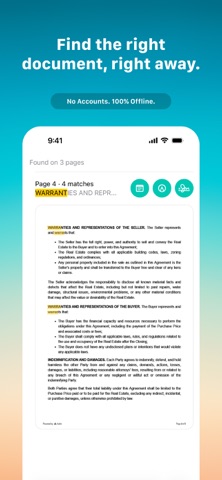


Description by Freddy Diaz Written by the developer, not by AppBrain. Click to read.
Bricks Scan helps turn paper into searchable, clearly named, organized documents — right on your device.
Most scanner apps stop after capture. Bricks Scan keeps going by making text searchable, giving files clear names, and organizing documents automatically.
====================================
THE WORKFLOW
====================================
1. Scan
Capture contracts, forms, IDs, receipts, and recurring paperwork.
2. Bricks Scan
Make documents searchable, name them clearly, and keep them organized automatically.
3. Ready
Find, review, sign, and share clean PDFs without extra steps.
====================================
BUILT FOR REAL WORK
====================================
• Instant Search — Find names, dates, addresses, and more fast.
• Paperless Signing — Sign documents without printing or rescanning.
• Markup & Notes — Highlight, annotate, and keep notes when needed.
• AI Summaries — Understand long documents faster.
====================================
PRIVATE BY DESIGN
====================================
All processing happens on your device. No mandatory accounts. No uploads for analysis or organization. Optional iCloud sync keeps documents updated across your Apple devices.
If Bricks Scan helps you, please consider leaving a review.
Questions or feedback: hello@bricks.pe
Terms of Use: https://www.apple.com/legal/internet-services/itunes/dev/stdeula/
Privacy Policy: https://www.bricks.pe/privacy.html