AppBrain
AppBrain
  • Apps
  • Apps being viewed right now Trending apps today Most popular apps All-time most downloaded apps Top rated apps iPhone and iPad apps
  • Intelligence ▾
    Intelligence overview → Track any Android app or your whole market
    Track & analyze
    Keyword Tracker & OptimizerTrack & improve Play rankings App Performance ReportOne-off PDF for any app StatisticsFree Android & Play market stats
    Promote your app
    Featured Apps App Links
  • Intelligence
  • Pricing
  • Dashboard
  • Sign up
  • Log in
Last updated on: 2026-10-05
App Store Apps > Productivity > BriefMe AI
App profile · Productivity · Data updated 2026-10-05
BriefMe AI icon

BriefMe AI

by Reymundo Perez Jr · Free · Version 1.0.4
Availability On the App Store since June 2024
Rating on App Store
–
Rating
–
0 reviews
Best rank
–
not in the top lists
Last updated
November 17, 2024
1.0.4

BriefMe AI is made and published by Reymundo Perez Jr. AppBrain is an independent app data site and isn't affiliated with Reymundo Perez Jr. The app name, icon, screenshots and description belong to Reymundo Perez Jr and are shown as published on the App Store.

About BriefMe AI

BriefMe AI is a productivity app developed by Reymundo Perez Jr.

What is the rating of BriefMe AI?

BriefMe AI has no ratings yet.

Is BriefMe AI free?

BriefMe AI is free. The app size is 45.01 MB. The latest version available is 1.0.4. The last update was on November 17, 2024.

What are the requirements for BriefMe AI?

The app has a content rating of High Maturity. The app has been available on the App Store since June 2024.

Description by Reymundo Perez Jr (from the App Store)
"Welcome to BriefMe – the ultimate meeting assistant designed to simplify and enhance your meeting experiences. Whether it's a medical consultation, educational session, or a police complaint meeting, BriefMe is here to help you capture every detail and provide you with concise, template-based summaries.
Key Features:
1. Record Any Meeting:
• Easily record any type of meeting with just a tap.
• Seamlessly organize your recordings with customizable titles.
2. Summarize with Templates:
• Choose from various summarization templates tailored to different meeting types:
3. Instant Summaries:
• Get instant, accurate summaries of your meetings.
• Ensure no important details are missed with our AI-powered summarization.
4. Home Screen Overview:
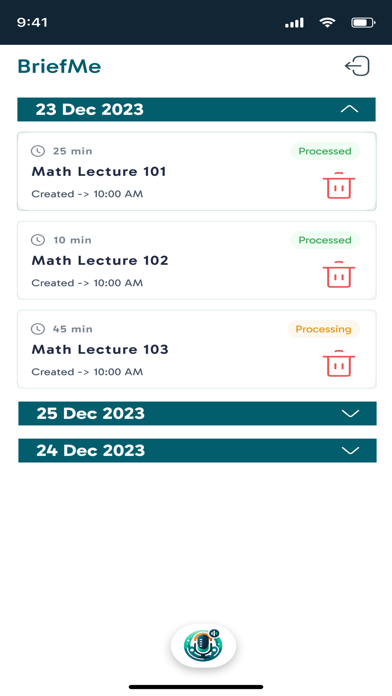
• Access all your summaries directly from the home screen.
• View a comprehensive history of your meetings and their summaries at a glance.
5. User-Friendly Interface:
• Intuitive and easy-to-navigate design.
• Clean layout that prioritizes user experience and efficiency.
Why Choose BriefMe?
• Efficiency: Save time by having all your meetings summarized quickly and accurately.
• Organization: Keep your meeting notes organized and easily accessible.
• Customization: Use templates specifically designed for different types of meetings.
• Convenience: Access your meeting history and summaries anytime, anywhere.
How It Works:
1. Record: Start recording your meeting with a simple tap.
2. Title: Give your recording a relevant title for easy identification.
3. Summarize: Select the appropriate template, and let BriefMe do the rest.
4. Review: Access your summarized meeting on the home screen and review the history as needed.
Ideal For:
• Professionals: Keep track of business meetings and client discussions.
• Students: Summarize lectures and study group sessions.
• Medical Practitioners: Document patient consultations efficiently.
• Law Enforcement: Record and summarize official meetings and complaints.
• Anyone who attends and needs to document meetings.
Security and Privacy:
Your recordings and summaries are stored securely, ensuring that your information is protected. We prioritize your privacy and follow best practices to keep your data safe.
Download BriefMe today and transform the way you handle meetings. Experience the convenience of having all your meeting information at your fingertips, summarized and organized just the way you need it.
"
Show more Show less
Price Free
Rating No ratings
Ranking Not ranked
Version 1.0.4
App size 45.0 MB
Maturity High Maturity

Screenshots

BriefMe AI Screenshot 1 of 5
BriefMe AI Screenshot 2 of 5
BriefMe AI Screenshot 3 of 5
BriefMe AI Screenshot 4 of 5
BriefMe AI Screenshot 5 of 5
Screenshots by Reymundo Perez Jr, from the the App Store listing
Official page on the App Store

Alternatives to BriefMe AI

Jotgenie icon Jotgenie
PUZZLCAT SOFTWARE (PTY) LTD
5.0
Free
1 ratings
AI Note Taker: AudioPad icon AI Note Taker: AudioPad
Asadbek Noyibjonov
0.0
Free
Walnote Ai Note Taker & Learn icon Walnote Ai Note Taker & Learn
Dhara Hingu
4.5
Free
110 ratings
Aladdin AI - virtual assistant icon Aladdin AI - virtual assistant
T-group
5.0
Free
3 ratings
AI Memos: Audio Notes icon AI Memos: Audio Notes
Finn Pauls
0.0
Free
Meeting.ai: Work Assistant icon Meeting.ai: Work Assistant
BAHASALAB AUTOMATION PTE. LTD.
4.9
Free
113 ratings
VoicePen: AI Speech to Text icon VoicePen: AI Speech to Text
Sirozh Tursunov
4.2
Free
18 ratings
Video Transcriber & Summarizer icon Video Transcriber & Summarizer
Qvalitech Engineering OU
4.0
Free
15 ratings

More from Reymundo Perez Jr

Magic Mirror AI icon Magic Mirror AI
Reymundo Perez Jr
0.0
Free

Changelog of BriefMe AI

No changelog data

Developer information for Reymundo Perez Jr

Reymundo Perez Jr

Address:

Share BriefMe AI

Comments on BriefMe AI for iOS

We don't have enough comments to show example comments. Please check back later.

App Store Rankings for BriefMe AI

This app is not ranked

Technologies used by BriefMe AI

Popular Productivity Apps Top new apps Apps other people are watching Price drops on Google Play Today's trending apps
Jotgenie icon Jotgenie
AI Note Taker: AudioPad icon AI Note Taker: AudioPad
Walnote Ai Note Taker & Learn icon Walnote Ai Note Taker & Learn
Aladdin AI - virtual assistant icon Aladdin AI - virtual assistant
AI Memos: Audio Notes icon AI Memos: Audio Notes
Meeting.ai: Work Assistant icon Meeting.ai: Work Assistant
VoicePen: AI Speech to Text icon VoicePen: AI Speech to Text
Video Transcriber & Summarizer icon Video Transcriber & Summarizer
Overview Alternatives Reviews Rankings Technology
AppBrain Intelligence premium content

Subscribe now to get full and unlimited access to AppBrain Intelligence. You'll have access to:

  • App Intelligence dashboard (performance timeline, competitor comparison, country rankings, insight cards)
  • Detailed ranking data per app
  • Full timeline per developer
  • Device market shares data per country
  • Unlimited keyword tracking
1 Month

$75/mo
(billed every month)

SAVE 0%
Subscribe
3 Months

$65/mo
($195 billed every 3 months)

SAVE 13%
Subscribe
1 Year

$57.50/mo
($690 billed every year)

SAVE 23%
Subscribe
Each subscription will automatically renew 3 days before the expiration date for the same time period. Subscriptions can be cancelled at any time before the renewal.

AppBrain is an app data site, we track rankings, ratings, installs for all apps and games on Google Play and the App Store. AppBrain doesn't host app files or APKs, all install links go directly to the official store. All trademarks are owned by their respective owners.

More apps

  • Top Android apps being viewed
  • iLauncher OS: Launcher Themes
  • Synthesia for Android
  • Bubble Shooter 2021 for Android

App statistics

  • Android statistics
  • Google Play Developer stats
  • Trending Android Apps
  • Trending iOS apps
  • Top popular Apps
  • Buy the best Android phone
  • Buy & sell app businesses

About AppBrain

  • Contact
  • Privacy
  • Documentation
  • DMCA takedowns
  • Articles
  • Blog
  • Free webpage for your Android app
© 2010-2026 - AppBrain