Download Android Apps and Games
AppBrain
  • Apps
  • Apps being viewed right now Trending apps today Most popular apps All-time most downloaded apps Top rated apps
  • Intelligence ▾
    Intelligence overview → Track any Android app or your whole market
    Track & analyze
    Keyword Tracker & OptimizerTrack & improve Play rankings App Performance ReportOne-off PDF for any app StatisticsFree Android & Play market stats
    Promote your app
    Featured Apps App Links
  • Intelligence
  • Pricing
  • Dashboard
  • Sign up
  • Log in
Last updated on: 2026-06-09
App Store Apps > Utilities > Brow Designer
Brow Designer icon

Brow Designer

1.2.2
SADWARE INCORPORATED
3.22
37 reviews
Free

Brow Designer Screenshot 1 of 6
Brow Designer Screenshot 2 of 6
Brow Designer Screenshot 3 of 6
Brow Designer Screenshot 4 of 6
Brow Designer Screenshot 5 of 6
Brow Designer Screenshot 6 of 6
Download from the App Store

About Brow Designer

Brow Designer is an overall app developed by SADWARE INCORPORATED.

Download Statistics

User Ratings

Brow Designer is rated 3.22 out of 5 stars. The rating is based on 37 ratings.

App Information

Brow Designer is FREE to download. The APK download size is 194.89 MB. The latest version available is 1.2.2. The last update was on November 20, 2025.

Technical Requirements

The app has a content rating of Everyone. The app has been available on Google Play April 2023.

Description
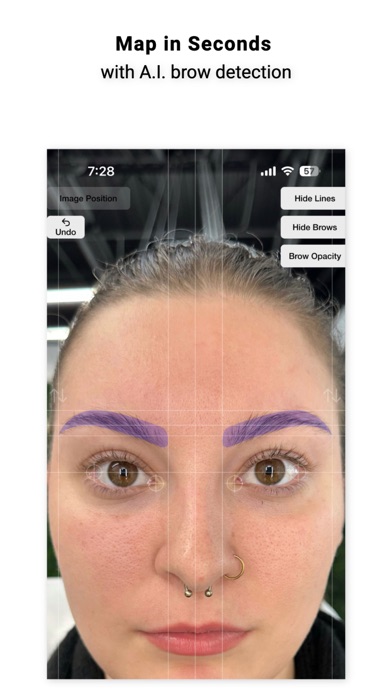
After years of meticulous research and development, we are excited to introduce Brow Designer, the ultimate brow shaping tool. Our app is designed based on workflows and experience of the world's greatest Permanent Makeup artists with the goal of helping you create the best possible brows in record time. Our AI-powered app quickly and automatically maps eyebrows onto a face, then allows you to customize the size, shape, and position to create your desired look. With Brow Designer, you'll enjoy expert-level brow shaping that's personalized, accurate, and effortless.

Unlike previous attempts at brow map apps that were frustrating, tricky, and time-consuming to use, Brow Designer was built from the ground up to be a user-friendly and blazing-fast addition to your Permanent Makeup workflow. However, we value your feedback and want to hear from you about how we can make this app even better. We are committed to making continuous improvements and learning from you, the professional brow designer. Please feel free to reach out to us with any questions or feedback. We look forward to hearing from you.

User Interface & Controls:
- Press & hold the gear button to get started. Once you have held long enough, your phone will vibrate and you can release. Releasing will open the menu and allow you to select a photo or open your camera
- Once an image is loaded, you can move it by dragging it and zoom by pinching
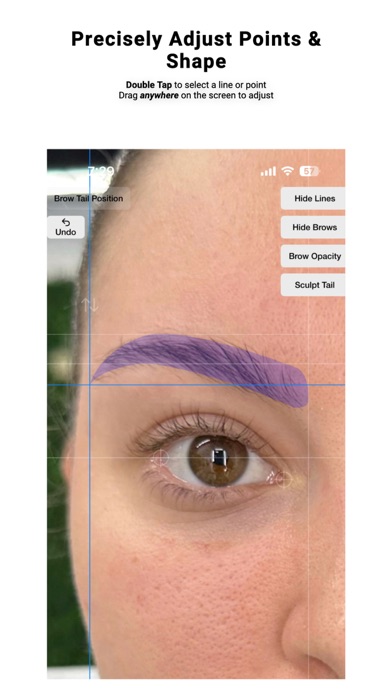
- Quickly Double Tap on a line or point to select it
- The selected line or point will show in blue
- Drag anywhere on the screen to adjust the selected point or line. This allows you to drag the position without obstructing it's location with your finger.
- Single tap to unselect or simply double tap on a different line to change the selection
- In the top right, you can press the Hide Lines button to show only the brows created. Tap it again to show the lines again.
- If you select either the head or tail of the brow, a bonus button will be displayed in the top right that will say "Sculpt Head" or "Sculpt Tail". Clicking this will change the controls to allow for reshaping or the heads and tails to get the shape just right.
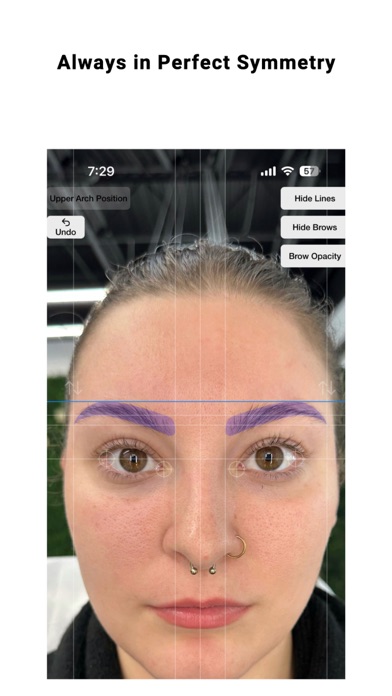
- The up and down arrows above each brow will allow you to individually adjust the vertical position of each brow individually and separately

How Automatic Mapping Works:
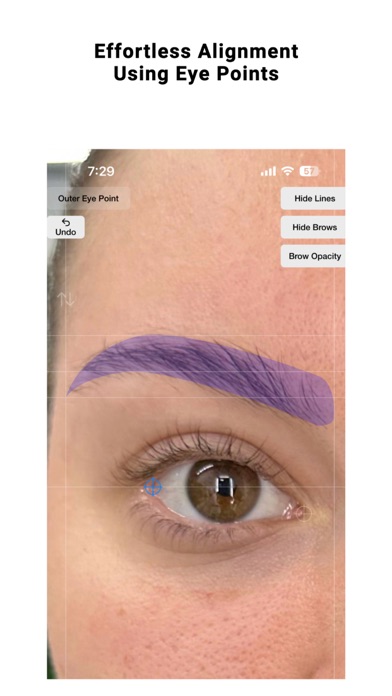
Brow Designer uses Artificial Intelligence-based image analysis to automatically align the image and map brow points. The rotation of the image is determined by aligning the outermost corners of each eye so that they are in line. This is because subjects will subconsciously use the outer eye corners as reference points when looking at themselves in a mirror or image. This method is the most reliable because no face is absolutely symmetrical, so using features such as ears, nose, or distance can be misleading. The center point of the brow map is then identified by finding the distance between the two inner points of the eyes for the same reason. If the App doesn't do this perfectly, the eye points can be adjusted manually. Simply double-tap on the crosshairs near the eyes and drag them to their appropriate positions to adjust rotation and the brow center point.

Tips:
For best results, the subject should be maskless, sitting or standing with their eyes open and a neutral facial expression. The entire face and head of the subject should be surrounded by empty space because lens distortion affects the outer section of the image the most.

You can find the terms of use here: https://www.apple.com/legal/internet-services/itunes/dev/stdeula/

SADWARE INCORPORATED is a one-human software company located in the great state of Texas.
Show more Show less

More data about Brow Designer

Price Free to download
Rating 3.22 based on 37 ratings
Ranking Not ranked
Version 1.2.2
App download size 194.9 MB
Suitable for Everyone

Alternative downloads for the Brow Designer app

PhiApp icon PhiApp
PhiAcademy GmbH
3.4
Free
67 ratings
NUE Conceal icon NUE Conceal
Benjamin Harvey
3.0
Free
2 ratings
Smart Beauty AR Camera App icon Smart Beauty AR Camera App
Hadi Pourkerman
5.0
Free
1 ratings
TattooPrinter icon TattooPrinter
Milestone Intellgent Electronics (guangzhou) Co.ltd
2.4
Free
5 ratings
Merit icon Merit
Merit International, Inc.
3.8
Free
41 ratings
Photo Blender - Photo Merge icon Photo Blender - Photo Merge
SHELL INFRASTRUCTURE PRIVATE LIMITED
3.0
Free
4 ratings
Before After: Photo Compare icon Before After: Photo Compare
Unfollowers
4.7
Free
25 ratings
MYXPrint icon MYXPrint
Milestone Intellgent Electronics (guangzhou) Co.ltd
1.1
Free
25 ratings

Changelog of Brow Designer

No changelog data

Developer information for SADWARE INCORPORATED

SADWARE INCORPORATED

Address:

Share Brow Designer

Comments on Brow Designer for iOS

We don't have enough comments to show example comments. Please check back later.

App Store Rankings for Brow Designer

This app is not ranked

Technologies used by Brow Designer

PhiApp icon PhiApp
NUE Conceal icon NUE Conceal
Smart Beauty AR Camera App icon Smart Beauty AR Camera App
TattooPrinter icon TattooPrinter
Merit icon Merit
Photo Blender - Photo Merge icon Photo Blender - Photo Merge
Before After: Photo Compare icon Before After: Photo Compare
MYXPrint icon MYXPrint

Back to top
AppBrain Intelligence premium content

Subscribe now to get full and unlimited access to AppBrain Intelligence. You'll have access to:

  • App Intelligence dashboard (performance timeline, competitor comparison, country rankings, insight cards)
  • Detailed ranking data per app
  • Full timeline per developer
  • Device market shares data per country
1 Month

$75/mo
(billed every month)

SAVE 0%
Subscribe
3 Months

$65/mo
($195 billed every 3 months)

SAVE 13%
Subscribe
1 Year

$57.50/mo
($690 billed every year)

SAVE 23%
Subscribe
Each subscription will automatically renew 3 days before the expiration date for the same time period. Subscriptions can be cancelled at any time before the renewal.

AppBrain is a directory focused on discovering great apps and games. We give statistics, rankings and search options that Google Play and the App Store don't have. All trademarks are owned by their respective owners. AppBrain doesn't offer APKs or binaries, and always lets users install the official version from Google Play or the App Store.

More apps

  • Top Android apps being viewed
  • EQInfo Android App
  • View CVS Specialty
  • CricFy TV : World Cup stats

Android Statistics

  • Android statistics
  • Google Play Developer stats
  • Trending Android Apps
  • Top popular Apps
  • Buy the best Android phone

About AppBrain

  • Contact
  • Privacy
  • Documentation
  • DMCA takedowns
  • Articles
  • Blog
  • Free App-Ads.Txt Validation
© 2010-2026 - AppBrain