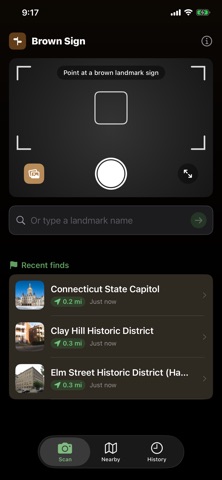
Brown Sign identifies the landmarks behind brown roadside signs, and helps you discover new ones around you.
SNAP OR TYPE
Point your camera at a brown highway sign, pick a photo from your library, or just type the name. Pinch to zoom in on a sign that's far away. Brown Sign identifies the landmark, pulls up a summary, and shows you a photo.
LAUNCH FROM ANYWHERE
Signs don't wait. Ask Siri to "Scan a sign with Brown Sign", add the scan button to Control Center, the Lock Screen, or your Action button, or long-press the app icon, and the camera is already up when the app opens.
NEARBY DISCOVERY
Open the Nearby tab to see landmarks around you, with an adjustable search radius from 2 to 25 miles. No scan needed. Switch to map view and pan to keep exploring; pins accumulate as you go, and the list follows along to show what's around the area you're viewing, with one tap to jump back to your own location. Hiking trails, museums, parks, monuments, lighthouses, covered bridges, historic districts, and dozens of other categories.
SMART SEARCH
Brown Sign searches Wikipedia, the National Park Service, and Wikidata to find the right match. It uses Apple Intelligence to clean up messy camera text and polish summaries into quick, readable cards.
LOCATION-AWARE
Results are ranked by distance from you, so local landmarks come first. Searching "Wadsworth" near Middletown, CT? You'll see the mansion down the road, not a city in Ohio.
MULTIPLE MATCHES
When a name matches multiple places, Brown Sign shows all of them sorted by distance. Tap any alternative to switch instantly.
GET DIRECTIONS
Tap "Directions" on any result to open Google Maps, Waze, or Apple Maps with turn-by-turn navigation to the landmark.
HISTORY
Every lookup is saved with a photo and full details. Swipe to delete, or tap to revisit any landmark you've looked up before.
RICH DETAIL CARDS
Each result includes coordinates, founding year, type (museum, park, fort, etc.), a Wikipedia photo, and the full article summary, with a one-tap link to read more in Safari. Where Apple has street-level imagery, a Look Around preview shows you the landmark from the road. Text is fully selectable for easy copying.
SHARE
Share any landmark's article link with friends, family, or fellow travelers in one tap.
PRIVACY FIRST
Everything runs on your device. Camera images stay local. Location is used only to find and rank nearby results, never tracked or shared. No accounts, no analytics, no ads.
COMPLETELY FREE
Every feature, everywhere. No subscription, no in-app purchases, no region packs to buy.
Brown Sign works on any iPhone running iOS 26. Apple Intelligence enhances the experience with smarter text cleanup and polished summaries, but the core pipeline works on every supported device.
Show more
Show less