



AppBrain's verdict
- Last updated
- November 4, 2026
- Size
- 62.1 MB
User feedback
Ratings and reviews on the App StoreComments on Browser: MultiTab Workspace for iOS
We don't have enough comments to show example comments. Please check back later.
Store listing
By KODEREAD SOLUTIONS LLP, from the App StoreDescription by KODEREAD SOLUTIONS LLP Written by the developer, not by AppBrain. Click to read.
MultiTab is a private workspace browser designed for people who use multiple accounts, tabs and online identities.
Keep work, personal, client, shopping, research and private browsing separate in one browser.
Stay signed in to different accounts, keep your tabs organized, block ads and trackers, protect your browsing with Face ID, and keep everything in the right workspace.
PRIVATE WORKSPACES:
Create separate spaces for every part of your digital life:
• Work
• Personal
• Business
• Private
• Shopping
• Study
• Social
• Research
• Client accounts
Each workspace keeps your browsing environment separate, keeping accounts and activity organized by context.
MULTIPLE ACCOUNTS, WITHOUT THE CONSTANT LOGOUT
Use the same websites with different accounts.
Keep personal and work accounts signed in separately. Switch workspaces without repeatedly logging out.
Perfect for:
• Work and personal accounts
• Multiple client accounts
• Business and social profiles
• Research projects
• Shopping accounts
MULTI-TAB BROWSING
Open as many tabs as you need and keep everything organized.
• Unlimited tabs
• Tab previews
• Pin important tabs
• Search open tabs
• Normal and Private tabs
• Persistent browsing sessions
• Easy tab switching
Your tabs stay where you left them, without the clutter.
AD-FREE BROWSING
Browse with fewer distractions.
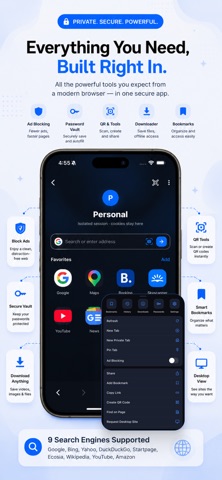
Built-in ad blocking helps remove intrusive ads, pop-ups and unwanted elements for a cleaner web.
Premium users can enjoy ad-free browsing throughout the app.
TRACKER & PRIVACY PROTECTION
Take more control over your browsing.
• Tracker blocking
• Private tabs
• Face ID / passcode app lock
• Workspace locking
• Secure password storage
• Clear browsing data when needed
Take more control over your browsing sessions and personal data with MultiTab.
SECURE PASSWORD VAULT
Save your website logins and use Autofill when you need them.
Keep passwords organized and protected, with control over which websites can save credentials.
DOWNLOAD ANYTHING
Save files directly from the browser.
• Videos
• Images
• Audio
• Documents
• Other files
Organize downloads by type and access saved files later.
SMART BROWSER TOOLS
Useful tools are built right into the browser:
• QR code scanner
• QR code generator
• Visual search
• Search multiple engines
• Find on page
• Request desktop websites
• Bookmarks
• Page sharing
• Save pages as PDF
• Download manager
CHOOSE YOUR SEARCH ENGINE
Choose the search engine that works best for you.
Supported options include Google, Bing, Yahoo, DuckDuckGo, Startpage, Ecosia, Wikipedia, YouTube and Amazon.
BUILT FOR YOUR WAY OF BROWSING
Use MultiTab for:
Work — Keep business browsing and personal browsing separate.
Clients — Manage different client accounts without mixing sessions.
Personal — Keep your everyday browsing in its own workspace.
Private — Protect sensitive browsing with private tabs and workspace locks.
Study & Research — Organize sources, tabs and projects separately.
Shopping — Keep shopping sessions and research in their own space.
WHY MULTITAB?
One browser can do it all.
Stop juggling browsers and logging in and out. Create a workspace for each context and keep everything organized.
Multiple accounts. Separate sessions. Private browsing. Ad blocking. One browser.
Start using MultiTab today.
PREMIUM
Unlock Premium features such as unlimited workspaces, ad-free browsing and additional browser capabilities.
Subscription options may include weekly, monthly and yearly plans. A free trial may be available.
Payment is charged to your Apple ID account at confirmation of purchase. Subscriptions renew automatically unless canceled at least 24 hours before the end of the current billing period. You can manage or cancel your subscription in your Apple ID account settings.
Privacy Policy: https://koderead.com/privacy-policy/
Terms of Use: https://www.apple.com/legal/internet-services/itunes/dev/stdeula/
Safety and technology
Found in the app by AppBrain- Price
- Free
- App size
- 62.1 MB
- Content rating
- Everyone
Technologies used by Browser: MultiTab Workspace
Releases
Updates seen on the App Store- Version
- 1.0.1
- Launched
- July 2026
No changelog data
Alternatives
Similar apps and more from KODEREAD SOLUTIONS LLPAlternatives to Browser: MultiTab Workspace


More from KODEREAD SOLUTIONS LLP


Rankings
App Store top chartsApp Store Rankings for Browser: MultiTab Workspace
About the app and developer
About Browser: MultiTab Workspace
Browser: MultiTab Workspace is an utilities app developed by KODEREAD SOLUTIONS LLP.
What is the rating of Browser: MultiTab Workspace?
Browser: MultiTab Workspace has no ratings yet.
Is Browser: MultiTab Workspace free?
Browser: MultiTab Workspace is free. The app size is 62.07 MB. The latest version available is 1.0.1. The last update was on November 4, 2026.
What are the requirements for Browser: MultiTab Workspace?
The app has a content rating of Everyone. The app has been available on the App Store since July 2026.
Browser: MultiTab Workspace is made and published by KODEREAD SOLUTIONS LLP. AppBrain is an independent app data site and isn't affiliated with KODEREAD SOLUTIONS LLP. The app name, icon, screenshots and description belong to KODEREAD SOLUTIONS LLP and are shown as published on the App Store.
Developer information for KODEREAD SOLUTIONS LLP
Address:
Frequently asked questions about Browser: MultiTab Workspace
Is Browser: MultiTab Workspace free?
Yes. Browser: MultiTab Workspace is free on the App Store.
Is Browser: MultiTab Workspace still available?
Yes. Browser: MultiTab Workspace is on the App Store, and the last update we saw was on November 4, 2026.
How large is Browser: MultiTab Workspace?
Browser: MultiTab Workspace is 62.07 MB.
Is Browser: MultiTab Workspace suitable for children?
App Store rates the content of Browser: MultiTab Workspace as suitable for everyone.
Who made Browser: MultiTab Workspace?
Browser: MultiTab Workspace was developed by KODEREAD SOLUTIONS LLP. It is listed in the utilities category on the App Store.
What are the best alternatives to Browser: MultiTab Workspace?
People looking at Browser: MultiTab Workspace also look at these utilities apps: AutoClicker - Web Auto Tap, DockLeap, Safe4SureBrowser, Arkee, Quiet Browser.