Download Android Apps and Games
AppBrain
  • Apps
  • Apps being viewed right now Trending apps today Most popular apps All-time most downloaded apps Top rated apps iPhone and iPad apps
  • Intelligence ▾
    Intelligence overview → Track any Android app or your whole market
    Track & analyze
    Keyword Tracker & OptimizerTrack & improve Play rankings App Performance ReportOne-off PDF for any app StatisticsFree Android & Play market stats
    Promote your app
    Featured Apps App Links
  • Intelligence
  • Pricing
  • Dashboard
  • Sign up
  • Log in
Last updated on: 2026-09-25
App Store Apps > Utilities > BT Keys: Keyboard & Trackpad
BT Keys: Keyboard & Trackpad icon

BT Keys: Keyboard & Trackpad

1.2.5
Anton Popov
4.25
4 reviews
Free

BT Keys: Keyboard & Trackpad Screenshot 1 of 8
BT Keys: Keyboard & Trackpad Screenshot 2 of 8
BT Keys: Keyboard & Trackpad Screenshot 3 of 8
BT Keys: Keyboard & Trackpad Screenshot 4 of 8
BT Keys: Keyboard & Trackpad Screenshot 5 of 8
BT Keys: Keyboard & Trackpad Screenshot 6 of 8
BT Keys: Keyboard & Trackpad Screenshot 7 of 8
BT Keys: Keyboard & Trackpad Screenshot 8 of 8
Download from the App Store

About BT Keys: Keyboard & Trackpad

BT Keys: Keyboard & Trackpad is an utilities app developed by Anton Popov.

User Ratings

BT Keys: Keyboard & Trackpad is rated 4.25 out of 5 stars. The rating is based on 4 ratings.

App Information

BT Keys: Keyboard & Trackpad is FREE to download. The download size is 5.19 MB. The latest version available is 1.2.5. The last update was on September 24, 2026.

Technical Requirements

The app has a content rating of Everyone. The app has been available on the App Store since June 2026.

Description
Turn your iPhone into a wireless Bluetooth keyboard and trackpad.

NOTHING TO INSTALL ON THE OTHER DEVICE
• Mac, iPad or iPhone signed into your Apple ID: open Devices, tap Scan and pick it. It connects from here — your iPhone becomes its keyboard and trackpad, in every app, with nothing installed over there.
• Everything else — PC, Android, smart TV, Raspberry Pi, and Apple devices on someone else's Apple ID: pair straight from that device's own Bluetooth settings, where your iPhone is listed as "BT Keys" and behaves like any other Bluetooth keyboard.

TYPE INTO A PC, SMART TV OR RASPBERRY PI
These see your iPhone as a normal Bluetooth keyboard + mouse. Pair from their Bluetooth settings — your iPhone is listed as "BT Keys", or whatever name you give it in the app's Settings — and start typing and pointing.

TYPE INTO A MAC, iPad OR ANOTHER iPhone
On your own Apple ID it takes one tap: Devices ▸ Scan ▸ pick the device — no pairing screen at all. On someone else's Apple ID, pair from that device's own Bluetooth settings: a code appears there and you confirm it on that device, with nothing to type on your iPhone. If neither route connects, install BT Keys there too and switch it to Receive mode — on a Mac, under the App Store's "iPhone & iPad Apps" tab.

Got an Android phone? It works too: with our AndroHID app, an Android phone can be the keyboard and trackpad for your iPhone or iPad.

KEYBOARD
• Your normal iPhone keyboard — every language, including Japanese, Chinese and Korean input methods, plus dictation
• Dedicated Ctrl, Shift, Alt and ⌘ modifier keys — tap a modifier, then a key for shortcuts like ⌘+Tab or Ctrl+C
• Fn row for F1–F12, plus Esc, Tab, Paste, Delete and a full arrow cluster
• Works with the other device's keyboard layout — US, UK, German, French, Spanish, Italian, Portuguese, Swiss, Belgian, Nordic, Latin American and more. Pick the same layout in Settings and letters, symbols and accents (ö, é, ñ, ç…) arrive exactly as typed
• Japanese, Chinese and Korean input works — to a Mac only, and the Mac must have "Unicode Hex Input" selected as its current input source, with Extended Unicode turned on in the app's Settings. Without both, the Mac types garbled characters instead of your text
• Numpad mode: the whole screen becomes a numeric keypad for a laptop without one. Real keypad keys, so spreadsheet shortcuts and Alt-codes work; one tap swaps the digits for arrows and the Home/End/Page keys
• Every keystroke is sent as a real Bluetooth HID report

MACROS & SNIPPETS
• Record a key combo — ⌘+Tab, Ctrl+Alt+Delete, anything — and replay it with one tap
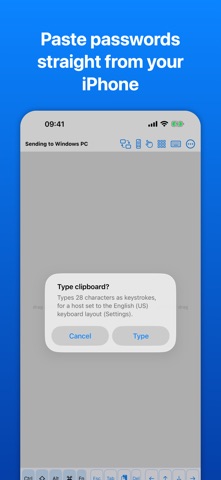
• Save text snippets (emails, passwords, URLs), and type your clipboard on the other device with the Paste key — handy for passwords

TRACKPAD
• Multi-touch trackpad with adjustable speed and acceleration
• One finger moves the pointer and taps to click; two fingers scroll and tap to right-click
• Tap then press again to drag — select text, move a window, drag a file
• Trackpad-only mode gives the pointer the whole screen, with no keyboard taking up half of it. Flicks keep gliding, the way a laptop trackpad does

REMOTE MODE
• Full-screen TV/media remote — transport controls, volume and a D-pad for on-screen navigation
• A companion Apple Watch app puts play/pause, skip and volume on your wrist

MULTIPLE DEVICES
• Stay connected to several devices at once and choose which one receives your input
• Each one is listed by its own name and model where it publishes them, and Identify wiggles its pointer so you can see which screen you are about to type into
• Rename any of them

LOOKS
• Light, dark, or whatever your phone is set to
• Ten accent colours

PRIVACY
• No accounts, no servers, no tracking
• Your keystrokes go straight to the paired device over an encrypted Bluetooth connection — never recorded, never uploaded

Free to use 10 minutes per day. A single one-time in-app purchase unlocks unlimited use — no subscription.
Show more Show less

More data about BT Keys: Keyboard & Trackpad

Price Free to download
Rating 4.25 based on 4 ratings
Ranking Not ranked
Version 1.2.5
App download size 5.19 MB
Suitable for Everyone

More from Anton Popov

Timer 2000 icon Timer 2000
Anton Popov
0.0
Free
Jukebox 2000: Music Player icon Jukebox 2000: Music Player
Anton Popov
0.0
Free
Lunar Patrol icon Lunar Patrol
Anton Popov
0.0
Free
2000 Words: German icon 2000 Words: German
Anton Popov
0.0
Free

Changelog of BT Keys: Keyboard & Trackpad

No changelog data

Developer information for Anton Popov

Anton Popov

Address:

Share BT Keys: Keyboard & Trackpad

Comments on BT Keys: Keyboard & Trackpad for iOS

We don't have enough comments to show example comments. Please check back later.

App Store Rankings for BT Keys: Keyboard & Trackpad

This app is not ranked

Technologies used by BT Keys: Keyboard & Trackpad

Frequently asked questions about BT Keys: Keyboard & Trackpad

Is BT Keys: Keyboard & Trackpad free?

Yes. BT Keys: Keyboard & Trackpad is free to download from the App Store.

Is BT Keys: Keyboard & Trackpad still available?

Yes. BT Keys: Keyboard & Trackpad is on the App Store, and the last update we saw was on September 24, 2026.

How large is the BT Keys: Keyboard & Trackpad download?

BT Keys: Keyboard & Trackpad is 5.19 MB to download.

Is BT Keys: Keyboard & Trackpad suitable for children?

App Store rates the content of BT Keys: Keyboard & Trackpad as suitable for everyone.

How do people rate BT Keys: Keyboard & Trackpad?

BT Keys: Keyboard & Trackpad scores 4.25 out of 5 stars, from 4 ratings on the App Store.

Who made BT Keys: Keyboard & Trackpad?

BT Keys: Keyboard & Trackpad was developed by Anton Popov. It is listed in the utilities category on the App Store.

Today's trending apps Popular Utilities Apps Apps other people are watching Top new apps Apps on sale
More hot apps 🔥

Back to top
AppBrain Intelligence premium content

Subscribe now to get full and unlimited access to AppBrain Intelligence. You'll have access to:

  • App Intelligence dashboard (performance timeline, competitor comparison, country rankings, insight cards)
  • Detailed ranking data per app
  • Full timeline per developer
  • Device market shares data per country
  • Unlimited keyword tracking
1 Month

$75/mo
(billed every month)

SAVE 0%
Subscribe
3 Months

$65/mo
($195 billed every 3 months)

SAVE 13%
Subscribe
1 Year

$57.50/mo
($690 billed every year)

SAVE 23%
Subscribe
Each subscription will automatically renew 3 days before the expiration date for the same time period. Subscriptions can be cancelled at any time before the renewal.

AppBrain is a directory focused on discovering great apps and games. We give statistics, rankings and search options that Google Play and the App Store don't have. All trademarks are owned by their respective owners. AppBrain doesn't offer APKs or binaries, and always lets users install the official version from Google Play or the App Store.

More apps

  • Top Android apps being viewed
  • Music Player
  • Dragon Ball: Goku Adventure
  • View Toca Boca World

App statistics

  • Android statistics
  • Google Play Developer stats
  • Trending Android Apps
  • Trending iOS apps
  • Top popular Apps
  • Buy the best Android phone

About AppBrain

  • Contact
  • Privacy
  • Documentation
  • DMCA takedowns
  • Articles
  • Blog
  • How to improve the earnings of your ad units
© 2010-2026 - AppBrain