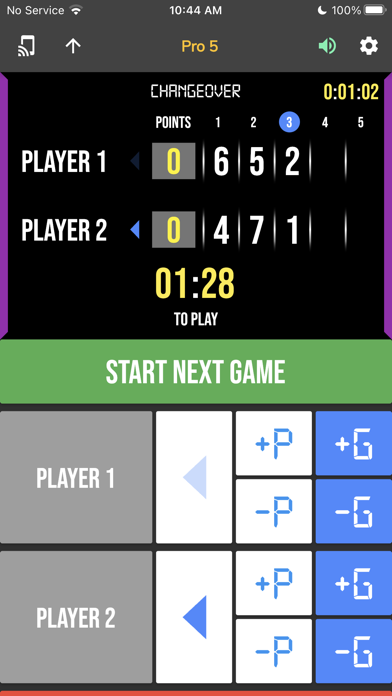
BT Tennis Controller is an overall app developed by The Basketball Temple LLC.
How many times has BT Tennis Controller been downloaded?
What is the rating of BT Tennis Controller?
BT Tennis Controller is rated 5.00 out of 5 stars, based on one rating ratings.
Is BT Tennis Controller free?
BT Tennis Controller is free to download. The APK download size is 118.95 MB. The latest version available is 1205. The last update was on June 4, 2026.
What are the requirements for BT Tennis Controller?
The app has a content rating of Everyone. The app has been available on Google Play February 2024.
Description
The BT Tennis Controller is a complimentary app meant to remotely control supported BT tennis scoreboards, and score camera devices. The app synchronizes the time and score on all these supported devices. The interface is extremely clean and intuitive, everything is directly touch or swipe based. Clearly labeled controller buttons are also added for those that prefer a button interface. The BT Controller app is easy to learn and new users can be running the time and score for a tennis game in no time.
For a full list of our other tutorials please visit: https://vimeo.com/channels/btstatsco
BT Controller App Features: - Clean design, no ads - Intuitive direct tap and swipe controls - Remotely control scoreboards, cameras, and other devices with WiFi or Bluetooth - Convenient Presets (Pro 5 Sets, Pro 3 Sets) - Convenient timers: warmup timer, change-over timer, in-between set timer, to serve timer - Automated game flow - Fully customizable game in the settings - Quick Start Documentation below
The BT Tennis Controller app was created by The Basketball Temple Company. After the success of our basketball products, we have expanded into other sports. The Basketball Temple Company focuses on high quality basketball academies, basketball leagues, and technologies that are used to support those academies and leagues. We open our technology to the public so everyone in the basketball community can experience the same technologies that we use within our institutions.
# Quick Start Documentation: All the actions below have corresponding controller buttons that may be used instead.
Score Controls: - Tap directly on the score to increase quickly - Swipe up/down score to increase/decrease - Hold down on team names to adjust name and color of teams - Select set to change scores of previous sets
Connect and Remote Control Settings: - Tap on top-left icon (or swipe left-to-right on the left edge) to open connect menu - Hit "Refresh" to find devices - Tap on WiFi or Bluetooth icon to connect, green icon indicates connected - If unable to connect or having connection errors try one of the following: 1) please ensure all devices are on the same WiFi network 2) please ensure bluetooth is turned ON on all devices 3) lastly, try to restart the app on all devices
Customize Game Settings: - Tap on top-right icon to open settings menu - Edit and save the many settings available
Each subscription will automatically renew 3 days before the expiration date for
the same time period. Subscriptions can be cancelled at any time before the renewal.