

BT Tennis Scoreboard
BT Tennis Scoreboard is made and published by The Basketball Temple LLC. AppBrain is an independent app data site and isn't affiliated with The Basketball Temple LLC. The app name, icon, screenshots and description belong to The Basketball Temple LLC and are shown as published on the App Store.
AppBrain's verdict
- Last updated
- October 4, 2026
Rankings
App Store top chartsApp Store Rankings for BT Tennis Scoreboard
Competitors
Similar apps and more from The Basketball Temple LLCMore from The Basketball Temple LLC


Also available on Google Play

Releases
Updates seen on the App Store- Version
- 1239
- Launched
- February 2024
No changelog data
User feedback
Ratings and reviews on the App StoreComments on BT Tennis Scoreboard for iOS
We don't have enough comments to show example comments. Please check back later.
Technology
Found in the app by AppBrain- Price
- Free
- App size
- 112.6 MB
- Content rating
- Everyone
Technologies used by BT Tennis Scoreboard
About the app and developer
About BT Tennis Scoreboard
BT Tennis Scoreboard is a sports app developed by The Basketball Temple LLC.
User Ratings
The app has no ratings yet.
App Information
BT Tennis Scoreboard is freely available from the App Store. The app size is 112.60 MB. The latest version available is 1239. The last update was on October 4, 2026.
Technical Requirements
The app has a content rating of Everyone. The app has been available on the App Store since February 2024.
Developer information for The Basketball Temple LLC
Address:
Frequently asked questions about BT Tennis Scoreboard
Is BT Tennis Scoreboard free?
Yes. BT Tennis Scoreboard is free on the App Store.
Is BT Tennis Scoreboard still available?
Yes. BT Tennis Scoreboard is on the App Store, and the last update we saw was on October 4, 2026.
How large is BT Tennis Scoreboard?
BT Tennis Scoreboard is 112.60 MB.
Is BT Tennis Scoreboard suitable for children?
App Store rates the content of BT Tennis Scoreboard as suitable for everyone.
Who made BT Tennis Scoreboard?
BT Tennis Scoreboard was developed by The Basketball Temple LLC. It is listed in the sports category on the App Store.
Store listing
By The Basketball Temple LLC, from the App Store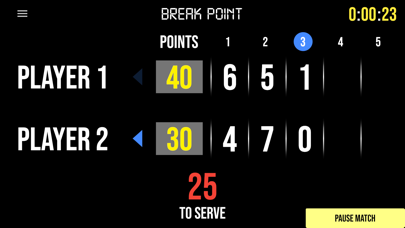


Description by The Basketball Temple LLC Written by the developer, not by AppBrain. Click to read.
BT Tennis Scoreboard Features:
- Clean design, no ads
- Intuitive direct tap and swipe controls
- Optionally remote control scoreboard with WiFi or Bluetooth
- Indicators for Break Point, Set Point, Match Point
- Automated game flow with server changes, change over, and set breaks
- "To Serve" clock, change over clock, and set break clock timers add convenience to game flow
- Fully customizable game in the settings
Compatible Apps:
BT Tennis Controller (Remote): https://www.basketballtemple.com/technologies/bt-controller-tennis-app
BT Tennis Camera: https://www.basketballtemple.com/technologies/bt-camera-tennis-app
For the best experience use the application on a large tablet, or hook your phone/tablet up to a large display or video projector. You'll feel like you have just bought a professional scoreboard!
The BT Tennis Camera app was created by The Basketball Temple Company. After the success of our basketball products, we have expanded into other sports. The Basketball Temple Company focuses on high quality academies, leagues, and technologies that are used to support those academies and leagues. We open our technology to the public so everyone in the sports community can experience the same technologies that we use within our institutions.
# Quick Start Documentation:
Optionally Remote Control the Scoreboard
1. Start the BT Tennis Scoreboard app on the main phone or tablet
2. On another phone, start the free BT Tennis Controller app (https://www.basketballtemple.com/technologies/bt-controller-tennis-app)
3. Open the connect menu in the BT Tennis Controller and connect to the BT Tennis Scoreboard with WiFi or Bluetooth
4. Control the game with the BT Tennis Controller and all score and timers will synchronize to the Scoreboard
Score Controls:
- Tap score to increase quickly
- Swipe up/down score to increase/decrease
- Hold down on team names to adjust name and color of teams
- Select set to adjust previous set scores
Optionally use the Scoreboard itself as a Remote Controller for the BT Tennis Camera app
- Tap on top-left icon to open connect menu
- Hit "Refresh" to find devices
- Tap on WiFi or Bluetooth icon to connect, green icon indicates connected
- If unable to connect or having connection errors try one of the following:
1) please ensure all devices are on the same WiFi network
2) please ensure bluetooth is turned ON on all devices
3) lastly, try to restart the app on all devices
# Change Team Names within the scoreboard app
1. Hold down on the team name, after a couple seconds an edit name dialog will appear
2. Edit the name and press "Update"
Customize Game Settings:
- Tap on top-right icon to open settings menu
- Edit and save the many settings available
For a full list of our other tutorials please visit: https://www.youtube.com/@btstatsco
Feel free to contact us at support@basketballtemple.com
Privacy Policy: https://www.basketballtemple.com/privacy
Terms of Use: https://www.apple.com/legal/internet-services/itunes/dev/stdeula/