




AppBrain's verdict
EstablishedWell rated- Rating on App Store
- 4.50
- 1,584 ratings
- Last updated
- June 26, 2025
- Size
- 112.4 MB
Users rate it well: 4.5 stars from 1,584 ratings.
User feedback
Ratings and reviews on the App StoreComments on BTS OFFICIAL LIGHT STICK for iOS
We don't have enough comments to show example comments. Please check back later.
Store listing
By FANLIGHT Co., Ltd, from the App StoreDescription by FANLIGHT Co., Ltd Written by the developer, not by AppBrain. Click to read.
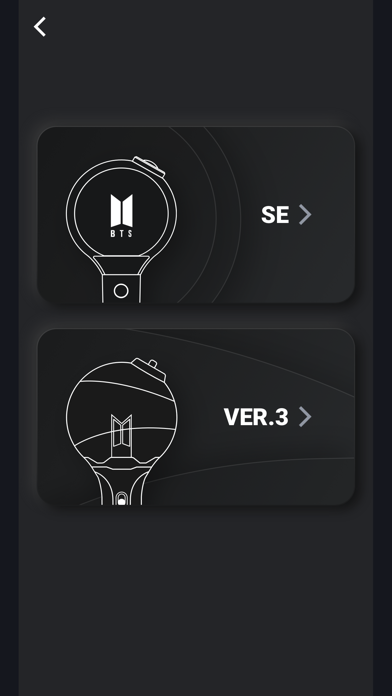
본 앱은 아미밤V3와 아미밤SE 버전을 모두 지원합니다.
[주요 기능 안내, MAIN FEATURES]
1. 공연모드
티켓 좌석 정보 등록 후 응원봉과 연동하면, 공연 중 다양한 응원봉의 무대 연출을 즐기실 수 있습니다.
공연이 있을 때만 사용 가능한 메뉴입니다.
2. 스마트폰 블루투스 연결
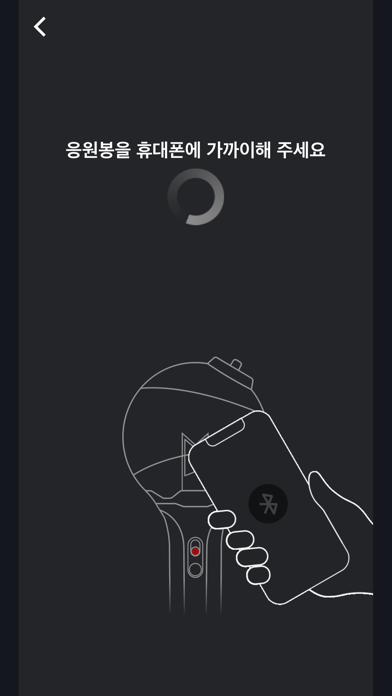
응원봉의 스위치를 아래로 내려 블루투스 모드로 맞춰주세요.
스마트폰의 블루투스 기능을 켜고 응원봉을 스마트폰 화면에 가까이하면, 응원봉과 스마트폰이 연동됩니다.
일부 스마트폰에서는 GPS를 켜야 블루투스 연결이 가능합니다.
블루투스 연결이 되지 않는 분들은 GPS 기능을 켜주시길 바랍니다.
3. 셀프모드
스마트폰과 블루투스 모드로 연결 후, 스마트폰 화면에서 직접 원하는 컬러를 선택하시면 응원봉의 컬러가 변경됩니다.
4. 배터리 잔량체크
"셀프모드" 상태에서 하단 버튼을 클릭하면 응원봉의 배터리 잔량 확인이 가능합니다. 배터리 교체가 필요한지 확인해 주세요.
[공연 관람 전 주의사항]
- 공연 관람 전, 본인의 티켓 좌석 정보를 확인하여 응원봉에 좌석 정보를 입력해 주세요.
- 응원봉의 무선 연출이 제대로 작동하지 않는 경우, 응원봉을 페어링 하지 않았거나 페어링 과정을 완료하지 않은 것이 원인일 수 있습니다. 앱을 통해 응원봉과 좌석 페어링을 완료해 주세요.
- 반드시 응원봉에 등록한 좌석 정보와 같은 좌석에서 공연을 관람해 주시길 바랍니다.
임의로 다른 좌석으로 이동하게 되면 응원봉 무대 연출이 달라질 수 있으니 주의해 주세요.
- 공연 도중 응원봉의 전원이 꺼지지 않도록, 공연 전 배터리 체크를 해주세요.
- 응원봉의 무대 연출을 위해, 공연 관람 시에는 반드시 좌석 정보 등록이 완료된 응원봉의 스위치를 위로 올려 “공연모드”로 설정해 주셔야 합니다.
- 공연장에서는 페어링 부스를 운영할 예정이오니, 응원봉에 좌석 정보 입력이 어려우신 경우 페어링 부스를 방문해 주세요.
- BTS OFFICIAL LIGHT STICK의 공연 연출은 전 세계의 공연에서도 진행 예정입니다.
[앱 이용을 위한 필수 접근 권한 안내]
앱과 응원봉의 원활한 이용을 위하여 아래 권한을 필요로 합니다.
안내 팝업이 뜨면 [허용] 해주세요.
- 저장 공간: QR/바코드 및 공연정보 위해 사용
- 전화: 기기의 인증 상태를 유지하기 위해 사용
- 카메라: QR/바코드 인식을 위해 사용
- 블루투스: 응원도구 연결을 위해 사용
- 위치: 블루투스 연결을 위해 사용
This is the mobile App for the BTS OFFICIAL LIGHT STICK.
This app supports both ARMY BOMB V3 and ARMY BOMB SE versions.
1. CONCERT MODE
Enter your concert ticket information and pair your light stick. You can enjoy various stage effects during the concert
This menu will be enabled several days prior to a concert.
2. CONNECTING WITH BLUETOOTH ON YOUR SMARTPHONE
Move the switch down on the light stick to set it to “BLUETOOTH MODE”..
Turn on the Bluetooth function on your smartphone and hold your smartphone close to connect them.
Some smartphones require you to turn on GPS to enable Bluetooth connectivity.
If you can not connect to Bluetooth, please turn on the GPS function.
3. SELF MODE
After connecting with your smartphone with Bluetooth, touch a color you want on the screen. The light stick color will change accordingly.
4. BATTERY CHECK
While in “SELF MODE”, select the button on the bottom of the screen to check the battery level of your light stick. Check if you need to replace the battery.
[NOTICE]
- Check your seat information on your ticket before the concert and enter it on the light stick in advance.
- If the light stick does not work properly, the cause may be due to not pairing your light stick or not completing the pairing process. Please complete the pairing of the light stick and the seat through the app.
- Please be seated in the same seat where you registered for the light stick. Moving to a different seat may cause different stage appearance.
- Check the light stick battery in advance to prevent turning off during the concert.
- To take part in the light stick production, be sure to register your light stick via the mobile App and set the light stick switch to “CONCERT MODE”.
- There will be Paring Booths located in the concert venue. If you need help registering your seat information, please visit a Paring Booth.
- Stage production integrating the BTS OFFICIAL LIGHT STICK will be featured in shows throughout the world, including the United States and Europe.
[Required access permission]
To use the app and the light stick, the following permissions are required:
- Device Storage: save QR code/ seat info etc.
- Phone: read phone status and identity
- Camera: take pictures of QR/barcode
- BLE: connect light stick
- GPS: connect BLE
Safety and technology
Found in the app by AppBrain- Price
- Free
- App size
- 112.4 MB
- Content rating
- Everyone
Technologies used by BTS OFFICIAL LIGHT STICK
Releases
Updates seen on the App Store- Version
- 3.1.1
- Launched
- September 2018
No changelog data
Alternatives
Similar apps and more from FANLIGHT Co., LtdAlternatives to BTS OFFICIAL LIGHT STICK


More from FANLIGHT Co., Ltd





Rankings
App Store top chartsApp Store Rankings for BTS OFFICIAL LIGHT STICK
About the app and developer
About BTS OFFICIAL LIGHT STICK
BTS OFFICIAL LIGHT STICK is an entertainment app developed by FANLIGHT Co., Ltd.
User Ratings
BTS OFFICIAL LIGHT STICK is rated 4.50 out of 5 stars. The rating is based on 1.6 thousand ratings.
App Information
BTS OFFICIAL LIGHT STICK is freely available from the App Store. The app size is 112.38 MB. The latest version available is 3.1.1. The last update was on June 26, 2025.
Technical Requirements
The app has a content rating of Everyone. The app has been available on the App Store since September 2018.
BTS OFFICIAL LIGHT STICK is made and published by FANLIGHT Co., Ltd. AppBrain is an independent app data site and isn't affiliated with FANLIGHT Co., Ltd. The app name, icon, screenshots and description belong to FANLIGHT Co., Ltd and are shown as published on the App Store.
Developer information for FANLIGHT Co., Ltd
Address:
Frequently asked questions about BTS OFFICIAL LIGHT STICK
Is BTS OFFICIAL LIGHT STICK free?
Yes. BTS OFFICIAL LIGHT STICK is free on the App Store.
Is BTS OFFICIAL LIGHT STICK still available?
Yes. BTS OFFICIAL LIGHT STICK is on the App Store, and the last update we saw was on June 26, 2025.
How large is BTS OFFICIAL LIGHT STICK?
BTS OFFICIAL LIGHT STICK is 112.38 MB.
Is BTS OFFICIAL LIGHT STICK suitable for children?
App Store rates the content of BTS OFFICIAL LIGHT STICK as suitable for everyone.
How do people rate BTS OFFICIAL LIGHT STICK?
BTS OFFICIAL LIGHT STICK scores 4.50 out of 5 stars, from 1,584 ratings on the App Store.
Who made BTS OFFICIAL LIGHT STICK?
BTS OFFICIAL LIGHT STICK was developed by FANLIGHT Co., Ltd. It is listed in the entertainment category on the App Store.
What are the best alternatives to BTS OFFICIAL LIGHT STICK?
People looking at BTS OFFICIAL LIGHT STICK also look at these entertainment apps: BLACKPINK LIGHT STICK v2, Mubeat for kpop Lovers, Mnet Plus, IDOLCHAMP, FAN N STAR.