

Budget Habit - Expense Tracker
Budget Habit - Expense Tracker is made and published by Oleksandr Bezuhlyi. AppBrain is an independent app data site and isn't affiliated with Oleksandr Bezuhlyi. The app name, icon, screenshots and description belong to Oleksandr Bezuhlyi and are shown as published on the App Store.
AppBrain's verdict
- Last updated
- October 9, 2026
Rankings
App Store top chartsApp Store Rankings for Budget Habit - Expense Tracker
Releases
Updates seen on the App Store- Version
- 1.9.0
- Launched
- July 2026
No changelog data
User feedback
Ratings and reviews on the App StoreComments on Budget Habit - Expense Tracker for iOS
We don't have enough comments to show example comments. Please check back later.
Technology
Found in the app by AppBrain- Price
- Free
- App size
- 88.6 MB
- Content rating
- Everyone
Technologies used by Budget Habit - Expense Tracker
About the app and developer
About Budget Habit - Expense Tracker
Budget Habit - Expense Tracker is a finance app developed by Oleksandr Bezuhlyi.
User Ratings
The app has no ratings yet.
App Information
Budget Habit - Expense Tracker is freely available from the App Store. The app size is 88.65 MB. The latest version available is 1.9.0. The last update was on October 9, 2026.
Technical Requirements
The app has a content rating of Everyone. The app has been available on the App Store since July 2026.
Developer information for Oleksandr Bezuhlyi
Address:
Store listing
By Oleksandr Bezuhlyi, from the App Store


Description by Oleksandr Bezuhlyi Written by the developer, not by AppBrain. Click to read.
Budget Habit builds one habit that makes you wealthier: log every expense, see where the money goes, cut what does not earn its place, and set the difference aside automatically. AI does the typing, so the habit costs you seconds, not evenings.
THE MONTHLY LOOP
1. Log it — catch every expense while it is fresh. Scan the receipt, say it to the assistant, or add it in two taps.
2. Review it — read the month's charts and cut what did not earn its place.
3. Pay yourself first — a saving rule works out what to set aside; one tap moves it into the goal.
4. Repeat — same loop, bigger numbers. Consistency beats intensity.
NO MORE TYPING (Premium)
• Photograph a receipt — AI fills in the amount, merchant and category, you review and save
• Its own full-frame camera, nothing cropped
• Speak or type to the assistant: "add 40 for coffee", "how much did I spend on groceries?", "set a 300 limit on eating out"
• It does the work inside the app and shows you the result
• Manual entry is still two taps: amount and category
REVIEW THE MONTH
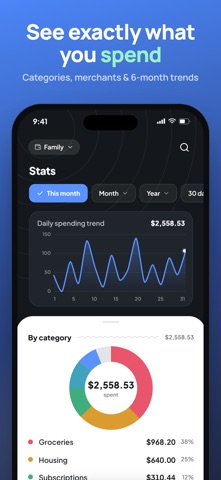
• Balance, income, expenses and what is left of the budget — the whole month on one screen
• Charts for spending by category and month-over-month trends
• Spot forgotten subscriptions and categories that crept up, and cut them next month
• A limit per category fills as you spend and turns red the moment you pass it
• Multiple wallets for cash, cards and savings, with merchant logos to spot spending at a glance
SAVE ON AUTOPILOT (Premium)
• Set a goal — a trip, a cushion, a new phone — and a saving rule works out what to set aside for it
• Skim a percentage of what you spend or earn, round up each expense, or set aside a fixed amount on a schedule
• Budget Habit keeps the count and reminds you when it is time; you confirm the transfer in one tap
• Every goal fills up in small amounts, month after month, without you thinking about it
FORGET NOTHING
• Planned and recurring payments — rent, subscriptions and bills on a calendar, booked before the month starts
• A heads-up before each payment is due, and a one-tap confirm once it is paid
• A daily nudge to log, a monthly nudge to review, and a reminder when a saving rule is ready to move
• Pick only the nudges you want
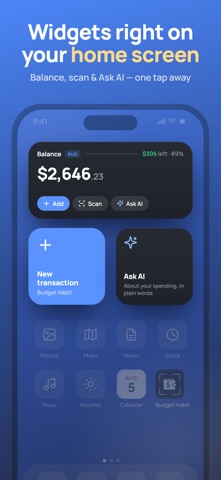
RIGHT ON YOUR HOME SCREEN
• Widgets show your balance and what is left at a glance
• Tiny 1×1 shortcuts to add an expense, scan a receipt or ask the assistant in one tap
BUDGET TOGETHER (Premium)
• Sign in and sync your budget across your devices, backed up in the cloud
• Share one budget with your partner or family — everyone adds from their own phone
• See who added what, with notifications for members' expenses
FREE vs PREMIUM
• Free forever, no account needed: track income and expenses, plan bills, set a savings goal and a category budget, see your stats, use widgets, and export to CSV
• Premium adds AI receipt scanning, the AI assistant, automatic saving rules, cloud sync, a shared family budget, and higher limits — more wallets, goals and shared budgets
• One subscription, monthly or yearly, cancel anytime in the App Store. New accounts start with a free trial
MAKE IT YOURS
• Light and dark themes with accent colors
• Available in 8 languages: English, Ukrainian, Spanish, German, French, Polish, Portuguese and Russian
Download Budget Habit and log your first expense in under a minute.
Terms of Use: https://budget-habit.com/terms
Privacy Policy: https://budget-habit.com/privacy