

BuildReport Pro: Punch List
BuildReport Pro: Punch List is made and published by Raghvendra Bhargava. AppBrain is an independent app data site and isn't affiliated with Raghvendra Bhargava. The app name, icon, screenshots and description belong to Raghvendra Bhargava and are shown as published on the App Store.
AppBrain's verdict
- Last updated
- October 24, 2026
Rankings
App Store top chartsApp Store Rankings for BuildReport Pro: Punch List
Competitors
Similar apps and more from Raghvendra BhargavaAlternatives to BuildReport Pro: Punch List


More from Raghvendra Bhargava





Releases
Updates seen on the App Store- Version
- 1.1
- Launched
- February 2026
No changelog data
User feedback
Ratings and reviews on the App StoreComments on BuildReport Pro: Punch List for iOS
We don't have enough comments to show example comments. Please check back later.
Technology
Found in the app by AppBrain- Price
- $9.99
- App size
- 24.0 MB
- Content rating
- Everyone
Technologies used by BuildReport Pro: Punch List
About the app and developer
About BuildReport Pro: Punch List
BuildReport Pro: Punch List is a business app developed by Raghvendra Bhargava.
What is the rating of BuildReport Pro: Punch List?
BuildReport Pro: Punch List has no ratings yet.
Is BuildReport Pro: Punch List free?
BuildReport Pro: Punch List costs $9.99. The app size is 24.02 MB. The latest version available is 1.1. The last update was on October 24, 2026.
What are the requirements for BuildReport Pro: Punch List?
The app has a content rating of Everyone. The app has been available on the App Store since February 2026.
Developer information for Raghvendra Bhargava
Address:
Frequently asked questions about BuildReport Pro: Punch List
Is BuildReport Pro: Punch List free?
No. BuildReport Pro: Punch List costs $9.99 on the App Store.
Is BuildReport Pro: Punch List still available?
Yes. BuildReport Pro: Punch List is on the App Store, and the last update we saw was on October 24, 2026.
How large is BuildReport Pro: Punch List?
BuildReport Pro: Punch List is 24.02 MB.
Is BuildReport Pro: Punch List suitable for children?
App Store rates the content of BuildReport Pro: Punch List as suitable for everyone.
Who made BuildReport Pro: Punch List?
BuildReport Pro: Punch List was developed by Raghvendra Bhargava. It is listed in the business category on the App Store.
What are the best alternatives to BuildReport Pro: Punch List?
People looking at BuildReport Pro: Punch List also look at these business apps: Site Report Expert: Punch List, CapsuFlow, Audit by BuildIntel, LLMTodoManagerApp, SnagMaster.Ai.
Store listing
By Raghvendra Bhargava, from the App Store




Description by Raghvendra Bhargava Written by the developer, not by AppBrain. Click to read.
Whether you're handing over a new build, checking a rental property, running a health and safety walk-round or keeping a house inventory, BuildReport Pro keeps every issue, photo and note in one place. No subscription, no cloud account. Your projects stay on your device.
WHO IT'S FOR
Builders, contractors, site managers, surveyors, property managers, landlords, health and safety officers and homeowners checking their new home.
CAPTURE ISSUES IN SECONDS
Take a photo, give it a title and you're done. Add more detail when you need it: status, priority, tag, who it's assigned to, the date it was raised and when it must be fixed by. Add as many photos as you like to show progress over time, and leave comments as work moves along.
Tired of typing the same things? Save your common titles, descriptions, tags and assignees once and pick them from a list. You can even import them from an Excel or CSV file.
MARK UP YOUR PHOTOS
Circle the crack, point an arrow at the leak, write a measurement right on the picture. Every markup can be moved, resized, undone or deleted.
PIN ISSUES ON FLOOR PLANS
Add a plan from a photo, a file or a scanned drawing, then drop numbered pins exactly where each issue is. Floor plans, pins and a legend go straight into your reports.
STAY ORGANISED
Break every project down by building, floor, room or area. Search, sort and select several items at once to tidy up quickly.
SEE WHERE YOU STAND
The project dashboard shows at a glance how much is done, what's still open, what's overdue and what's due this week, by status, priority, person and location. Coming back for a second visit? Start a re-inspection round: open issues carry forward and you can see what's been fixed since last time. Due date reminders help nothing slip through.
AI THAT SAVES YOU TIME
Let the app do the tedious bits so you can focus on the site:
◆ Voice dictation: just say what you see, and the app fills in the issue for you
◆ Describe photo: get an issue description written from your photo
◆ Clean up notes: fix spelling and grammar in a tap
◆ Report summary: add a clear overview at the start of your report
◆ Smart tags: get tag suggestions based on what's in the photo
◆ Document scanner: scan notes, permits and drawings with automatic cropping
◆ Room detection: read room names on a floor plan and create your locations for you
◆ Face blur: automatically blur people in your photos to protect their privacy
◆ Report translation: send your report in another language
◆ Location QR codes: print stickers for each room and scan to jump straight to it
Every AI feature can be switched on or off. Describe photo, Clean up notes and Report summary need a device that supports Apple Intelligence.
REPORTS YOU'LL BE PROUD TO SEND
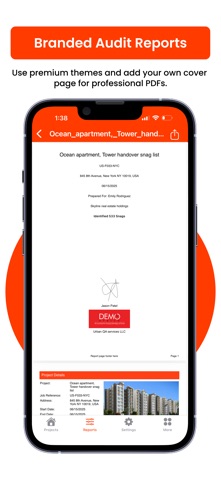
Create polished PDF and Excel reports on your device in moments. Choose a theme, fonts and layout, and add your company logo, details and signature. Filter by status, priority, location or date, and choose exactly which details, photos and plans to include. Then send by email or message, print it, or share it to any app.
SHARE WITH YOUR TEAM
Send a whole project to a colleague or subcontractor, and bring their updates back in. Back up and restore everything whenever you like.
MAKE IT YOUR OWN
Call them snags, issues, defects or items, whatever your team says. Available in 50 languages, with light and dark mode.
Questions or ideas? We'd love to hear from you: support@appculus.com
Website: https://sitereport.auditbricks.com