

AppBrain's verdict
- Rating on App Store
- 3.20
- 5 ratings
- Last updated
- October 16, 2024
- Size
- 2.68 MB
It doesn't have enough ratings yet to judge what users think.
User feedback
Ratings and reviews on the App StoreComments on Bulk Image Editor for iOS
We don't have enough comments to show example comments. Please check back later.
Store listing
By Thomas Coomer, from the App StoreDescription by Thomas Coomer Written by the developer, not by AppBrain. Click to read.
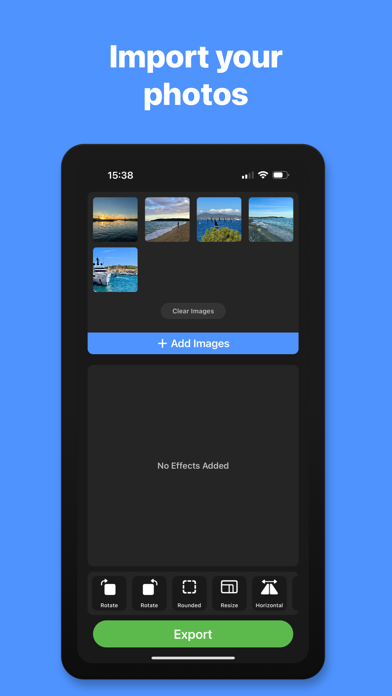
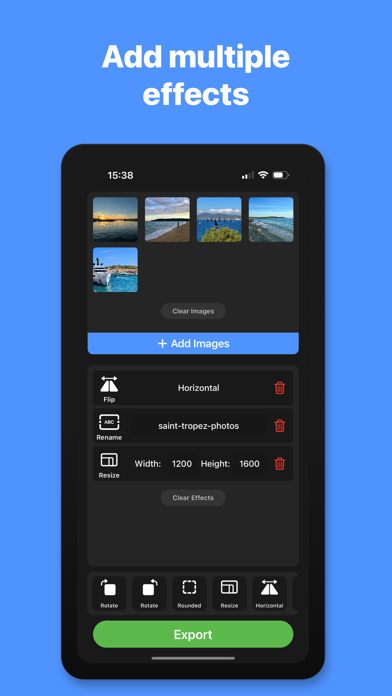
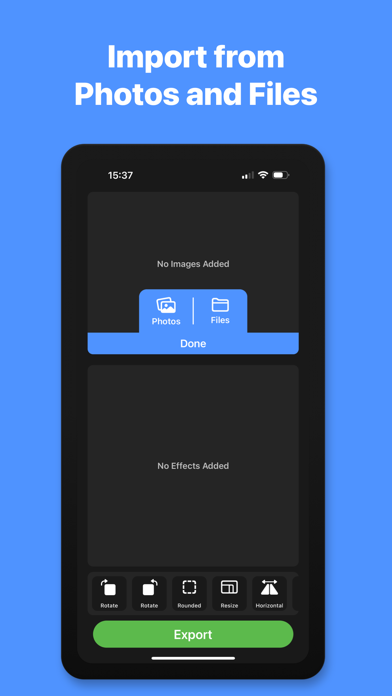
Import images from your Photo Library or from the Files app. Add a list of effects to modify your images including rotate, flip, resize, corner radius, rename, file format, compress and more.
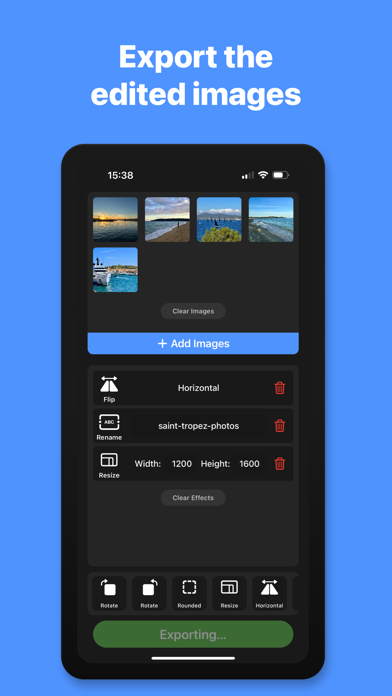
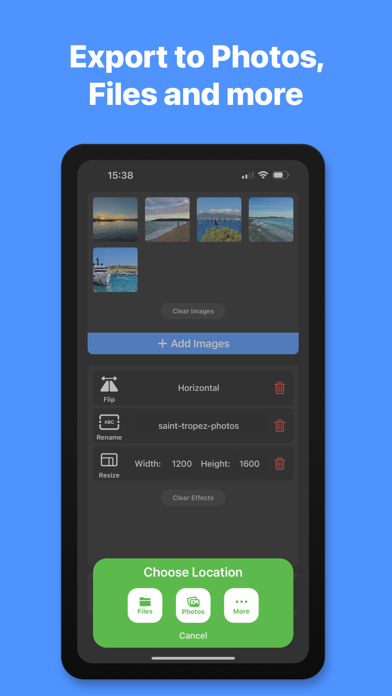
With a single click of the Export button, the list of effects will be applied to all of the images that you have imported, ready to save to Photos, Files, iCloud Drive or share via AirDrop, Mail, Messages and more.
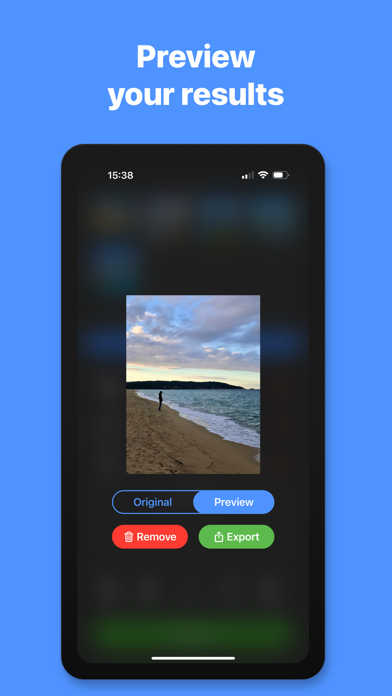
You can tap on any of the images in the image viewer grid to show a preview of the effect before exporting. You can also apply the list of effects and export a single image from the image preview.
Bulk editing tools include, rotate clockwise, rotate anti-clockwise, flip vertical, flip horizontal, corner radius, resize, rename file, file name prefix and file name suffix.
Rotate: Clockwise & anti-clockwise.
Flip: Flip the images horizontally or vertically.
Corner Radius: Accurately add & adjust the radius of the image corners with specific pixel values.
Resize: Resize your images to make them all the same size and aspect ratio, without squashing the images.
Aspect Ratio Crop: Enter your desired aspect ratio and the app will automatically calculate the new file dimensions and adjust the image position to maintain the highest resolution possible for each image.
Auto-Enhance: Applies the auto enhance filter to each of the imported images.
File Format: Export images in JPG, PNG, HEIC or PDF format.
Compress: Reduce the file size of the exported images. (File size will vary based on effects applied and format of exported images)
Rename: Enter a new file name for your images. Images will automatically be saved with a sequential number for each image you export.
Prefix: Enter a file name prefix to add to the start of the file name for each exported image.
Suffix: Enter a file name suffix to add to the end of the file name for each exported image.
- Subscription Details -
Bulk Image Editor requires a monthly subscription after your 14 day free trial.
Your subscription can be cancelled at any time. No long term commitment required.
Subscriptions will be charged to your iTunes account at confirmation of purchase. Your subscription will automatically renew unless automatic renewal is turned off at least 24 hours before the end of the current period. Your account will be charged for renewal within 24 hours prior to the end of the current period. You can manage your subscriptions and automatic renewal status in Account Settings after purchase. Price may vary by location.
Privacy Policy: https://smudge.app/privacy
Terms and Conditions: https://smudge.app/app-terms
Safety and technology
Found in the app by AppBrain- Price
- Free
- App size
- 2.68 MB
- Content rating
- Everyone
Technologies used by Bulk Image Editor
Releases
Updates seen on the App Store- Version
- 1.2.3
- Launched
- November 2022
No changelog data
Alternatives
Similar apps and more from Thomas CoomerAlternatives to Bulk Image Editor




More from Thomas Coomer




Rankings
App Store top chartsApp Store Rankings for Bulk Image Editor
About the app and developer
About Bulk Image Editor
Bulk Image Editor is a graphics & design app developed by Thomas Coomer.
What is the rating of Bulk Image Editor?
Bulk Image Editor is rated 3.20 out of 5 stars, based on 5 ratings.
Is Bulk Image Editor free?
Bulk Image Editor is free. The app size is 2.68 MB. The latest version available is 1.2.3. The last update was on October 16, 2024.
What are the requirements for Bulk Image Editor?
The app has a content rating of Everyone. The app has been available on the App Store since November 2022.
Bulk Image Editor is made and published by Thomas Coomer. AppBrain is an independent app data site and isn't affiliated with Thomas Coomer. The app name, icon, screenshots and description belong to Thomas Coomer and are shown as published on the App Store.
Developer information for Thomas Coomer
Address:
Frequently asked questions about Bulk Image Editor
Is Bulk Image Editor free?
Yes. Bulk Image Editor is free on the App Store.
Is Bulk Image Editor still available?
Yes. Bulk Image Editor is on the App Store, and the last update we saw was on October 16, 2024.
How large is Bulk Image Editor?
Bulk Image Editor is 2.68 MB.
Is Bulk Image Editor suitable for children?
App Store rates the content of Bulk Image Editor as suitable for everyone.
How do people rate Bulk Image Editor?
Bulk Image Editor scores 3.20 out of 5 stars, from 5 ratings on the App Store.
Who made Bulk Image Editor?
Bulk Image Editor was developed by Thomas Coomer. It is listed in the graphics & design category on the App Store.
What are the best alternatives to Bulk Image Editor?
People looking at Bulk Image Editor also look at these graphics & design apps: Add text to Photos - Text Art, Banner Maker : Ad Creator App, AI painter-Professional AI, Corr - Photo Editor & Design, Shimeji: My Digital Pixel Pets.